# Segment
Learn how to add and setup a segment of C1Gauge. See more demos, documentation, and samples here.
## Content
[C1GaugeSegment](/componentone/docs/win/online-gauges/) shows a part of a circle as it is shown at the below images. The **StartAngle** and **SweepAngle** properties are in degrees. They don't take the **CornerRadius** into account (work as if the **CornerRadius** is 0). The **InnerRadius** property can be positive, negative, or 0 (default).
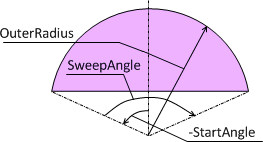
[Settings for the above shape: StartAngle = -80, SweepAngle = 160, OuterRadius = 100\]
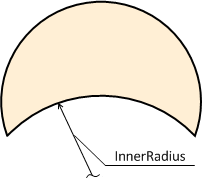
[Settings for the above shape: StartAngle = -115, SweepAngle = 230, OuterRadius = 100, InnerRadius = 110\]
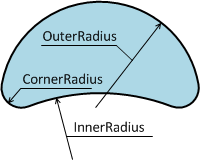
[Settings for the above shape: StartAngle = -115, SweepAngle = 230, CornerRadius = 20, OuterRadius = 100, InnerRadius = 160\]
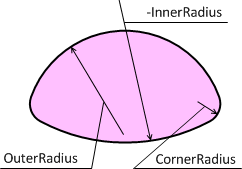
[Settings for the above shape: StartAngle = -80, SweepAngle = 160, CornerRadius = 20, OuterRadius = 100, InnerRadius = -200\]
## See Also
[Sector](/componentone/docs/win/online-gauges/workingwithgaugesfor/gaugefaceandcoversha/sector)