# Sector
Learn how to add and setup the complex shape C1GaugeSector. See more demos, documentation, and samples here.
## Content
[C1GaugeSector](/componentone/docs/win/online-gauges/) is the most complex shape. You can observe all the available options in the following images.
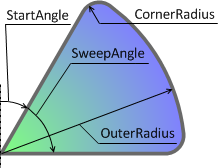
[Settings for the above shape: StartAngle = 30, SweepAngle = 60, CenterRadius = 0, CornerRadius = 10, InnerRadius = 0, OuterRadius = 100\]
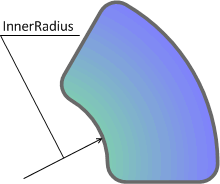
[Settings for the above shape: StartAngle = 30, SweepAngle = 60, CenterRadius = 0, CornerRadius = 10, InnerRadius = 45, OuterRadius = 100\]
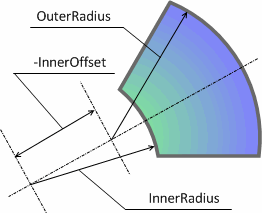
[Settings for the above shape: StartAngle = 30, SweepAngle = 60, CenterRadius = 0, CornerRadius = 0, InnerOffset = -60, InnerRadius = 100, OuterRadius = 100\]
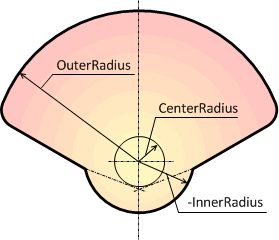
[Settings for the above shape: StartAngle = -70, SweepAngle = 140, CenterRadius = 20, CornerRadius = 10, InnerRadius = -35, OuterRadius = 100\]
## See Also
[Caption](/componentone/docs/win/online-gauges/workingwithgaugesfor/gaugefaceandcoversha/caption)