# Rectangle
Learn how to add and setup a rectangle shape. See more demos, documentation, and samples here.
## Content
The [C1GaugeRectangle](/componentone/docs/win/online-gauges/) shape draws a rectangle with optionally rounded corners. The default corner radius is specified by the **CornerRadius** property. Other settings are the same as for [C1GaugeEllipse](/componentone/docs/win/online-gauges/). When filling a rectangle with radial gradient set the **C1GaugeGradient.Direction** property to **RadialOuter**.
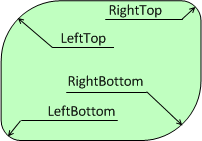
[Settings for this shape: Width = -1, Height = -0.7, CornerRadius = 20, LeftTop = 40, RightBottom = 40\]
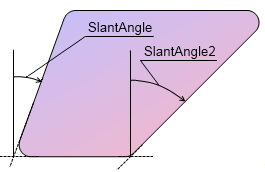
[Settings for this shape: SlantAngle = 20, SlantAngle2 = 45\]
## See Also
[Segment](/componentone/docs/win/online-gauges/workingwithgaugesfor/gaugefaceandcoversha/segment)