# Adding Tick Marks
Learn how to add tick marks in C1Gauge. See more demos, documentation, and samples here.
## Content
In this example, we'll add tick marks to our gauge.
1. Click the **ellipsis** button next to the [Gauges](/componentone/docs/win/online-gauges/) property in the Properties window. The **C1Gauge.Gauges Collection Editor** dialog box opens.
2. Click the **ellipsis** button next to **Decorators**. The **Decorators Collection Editor** opens.
3. From the **Decorators Collection Editor**, drop-down the **Add** button and select [C1GaugeMarks](/componentone/docs/win/online-gauges/). These will be our major tick marks that display at every 10th interval.
4. Set the [Interval](/componentone/docs/win/online-gauges/) property to **10**. You will notice the tick marks appear.
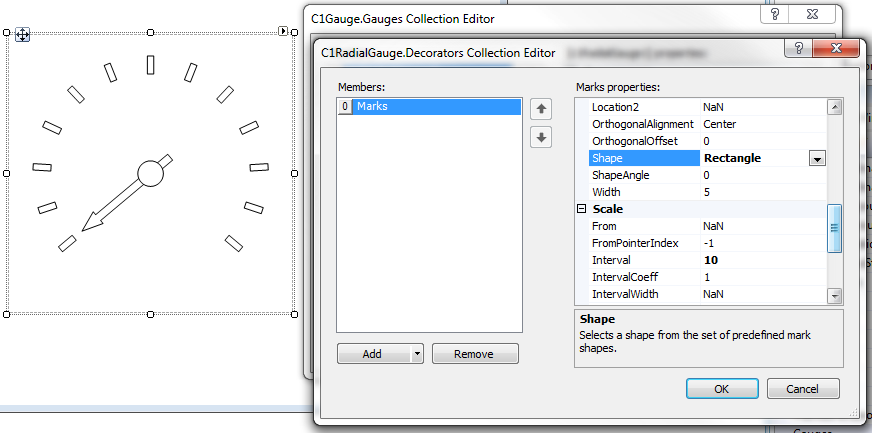
5. By default, the marks have a round shape. Let’s make these rectangular by changing the **Shape** property to **Rectangle**.
6. Under **Appearance**, expand **Filling** and set the **Color** property to **DarkGray**. Then remove the border by expanding **Border** and setting the **LineStyle** property to **None**.
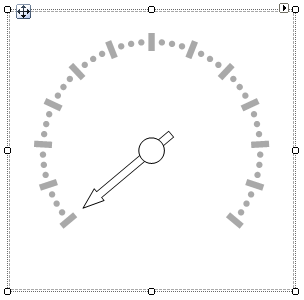
7. To add minor tick marks, add another [C1GaugeMarks](/componentone/docs/win/online-gauges/) item in the **Decorators Collection Editor**. For these, set the **Interval** to **2.5** so we get three minor ticks between each major mark.
8. We’ll keep these marks round in shape, but let’s make them shorter by setting the **Length** property to **5** (to match the **Width** property, which is also **5**).
9. Expand **Filling** and set the **Color** property to **DarkGray**. Then remove the border by expanding **Border** and setting the **LineStyle** property to **None**.
## See Also
[Adding Tick Labels](/componentone/docs/win/online-gauges/gaugesforwinformstas/settingupthescale/addingticklabels)