# Adding a Glass Effect
Learn how to add a glass effect in the C1Gauge control with the help of CoverShapes collection. See more demos, documentation, and samples here.
## Content
In addition to the **FaceShapes** collection, each gauge in [C1Gauge](/componentone/docs/win/online-gauges/) has a **CoverShapes** collection. The only difference is that the **CoverShapes** items draw on top of all gauge elements.
To create a glassing effect, we will add a semi-transparent segment.
1. Click the **ellipsis** button next to the [Gauges](/componentone/docs/win/online-gauges/) property in the Properties window. The **C1Gauge.Gauges Collection Editor** dialog box opens.
2. Click the **ellipsis** button next to **CoverShapes**. The **CoverShapes Collection Editor** opens.
3. Click the **Add** drop-down arrow and select [C1GaugeSegment](/componentone/docs/win/online-gauges/).
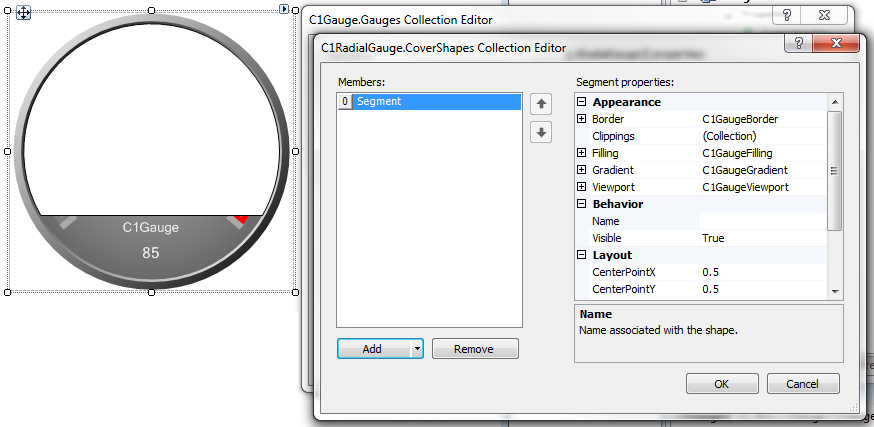
4. Remove the border of the **Segment** by expanding **Border** and setting [LineStyle](/componentone/docs/win/online-gauges/) to **None**.
5. Expand **Filling** and set the [BrushType](/componentone/docs/win/online-gauges/) property to **Gradient**. Set [Color](/componentone/docs/win/online-gauges/) to **Transparent** and [Color2](/componentone/docs/win/online-gauges/) to **White**.
6. Expand **Gradient** and set [Direction](/componentone/docs/win/online-gauges/) to **Vertical**. This will give you a semi-transparent fill on top of the gauge.
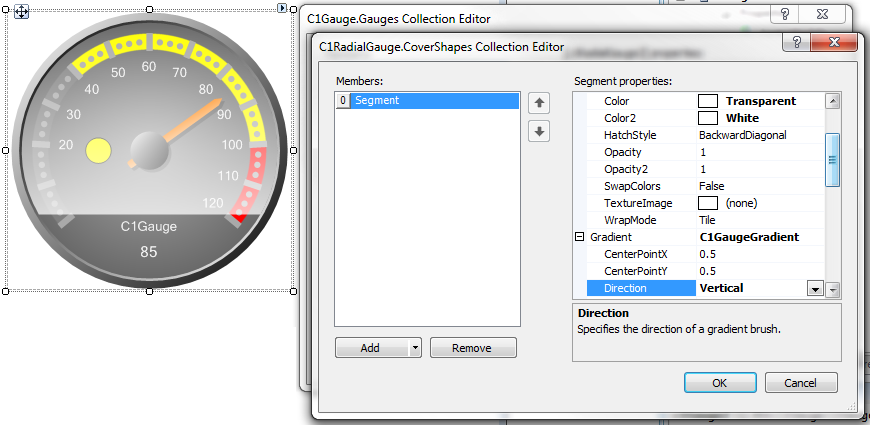
7. Finally, to create an arc to simulate a real glass-looking gauge, we need to set a few angle properties. Set the [StartAngle](/componentone/docs/win/online-gauges/) to **-110**, the [SweepAngle](/componentone/docs/win/online-gauges/) to **180** and set the [InnerRadius](/componentone/docs/win/online-gauges/) property to **150**. This will give us the desired glassing effect.
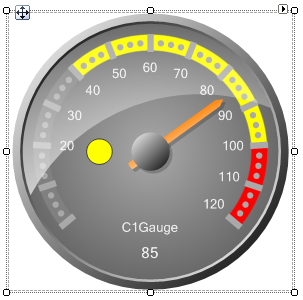
To achieve glassing effects for non-circular shapes, we can take advantage of the **Clippings** collections.