# CoverShapes Collection Editor
Learn how to add, remove, and edit cover shapes in the C1Gauge control with the help of CoverShapes Collection Editor. See more demos, documentation, and samples here.
## Content
The **C1Gauge.CoverShapes Collection Editor**, **C1LinearGauge.CoverShapes Collection Editor**, and **C1RadialGauge.CoverShapes Collection Editor** allow you to add, remove, and edit items in the [CoverShapes](/componentone/docs/win/online-gauges/) collection. You can access the **CoverShapes Collection Editor** by selecting the **Edit Cover Shapes** option from the [C1Gauge Tasks menu](/componentone/docs/win/online-gauges/designtimesupport/c1gaugetasksmenu) or from the [C1Gauge context menu](/componentone/docs/win/online-gauges/designtimesupport/c1gaugecontextmenu) or [C1LinearGauge and C1RadialGauge context menus](/componentone/docs/win/online-gauges/designtimesupport/c1lineargaugeandc1ra) or by clicking the **ellipses** button next to the **CoverShapes** item in **C1Gauge**, **C1LinearGauge**, or **C1RadialGauge**'s Properties window.
Once open, the **CoverShapes Collection Editor** will appear similar to the following image:
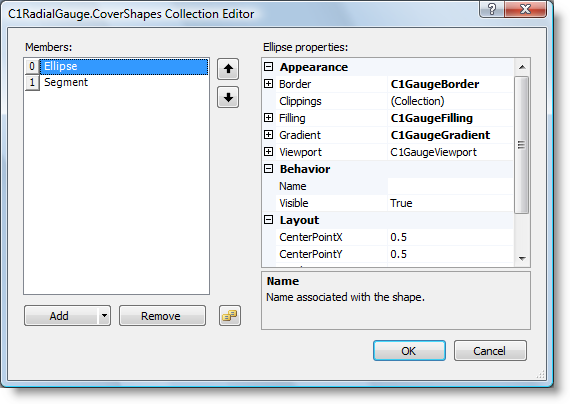
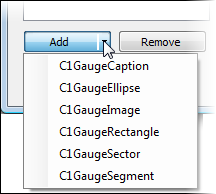
The left side of the editor lists shapes included in the collection. You can click the **Add** button to add a new caption, ellipse, image, rectangle, sector or segment:
To remove an item, select the item to remove and click the **Remove** button. You can also change the order that shapes appear in by using the arrow buttons.
To edit properties on a shape, pick an item in the **Members** list and edit its properties in the properties grid. To save your changes click the **OK** button. To close the dialog box without saving any changes, click the **Cancel** button. You can also double-click the CoverShapes item on the form to open the **Item Editor** and edit the properties.
## See Also
[MorePointers Collection Editor](/componentone/docs/win/online-gauges/designtimesupport/gaugesforwinformscol/morepointerscollecti)