# Task Information Dialog Box
## Content
The **Task Information** dialog box is used for providing the details of the new task such as the task duration, task start date, task finish date, task schedule mode(manual or automatic), task percent completed, predecessor tasks, resource tasks, advanced tasks, and notes for the tasks.In addition to, you can also modify the style for each task by clicking on the **Styles** button.
### To Access the Task Information dialog box
Click on the **Task information** button in the C1GanttView Toolbar.
The **Task Information** dialog box appears as the following:
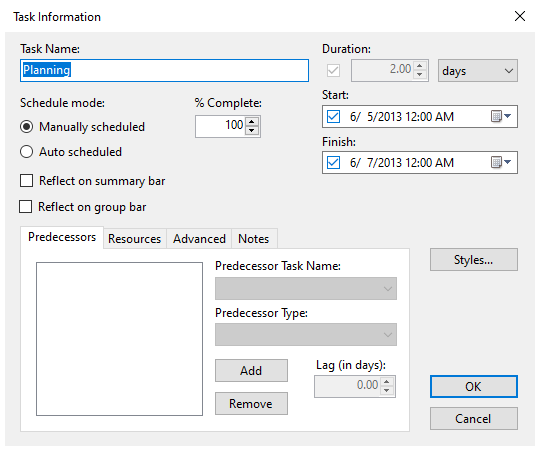
The **Task Information** dialog box consists of the following tabs:
### Predecessors Tab
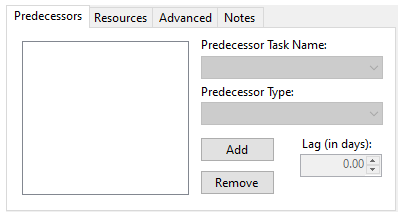
In the **Predecessors** tab you can add or remove predecessors, select the predecessor task name, select the predecessor type, and specify the lag time in days.
Fore more information on predecessor in GanttView, see [Task Predecessor](/componentone/docs/win/online-ganttview/work-with-ganttview/tasks-elements/tasks-predecessor).
### Resources Tab
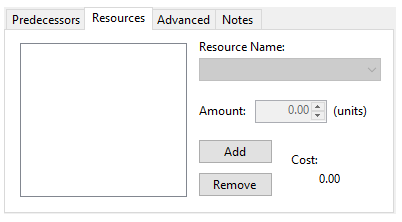
In the **Resources** tab you can add a resource to the selected task using the **Add** button or remove a resource from the selected task using the **Remove** button.
### Advanced Tab
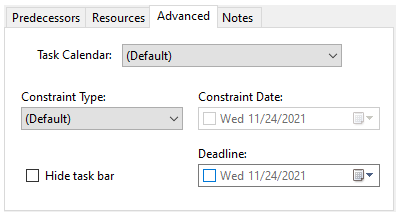
In the **Advanced** tab you can specify the task calendar, whether or not to hide the selected task bar, and specify a deadline for the selected task. If the task is auto scheduled, you can choose the constraint type and constraint date for the selected task.
For more information on constraints see, [Task Constraints](/componentone/docs/win/online-ganttview/work-with-ganttview/tasks-elements/tasks-constraints).
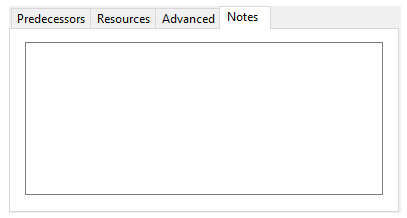
### Notes Tab
This tab enables you to add additional comments about the task into the **Notes** textbox.
For more information about notes, see [Task Notes](/componentone/docs/win/online-ganttview/work-with-ganttview/tasks-elements/tasks-notes).