# FlexReport for WinForms Overview
Get started with, FlexReport comprehensive reporting tool that provides complete reporting solution - from building complex reports to previewing, exporting, and printing.
## Content
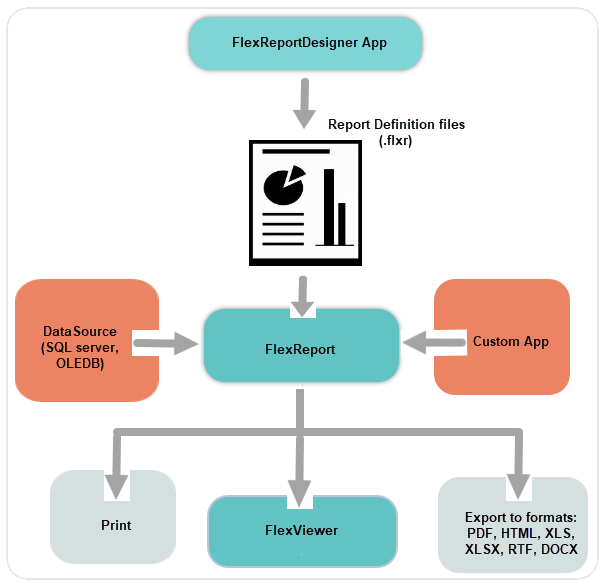
**FlexReport** is a fast-paced **reporting engine**, which enables you to generate, preview, export and print modern and dynamic reports for all your business applications.
**FlexReport for WinForms** brings an extended suite of reporting features like special field types, report wizard, **70+ chart types**, data transformation (sorting, filtering and grouping), calculated fields, parameters, paragraph fields, subsections, and many more. Further, **FlexReport** allows exporting reports to popular file formats, such as DOCX, HTML, XLS, XLSX, RTF, BMP, PNG, JPEG, GIF, TIFF, PDF and PDFA.
The reporting engine also provides a responsive report (or document) previewing control, **FlexViewer,** and **WYSIWYG standalone designer app**, **FlexReportDesigner**. The FlexViewer tool enables you to view your FlexReports across any desktop applications, browsers, and Windows 10 devices. The FlexReportDesigner allows you to build **code-free FlexReports** with numerous features like snap lines, font and style formatting, collapsible sections, drag-and-drop field functionality, chart editors, calculated fields etc.
The minimal system requirements to work with FlexReport and/or FlexViewer are Windows 7 SP1 or Windows Server 2008 R2 SP1 with Platform Update (KB2670838).
| **Blogs** | |
| ----- | --- |
| @cols=2:[A Guide to FlexReport Designer Features](https://developer.mescius.com/blogs/a-guide-to-flexreport-designer-features)
[FlexReport: Export to PDF or PDF/A Format](https://developer.mescius.com/blogs/flexreport-export-to-pdf-or-pdfa-format)
[FlexReport: Using Sections and Subsections in .NET Reports](https://developer.mescius.com/blogs/flexreport-using-sections-and-subsections-in-net-reports)
[Using Parameters and Multiple Data Sources in FlexReport](https://developer.mescius.com/blogs/using-parameters-and-multiple-data-sources-flexreport) |
| **Documentation** | **Product Sample Location** |
| [Getting started with FlexReport](/componentone/docs/win/online-flexreport/flexreport-quickstart) [Design-Time Support](/componentone/docs/win/online-flexreport/design-time-support) [Data Binding](/componentone/docs/win/online-flexreport/DataBindinginFlexReport) [FlexReportDesigner](/componentone/docs/win/online-flexreport/flexreport-designer) [Sections of FlexReport](/componentone/docs/win/online-flexreport/SectionsofC1FlexReport) [FlexViewer](/componentone/docs/win/online-flexreport/flexviewer) | .NET Framework: Product samples are located at \\Documents\\ComponentOne Samples\\WinForms\\vx.x.x\\FlexReport\\CS\\ on your system, if you have installed the samples while installing WinForms Edition using ComponentOneControlPanel.exe. .NET: Product samples are located at \\Documents\\ComponentOne Samples\\WinForms\\vx.x\\FlexReport\\CS\\ on your system, if you have installed the samples while installing WinForms Edition using ComponentOneControlPanel.exe. |
| **Videos** | **Demo Samples** |
| [FlexReport for WinForms Intro](https://www.youtube.com/watch?v=osVNP4ALK4o) | [Download WinForms Product Demo](https://developer.mescius.com/componentone/demos) |
>type=note
> **Note**: ComponentOne FlexReport and FlexViewer are compatible with both .NET and .NET Framework assemblies.
| @cols=2: |
| --- | --- |
| [C1.Win.FlexReport .NET Assembly](/componentone/docs/win/online-flexreport/) | [C1.Win.FlexReport .NET Framework Assembly](/componentone/api/win/online-flexreport/dotnet-framework-api/C1.Win.FlexReport.4.8/Assembly) |
| [C1.Win.FlexViewer .NET Assembly](/componentone/docs/win/online-flexreport/) | [C1.Win.FlexViewer .NET Framework Assembly](/componentone/api/win/online-flexreport/dotnet-framework-api/C1.Win.FlexViewer.4.8/Assembly) |
## See Also
[Help with WinForms Edition](/componentone/docs/win/online-flexreport/overview/HelpwithWinFormsEdition)
[Upgrading C1Report to FlexReport](/componentone/docs/win/online-flexreport/overview/UpgradingC1ReporttoC1FlexReport)