# Calculated Fields
Learn how to add a calculated field using the report parameters in FlexReport for WinForms control. See more demos, documentation, and samples here.
## Content
Parameters can be used to create expressions for calculated fields. To use parameters to perform various calculations in the report, perform the steps below:
1. Run **FlexReportDesigner.exe** application.
2. Create a new report. Bind it to Products table. The report opens in the Design mode.
3. Click the **Data** tab.
4. Right-click **Data Sources** and select **Add Data Source.** The **Data Sources** dialog box appears.
5. Add another Data source and bind it to Products table. This data source is added for the parameter. Name this data source as 'dsProducts'.
6. Add a parameter 'Parameter0' by right-clicking **Parameters** and then selecting **Add Parameter**.
7. From the Properties window, click the ellipsis button next to **AllowedValuesDefinition**. The **AllowedValuesDefinition Editor** dialog box appears.
8. Select the **From Data Source** radio button and then select Data Source - dsProducts, Label - ProductName, and Value - ProductName. Click **OK**.
9. Add another parameter 'Discount'.
10. Edit the 'Main' data source. Write following Sql statement:
`Select * from Products where ProductName=Parameter0`
11. Add a **Calculated** field from the Fields group in the **Insert** tab. The **VBScript Editor** opens.
12. Specify the following expression in the editor:
`UnitPrice*Discount`
13. Drop the Calculated field in the Detail section. Also add a Text field to display 'Discounted Price' in the PageHeader section.
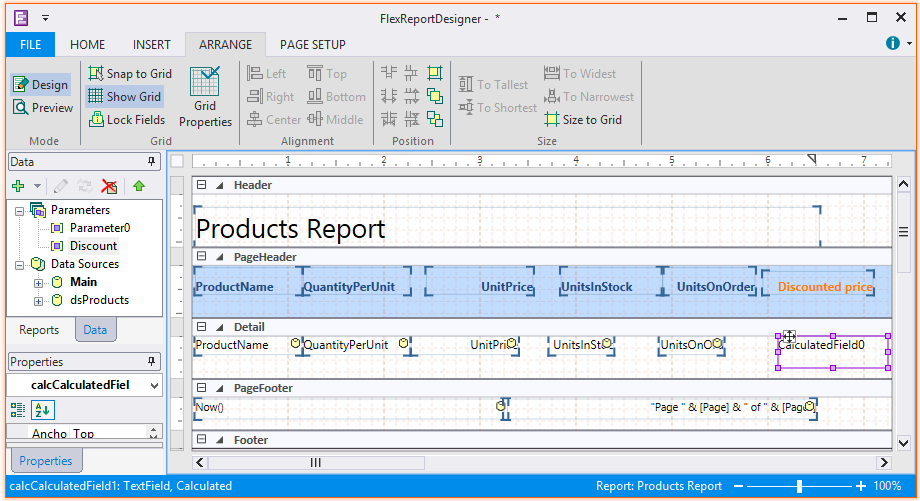
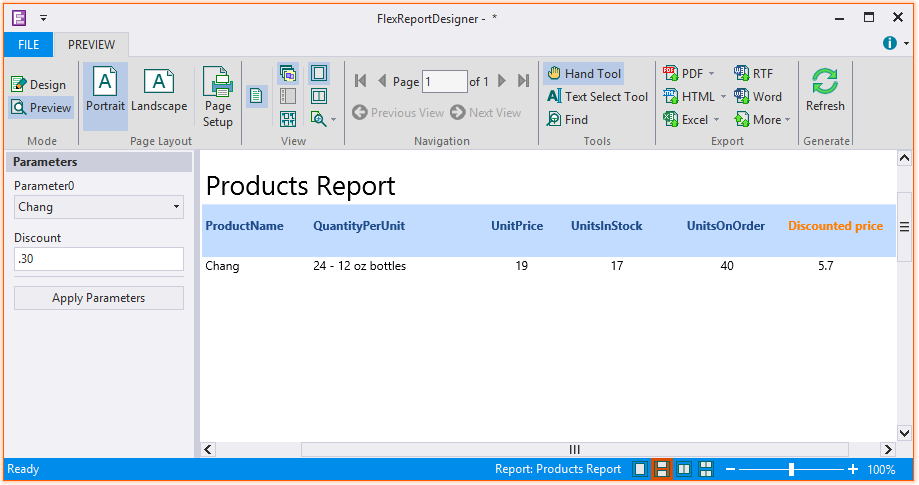
14. Preview the report. Select the product name from Parameter0 and enter the discount value in Discount parameter. The discounted price is calculated on clicking **Apply Parameters**.