# Data Binding
Get started with, FlexReport comprehensive reporting tool that provides complete reporting solution - from building complex reports to previewing, exporting, and printing.
## Content
You learnt how to create a report definition and save it in .flxr files using the **FlexReportDesigner** application. In this topic, you will see how to load the data from a data source or execute data-binding using the **FlexReport** component, which loads and displays data from the data source specified in the report definition file.
For successful data binding, FlexReport needs the actual data to create the report. In most cases, the data is fetched from a database, but there are other options as well. The following sections explore how to retrieve data from different sources.
## Retrieve Data from Database
To retrieve or load the report data in FlexReport, set the following **DataSource** properties in C1FlexReport class:
| **Properties** | **Description** |
| ---------- | ----------- |
| ConnectionString | The ConnectionString property specifies the database that contains the data. |
| RecordSource | The RecordSource property specifies which table, stored procedure, or SQL command to use for retrieving the data. |
The code snippet depicts how to set the data source programmatically using these properties:
```csharp
// initialize DataSource
DataSource ds = flexReport.DataSource;
ds.ConnectionString = @"Provider=Microsoft.ACE.OLEDB.12.0;Data Source=C:\Users\GPCTAdmin\Documents\ComponentOne Samples\Common\C1NWind.mdb";
ds.RecordSource = "Employees";
```
Once these properties are set, C1FlexReport initializes the data source and uses them to load the data from the database automatically. This is same as initializing data source through the code or the designer as illustrated in [Quickstart](/componentone/docs/win/online-flexreport/flexreport-quickstart).
## Retrieve Data from Stored Procedure
Stored procedures (or sprocs) can assist you to achieve a systematic implementation of logic across applications, improve performance, and shield users from needing to know the details of the tables in the database. One of the major advantages of stored procedures is that you can pass in parameters to have the database filter the recordset. This returns a smaller set of data, which is quicker and easier for the report to manipulate.
You can populate a report from a stored procedure in the **FlexReport Wizard**. To open the **FlexReport Wizard** complete one of the following:
* In Visual Studio, select the **Edit Report** option from the **FlexReport** context menu (for .NET framework).
* In Visual Studio, select **Edit Report** from the **C1FlexReport Tasks** menu (for .NET framework).
* In the **FlexReportDesigner** application, click the **New Report** button from the **Reports** tab.
Populating a report from a stored procedure is not different from using SQL statements or straight tables. In the '**Step 1: Select the Data Source for the new report.'** window of the **FlexReport Wizard**, click the **ellipsis** button to choose a datasource. Then, choose a **Stored Procedure** from the list of available **Data sources**:
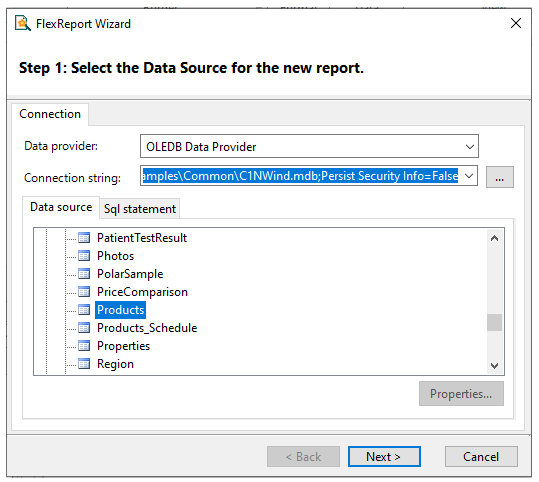
Select **Next** to continue through the wizard.
When it comes to loading other forms of data, you have two options:
* You can use the DataSource's [ConnectionString](/componentone/docs/win/online-flexreport/) and [RecordSource](/componentone/docs/win/online-flexreport/) properties to select the datasource:
In the Designer, use the **DataSource** dialog box to select the connection string (by clicking the ellipsis button "..."), then pick the table or sproc you want to use from the list. For example:
```auto
connectionstring = "Provider=Microsoft.Jet.OLEDB.4.0;
DataSource=C:\Users\Windows 8.1\Documents\ComponentOne Samples\Common\C1NWind.mdb;Persist Security Info=False;"
RecordSource = "[Products by Category]"
```
(In this case the stored procedure name has spaces, so it's enclosed in square brackets).
* You can create the data source using whatever method you want, and then assign it to the DataSource's **Recordset** property:
This method requires you to write code, and is useful when you have your data cached somewhere and want to use it to produce several reports. It overrides the previous method.
The syntax is different depending on the type of connection/adapter you want to use (OleDb, SQL, Oracle, and so on). The easier way to get the syntax right is to drag tables or sprocs from Visual Studio's Server Explorer onto a form. This adds all the cryptic elements required, and then you can go over the code and pick up the pieces you want.
You can specify stored procedures as data sources by their name. If the sproc has parameters, you pass them as parameters. For example, in a report definition built against MSSQL and ADVENTURE\_WORKS.mdf database, the SQL request is specified in **FlexReportDesigner** (adjust the path to ADVENTUREWORKS\_DATA.MDF as needed) as:
```auto
PARAMETERS Employee Int 290;
DECLARE @RC int
DECLARE @EmployeeID int
set @EmployeeID = [Empoyee]
EXECUTE @RC = [C:\ADVENTUREWORKS_DATA.MDF].[dbo].
[uspGetEmployeeManagers]
@EmployeeID
```
## Retrieve Data from DataTable Objects
Many applications need to work on data outside **FlexReport** and load it into DataTable objects. In such cases, you can use DataTable objects as report data sources, avoiding the need to load them again while rendering the report.
This approach is also useful in cases where:
* Security restrictions dictate that connection strings must be kept private and only the data itself may be exposed (not its source).
* The database is not supported by OLEDB (the provider used internally by FlexReport).
* The data does not come from a database at all. Instead, the DataTable is created and populated using custom code.
To use a DataTable object as a **FlexReport** data source, simply load the report definition and then assign the DataTable to [Recordset](/componentone/docs/win/online-flexreport/) property of DataSource class. For example:
```csharp
// load DataTable from cache or from a secure/custom provider
DataTable dt = GetMyDataTable();
// load report definition (before setting the data source)
c1FlexReport1.Load(@"reportFile", "reportName");
// use DataTable as the data source
c1FlexReport1.DataSource.Recordset = dt;
```
## Retrieve Data from Custom DataSource Objects
You can use custom objects as data sources. The only requirement is that the custom object must implement the IC1FlexReportRecordset interface.
**IC1FlexReportRecordset** is a simple interface that can be added to virtually any collection of data with ease. In most scenarios, this is more efficient than creating a **DataTable** object and copying all the data into it. For example, you could use custom data source objects to wrap a file system or custom .xml or .flxr files.
To use custom data source objects, load the report definition and then assign the object to the C1FlexReport's Recordset property. For example:
```csharp
// get custom data source object
IC1FlexReportRecordsetrs=(IC1FlexReportRecordset)GetMyCustomDataSource();
// load report definition before setting the datasource
flexreport.Load(@"reportFile","reportName");
//use custom datasource object in FlexReport component
flexreport.DataSource.Recordset=rs;
```
>type=note
> **Note**: WinForms .NET 6 Edition does not include rich design-time support yet. We will enhance it in the future releases.