# Adding Predefined Views

This topic covers information about adding predefined views.

## Content

Users can add predefined views to their FlexPivot application by defining the views in an XML file and adding the same as a resource to the Project Designer. The [FlexPivotPage](/componentone/api/win/online-flexpivot/dotnet-api/C1.Win.FlexPivot.10/C1.Win.FlexPivot.FlexPivotPage.html) class includes [ReadXml](/componentone/api/win/online-flexpivot/dotnet-standard-api/C1.PivotEngine/C1.PivotEngine.RangeInfo.ReadXml.html) and [WriteXml](/componentone/api/win/online-flexpivot/dotnet-standard-api/C1.PivotEngine/C1.PivotEngine.RangeInfo.WriteXml.html) methods to add files as streams. These methods are automatically invoked by the FlexPivotPage control to apply predefined views.

1. Create a new XML file, for example FlexPivotViews.xml, and add the following code to define 5 view definitions, each showing **Extended Price** (a field in the Invoices View of the c1NWind.mdb database file) by
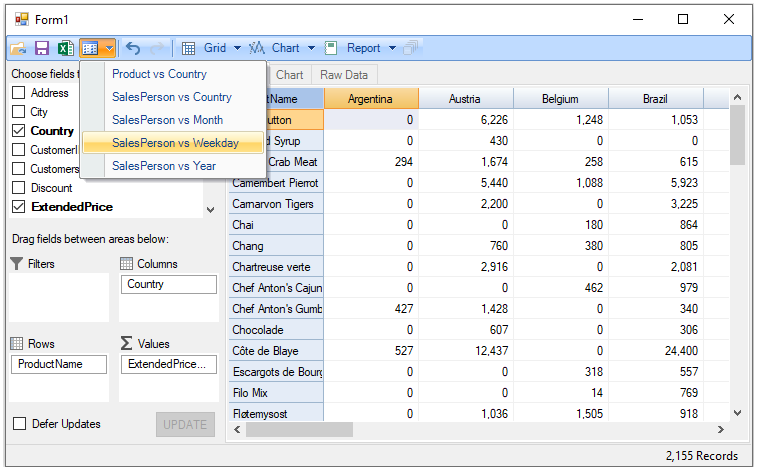
    * Product vs Country
    * Salesperson vs Country
    * Salesperson vs Month
    * Salesperson vs Weekday
    * Salesperson vs Year

        ```XML
        <FlexPivotViews>
        <FlexPivotPage id="Product vs Country">
          <C1FlexPivotEngine>
            <Fields>
              <Field name="Address" subtotal="Count" />
              <Field name="City" subtotal="Count" />
              <Field name="Country" subtotal="Count" />
              <Field name="CustomerID" subtotal="Count" />
              <Field name="Customers_CompanyName" subtotal="Count" />
              <Field name="Discount" subtotal="Sum" format="n0" />
              <Field name="ExtendedPrice" subtotal="Sum" format="n0" />
              <Field name="Freight" subtotal="Sum" format="n0" />
              <Field name="OrderDate" subtotal="Count" format="d" />
              <Field name="OrderID" subtotal="Sum" format="n0" />
              <Field name="PostalCode" subtotal="Count" />
              <Field name="ProductID" subtotal="Sum" format="n0" />
              <Field name="ProductName" subtotal="Count" />
              <Field name="Quantity" subtotal="Sum" format="n0" />
              <Field name="Region" subtotal="Count" />
              <Field name="RequiredDate" subtotal="Count" format="d" />
              <Field name="Salesperson" subtotal="Count" />
              <Field name="ShipAddress" subtotal="Count" />
              <Field name="ShipCity" subtotal="Count" />
              <Field name="ShipCountry" subtotal="Count" />
              <Field name="ShipName" subtotal="Count" />
              <Field name="ShippedDate" subtotal="Count" format="d" />
              <Field name="Shippers_CompanyName" subtotal="Count" />
              <Field name="ShipPostalCode" subtotal="Count" />
              <Field name="ShipRegion" subtotal="Count" />
              <Field name="UnitPrice" subtotal="Sum" format="n0" />
            </Fields>
            <RowFields>
              <Field name="ProductName" />
            </RowFields>
            <ColumnFields>
              <Field name="Country" />
            </ColumnFields>
            <ValueFields>
              <Field name="ExtendedPrice" />
            </ValueFields>
          </C1FlexPivotEngine>
          <C1FlexPivotPrintDocument>
            <Header Text="&amp;[ViewTitle]&#x9;&amp;[Date]&#x9;Page &amp;[Page]" Separator="True" FontName="Arial" FontSize="9" FontStyle="Regular" />
            <Footer Text="" Separator="False" FontName="Arial" FontSize="9" FontStyle="Regular" />
            <Grid ShowGrid="True" GridOptions="1" />
            <Chart ShowChart="True" ChartFillsPage="True" />
            <RawData ShowRawData="False" RawDataOptions="1" />
            <PageSettings Landscape="False" Margins="100,100,100,100" />
          </C1FlexPivotPrintDocument>
          <FlexPivotChart ChartType="Bar" ColorGeneration="Office" ShowTitle="True" ShowLegend="Automatic" ShowGridLines="True" Stacked="True" />
        </FlexPivotPage>
        <FlexPivotPage id="SalesPerson vs Country">
          <C1FlexPivotEngine>
            <Fields>
              <Field name="Address" subtotal="Count" />
              <Field name="City" subtotal="Count" />
              <Field name="Country" subtotal="Count" />
              <Field name="CustomerID" subtotal="Count" />
              <Field name="Customers_CompanyName" subtotal="Count" />
              <Field name="Discount" subtotal="Sum" format="n0" />
              <Field name="ExtendedPrice" subtotal="Sum" format="n0" />
              <Field name="Freight" subtotal="Sum" format="n0" />
              <Field name="OrderDate" subtotal="Count" format="d" />
              <Field name="OrderID" subtotal="Sum" format="n0" />
              <Field name="PostalCode" subtotal="Count" />
              <Field name="ProductID" subtotal="Sum" format="n0" />
              <Field name="ProductName" subtotal="Count" />
              <Field name="Quantity" subtotal="Sum" format="n0" />
              <Field name="Region" subtotal="Count" />
              <Field name="RequiredDate" subtotal="Count" format="d" />
              <Field name="Salesperson" subtotal="Count" />
              <Field name="ShipAddress" subtotal="Count" />
              <Field name="ShipCity" subtotal="Count" />
              <Field name="ShipCountry" subtotal="Count" />
              <Field name="ShipName" subtotal="Count" />
              <Field name="ShippedDate" subtotal="Count" format="d" />
              <Field name="Shippers_CompanyName" subtotal="Count" />
              <Field name="ShipPostalCode" subtotal="Count" />
              <Field name="ShipRegion" subtotal="Count" />
              <Field name="UnitPrice" subtotal="Sum" format="n0" />
            </Fields>
            <RowFields>
              <Field name="Country" />
            </RowFields>
            <ColumnFields>
              <Field name="Salesperson" />
            </ColumnFields>
            <ValueFields>
              <Field name="ExtendedPrice" />
            </ValueFields>
          </C1FlexPivotEngine>
          <C1FlexPivotPrintDocument>
            <Header Text="&amp;[ViewTitle]&#x9;&amp;[Date]&#x9;Page &amp;[Page]" Separator="True" FontName="Arial" FontSize="9" FontStyle="Regular" />
            <Footer Text="" Separator="False" FontName="Arial" FontSize="9" FontStyle="Regular" />
            <Grid ShowGrid="True" GridOptions="1" />
            <Chart ShowChart="True" ChartFillsPage="True" />
            <RawData ShowRawData="False" RawDataOptions="1" />
            <PageSettings Landscape="False" Margins="100,100,100,100" />
          </C1FlexPivotPrintDocument>
          <FlexPivotChart ChartType="Bar" ColorGeneration="Office" ShowTitle="True" ShowLegend="Automatic" ShowGridLines="True" Stacked="True" />
        </FlexPivotPage>
        <FlexPivotPage id="SalesPerson vs Month">
          <C1FlexPivotEngine>
            <Fields>
              <Field name="Address" subtotal="Count" />
              <Field name="City" subtotal="Count" />
              <Field name="Country" subtotal="Count" />
              <Field name="CustomerID" subtotal="Count" />
              <Field name="Customers_CompanyName" subtotal="Count" />
              <Field name="Discount" subtotal="Sum" format="n0" />
              <Field name="ExtendedPrice" subtotal="Sum" format="n0" />
              <Field name="Freight" subtotal="Sum" format="n0" />
              <Field name="OrderDate" subtotal="Count" format="MMMM" />
              <Field name="OrderID" subtotal="Sum" format="n0" />
              <Field name="PostalCode" subtotal="Count" />
              <Field name="ProductID" subtotal="Sum" format="n0" />
              <Field name="ProductName" subtotal="Count" />
              <Field name="Quantity" subtotal="Sum" format="n0" />
              <Field name="Region" subtotal="Count" />
              <Field name="RequiredDate" subtotal="Count" format="d" />
              <Field name="Salesperson" subtotal="Count" />
              <Field name="ShipAddress" subtotal="Count" />
              <Field name="ShipCity" subtotal="Count" />
              <Field name="ShipCountry" subtotal="Count" />
              <Field name="ShipName" subtotal="Count" />
              <Field name="ShippedDate" subtotal="Count" format="d" />
              <Field name="Shippers_CompanyName" subtotal="Count" />
              <Field name="ShipPostalCode" subtotal="Count" />
              <Field name="ShipRegion" subtotal="Count" />
              <Field name="UnitPrice" subtotal="Sum" format="n0" />
            </Fields>
            <RowFields>
              <Field name="Salesperson" />
            </RowFields>
            <ColumnFields>
              <Field name="OrderDate" />
            </ColumnFields>
            <ValueFields>
              <Field name="ExtendedPrice" />
            </ValueFields>
          </C1FlexPivotEngine>
          <C1FlexPivotPrintDocument>
            <Header Text="&amp;[ViewTitle]&#x9;&amp;[Date]&#x9;Page &amp;[Page]" Separator="True" FontName="Arial" FontSize="9" FontStyle="Regular" />
            <Footer Text="" Separator="False" FontName="Arial" FontSize="9" FontStyle="Regular" />
            <Grid ShowGrid="True" GridOptions="1" />
            <Chart ShowChart="True" ChartFillsPage="True" />
            <RawData ShowRawData="False" RawDataOptions="1" />
            <PageSettings Landscape="False" Margins="100,100,100,100" />
          </C1FlexPivotPrintDocument>
          <FlexPivotChart ChartType="Bar" ColorGeneration="Office" ShowTitle="True" ShowLegend="Automatic" ShowGridLines="True" Stacked="True" />
        </FlexPivotPage>
        <FlexPivotPage id="SalesPerson vs Weekday">
          <C1FlexPivotEngine>
            <Fields>
              <Field name="Address" subtotal="Count" />
              <Field name="City" subtotal="Count" />
              <Field name="Country" subtotal="Count" />
              <Field name="CustomerID" subtotal="Count" />
              <Field name="Customers_CompanyName" subtotal="Count" />
              <Field name="Discount" subtotal="Sum" format="n0" />
              <Field name="ExtendedPrice" subtotal="Sum" format="n0" />
              <Field name="Freight" subtotal="Sum" format="n0" />
              <Field name="OrderDate" subtotal="Count" format="dddd" />
              <Field name="OrderID" subtotal="Sum" format="n0" />
              <Field name="PostalCode" subtotal="Count" />
              <Field name="ProductID" subtotal="Sum" format="n0" />
              <Field name="ProductName" subtotal="Count" />
              <Field name="Quantity" subtotal="Sum" format="n0" />
              <Field name="Region" subtotal="Count" />
              <Field name="RequiredDate" subtotal="Count" format="d" />
              <Field name="Salesperson" subtotal="Count" />
              <Field name="ShipAddress" subtotal="Count" />
              <Field name="ShipCity" subtotal="Count" />
              <Field name="ShipCountry" subtotal="Count" />
              <Field name="ShipName" subtotal="Count" />
              <Field name="ShippedDate" subtotal="Count" format="d" />
              <Field name="Shippers_CompanyName" subtotal="Count" />
              <Field name="ShipPostalCode" subtotal="Count" />
              <Field name="ShipRegion" subtotal="Count" />
              <Field name="UnitPrice" subtotal="Sum" format="n0" />
            </Fields>
            <RowFields>
              <Field name="Salesperson" />
            </RowFields>
            <ColumnFields>
              <Field name="OrderDate" />
            </ColumnFields>
            <ValueFields>
              <Field name="ExtendedPrice" />
            </ValueFields>
          </C1FlexPivotEngine>
          <C1FlexPivotPrintDocument>
            <Header Text="&amp;[ViewTitle]&#x9;&amp;[Date]&#x9;Page &amp;[Page]" Separator="True" FontName="Arial" FontSize="9" FontStyle="Regular" />
            <Footer Text="" Separator="False" FontName="Arial" FontSize="9" FontStyle="Regular" />
            <Grid ShowGrid="True" GridOptions="1" />
            <Chart ShowChart="True" ChartFillsPage="True" />
            <RawData ShowRawData="False" RawDataOptions="1" />
            <PageSettings Landscape="False" Margins="100,100,100,100" />
          </C1FlexPivotPrintDocument>
          <FlexPivotChart ChartType="Bar" ColorGeneration="Office" ShowTitle="True" ShowLegend="Automatic" ShowGridLines="True" Stacked="True" />
        </FlexPivotPage>
        <FlexPivotPage id="SalesPerson vs Year">
          <C1FlexPivotEngine>
            <Fields>
              <Field name="Address" subtotal="Count" />
              <Field name="City" subtotal="Count" />
              <Field name="Country" subtotal="Count" />
              <Field name="CustomerID" subtotal="Count" />
              <Field name="Customers_CompanyName" subtotal="Count" />
              <Field name="Discount" subtotal="Sum" format="n0" />
              <Field name="ExtendedPrice" subtotal="Sum" format="n0" />
              <Field name="Freight" subtotal="Sum" format="n0" />
              <Field name="OrderDate" subtotal="Count" format="yyyy" />
              <Field name="OrderID" subtotal="Sum" format="n0" />
              <Field name="PostalCode" subtotal="Count" />
              <Field name="ProductID" subtotal="Sum" format="n0" />
              <Field name="ProductName" subtotal="Count" />
              <Field name="Quantity" subtotal="Sum" format="n0" />
              <Field name="Region" subtotal="Count" />
              <Field name="RequiredDate" subtotal="Count" format="d" />
              <Field name="Salesperson" subtotal="Count" />
              <Field name="ShipAddress" subtotal="Count" />
              <Field name="ShipCity" subtotal="Count" />
              <Field name="ShipCountry" subtotal="Count" />
              <Field name="ShipName" subtotal="Count" />
              <Field name="ShippedDate" subtotal="Count" format="d" />
              <Field name="Shippers_CompanyName" subtotal="Count" />
              <Field name="ShipPostalCode" subtotal="Count" />
              <Field name="ShipRegion" subtotal="Count" />
              <Field name="UnitPrice" subtotal="Sum" format="n0" />
            </Fields>
            <RowFields>
              <Field name="Salesperson" />
            </RowFields>
            <ColumnFields>
              <Field name="OrderDate" />
            </ColumnFields>
            <ValueFields>
              <Field name="ExtendedPrice" />
            </ValueFields>
          </C1FlexPivotEngine>
          <C1FlexPivotPrintDocument>
            <Header Text="&amp;[ViewTitle]&#x9;&amp;[Date]&#x9;Page &amp;[Page]" Separator="True" FontName="Arial" FontSize="9" FontStyle="Regular" />
            <Footer Text="" Separator="False" FontName="Arial" FontSize="9" FontStyle="Regular" />
            <Grid ShowGrid="True" GridOptions="1" />
            <Chart ShowChart="True" ChartFillsPage="True" />
            <RawData ShowRawData="False" RawDataOptions="1" />
            <PageSettings Landscape="False" Margins="100,100,100,100" />
          </C1FlexPivotPrintDocument>
          <FlexPivotChart ChartType="Bar" ColorGeneration="Office" ShowTitle="True" ShowLegend="Automatic" ShowGridLines="True" Stacked="True" />
        </FlexPivotPage>  
        </FlexPivotViews>
        ```
2. Add the view definitions created above in an XML file (i.e. FlexPivotViews.xml) along with two image files CollapseAll.png ( ![CollapseAll image](https://cdn.mescius.io/document-site-files/images/78f24d1c-0e57-452f-87a1-d318e186587a/images/collapseall.png) ) and Views\_small.png (![Views_small image](https://cdn.mescius.io/document-site-files/images/78f24d1c-0e57-452f-87a1-d318e186587a/images/views_small.png)) in a folder named, for example, **Resources**.
3. Add the **Resources** folder at the back end of your project and include it in your project from the Solution Explorer.
4. Right-click your project in the Solution Explorer and select Properties to open the Project Designer.
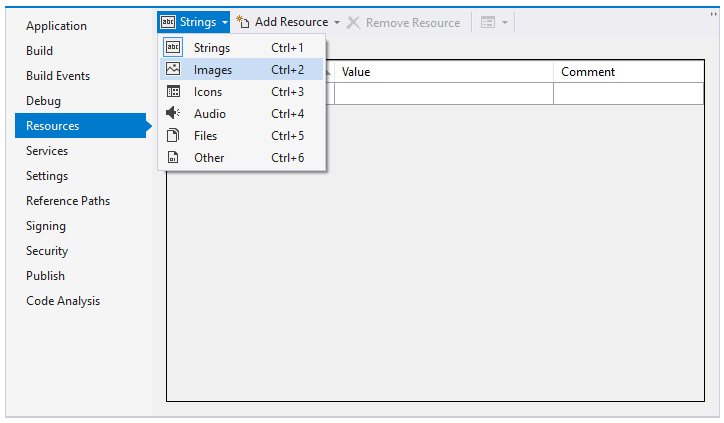
5. Select **Resources** and click the **Strings** drop-down menu. Choose **Images** option from the drop-down as illustrated in the image below.
<br>
    ![addingpredefinedview_flexpivot](https://cdn.mescius.io/document-site-files/images/78f24d1c-0e57-452f-87a1-d318e186587a/images/addingpredefinedview_flexpivot_1.png)
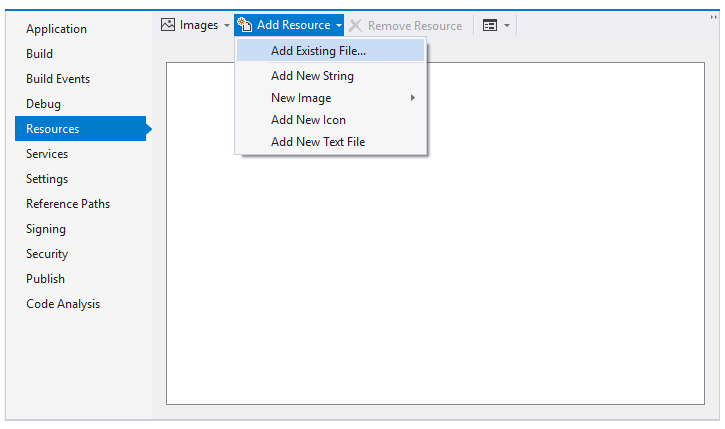
6. Select the Add Resource drop-down menu and choose **Add Existing File** option.
<br>
    ![add_existing_file_option](https://cdn.mescius.io/document-site-files/images/78f24d1c-0e57-452f-87a1-d318e186587a/images/addingpredefinedview_flexpivot_2.png)
7. Browse to the Resources folder where the two image files are added in Step 2 and add them in the Project Designer.
8. Click the **Strings** drop-down menu. Choose **Files** option from the drop-down.
9. Select the Add Resources drop-down menu and choose **Add Existing File** option.
10. Browse to the Resources folder where FlexPivotViews.xml file is added in Step 2 and add it in the Project Designer.
11. Switch to the code view (i.e. Form1.cs) and add the following code to build menu with predefined views. **vbnet**

```auto
```vbnet
' build menu with predefined views:
Dim doc = New System.Xml.XmlDocument()
doc.LoadXml(My.Resources.FlexPivotViews)
Dim menuView = New C1.Win.C1Command.C1CommandMenu()
menuView.Text = "&View"
menuView.Image = My.Resources.Views_small
```

**csharp**

```csharp
// build menu with predefined views:
var doc = new System.Xml.XmlDocument();
doc.LoadXml(Properties.Resources.FlexPivotViews);
var menuView = new C1.Win.C1Command.C1CommandMenu();
menuView.Text = "&View";
menuView.Image = Properties.Resources.Views_small;
```
```

12. Add the following code below the above code snippet to apply selected view from the drop-down menu. **vbnet**

```auto
```vbnet
For Each nd As System.Xml.XmlNode In doc.SelectNodes("FlexPivotViews/FlexPivotPage")
    Dim cmd = New C1.Win.C1Command.C1Command()
    cmd.Text = nd.Attributes("id").Value
    cmd.UserData = nd
    AddHandler cmd.Click, AddressOf menuView_DropDownItemClicked
    Dim link = New C1.Win.C1Command.C1CommandLink(cmd)
    menuView.CommandLinks.Add(link)
Next nd
```

**csharp**

```csharp
foreach (System.Xml.XmlNode nd in doc.SelectNodes("FlexPivotViews/FlexPivotPage"))
{
    var cmd = new C1.Win.C1Command.C1Command();
    cmd.Text = nd.Attributes["id"].Value;
    cmd.UserData = nd;
    cmd.Click += menuView_DropDownItemClicked;
    var link = new C1.Win.C1Command.C1CommandLink(cmd);
    menuView.CommandLinks.Add(link);
}
```
```

13. Add the following code to the event handler created for **menuView\_DropDownItemClicked** event. **vbnet**

```auto
```vbnet
Private Sub menuView_DropDownItemClicked(ByVal sender As Object, ByVal e As C1.Win.C1Command.ClickEventArgs)
    Dim nd = TryCast(e.CallerLink.Command.UserData, System.Xml.XmlNode)
    If nd IsNot Nothing Then
        ' load view definition from XML
        FlexPivotPage1.ViewDefinition = nd.OuterXml
        ' show current view name in status bar
        FlexPivotPage1.LabelStatus.Text = nd.Attributes("id").Value
    End If
End Sub
```

**csharp**

```csharp
private void menuView_DropDownItemClicked(object sender, C1.Win.C1Command.ClickEventArgs e)
{
    var nd = e.CallerLink.Command.UserData as System.Xml.XmlNode;
    if (nd != null)
    {
        // load view definition from XML
        flexPivotPage1.ViewDefinition = nd.OuterXml;
        // show current view name in status bar
        flexPivotPage1.LabelStatus.Text = nd.Attributes["id"].Value;
    }
}
```
```

14. Add the new View Menu to the toolstrip appearing on FlexPivotPage control using the following code. **vbnet**

```auto
```vbnet
' add new view menu to FlexPivotPage toolstrip
Dim menuLink = New C1.Win.C1Command.C1CommandLink(menuView)
FlexPivotPage1.ToolBar.CommandLinks.Insert(3, menuLink)
```

**csharp**

```csharp
// add new view menu to FlexPivotPage toolstrip
var menuLink = new C1.Win.C1Command.C1CommandLink(menuView);
flexPivotPage1.ToolBar.CommandLinks.Insert(3, menuLink);
```
```

15. Initialize a new variable, for example collapseAllView, of C1Command type in the Form1 class. **vbnet**

```auto
```vbnet
Dim collapseAllView As C1.Win.C1Command.C1Command
```

**csharp**

```csharp
C1.Win.C1Command.C1Command collapseAllView;
```
```

16. Add the CollapseAll Menu to the toolstrip appearing on FlexPivotPage control using the following code. **vbnet**

```auto
```vbnet
' add collapseall menu to FlexPivotPage toolstrip
collapseAllView = New C1.Win.C1Command.C1Command()
collapseAllView.Text = "&CollapseAll"
collapseAllView.Image = My.Resources.CollapseAll
AddHandler collapseAllView.Click, AddressOf collapseAllView_Click
Dim collapseAllViewLink = New C1.Win.C1Command.C1CommandLink(collapseAllView)
FlexPivotPage1.ToolBar.CommandLinks.Add(collapseAllViewLink)
```

**csharp**

```csharp
// add collapseall menu to FlexPivotPage toolstrip
collapseAllView = new C1.Win.C1Command.C1Command();
collapseAllView.Text = "&CollapseAll";
collapseAllView.Image = Properties.Resources.CollapseAll;
collapseAllView.Click += collapseAllView_Click;
C1.Win.C1Command.C1CommandLink collapseAllViewLink = new C1.Win.C1Command.C1CommandLink(collapseAllView);
flexPivotPage1.ToolBar.CommandLinks.Add(collapseAllViewLink);
```
```

17. Add the following code in the event handler created for **collapseAllView\_Click** event. **vbnet**

```auto
```vbnet
Private Sub collapseAllView_Click(ByVal sender As Object, ByVal e As EventArgs)
    FlexPivotPage1.FlexPivotGrid.CollapseAllCols()
    FlexPivotPage1.FlexPivotGrid.CollapseAllRows()
End Sub
```

**csharp**

```csharp
private void collapseAllView_Click(object sender, C1.Win.C1Command.ClickEventArgs e)
{
    flexPivotPage1.FlexPivotGrid.CollapseAllCols();
    flexPivotPage1.FlexPivotGrid.CollapseAllRows();
}
```
```

18. Subscribe **FlexPivotPage1.Updated** event using the code below. **vbnet**

```auto
```vbnet
AddHandler FlexPivotPage1.Updated, AddressOf FlexPivotPage1_Updated
```

**csharp**

```csharp
flexPivotPage1.Updated += flexPivotPage1_Updated;
```
```

19. Add the following code to the event handler created for **FlexPivotPage1.Updated** event. **vbnet**

```auto
```vbnet
Private Sub FlexPivotPage1_Updated(ByVal sender As Object, ByVal e As EventArgs)
    ' clear report name after user made any changes
    FlexPivotPage1.LabelStatus.Text = String.Empty
    ' update button status of collapseAllView.
    If (FlexPivotPage1.ShowTotalsColumns 
    = C1.FlexPivot.ShowTotals.Subtotals Or FlexPivotPage1.ShowTotalsRows 
    = C1.FlexPivot.ShowTotals.Subtotals) Then
        collapseAllView.Enabled = True
    Else
        collapseAllView.Enabled = False
    End If
End Sub
```

**csharp**

```csharp
private void flexPivotPage1_Updated(object sender, EventArgs e)
{
    // clear report name after user made any changes
    flexPivotPage1.LabelStatus.Text = string.Empty;
    // update button status of collapseAllView.
    if (flexPivotPage1.ShowTotalsColumns == C1.FlexPivot.ShowTotals.Subtotals 
    || flexPivotPage1.ShowTotalsRows == C1.FlexPivot.ShowTotals.Subtotals)
        collapseAllView.Enabled = true;
    else
        collapseAllView.Enabled = false;
}
```
```

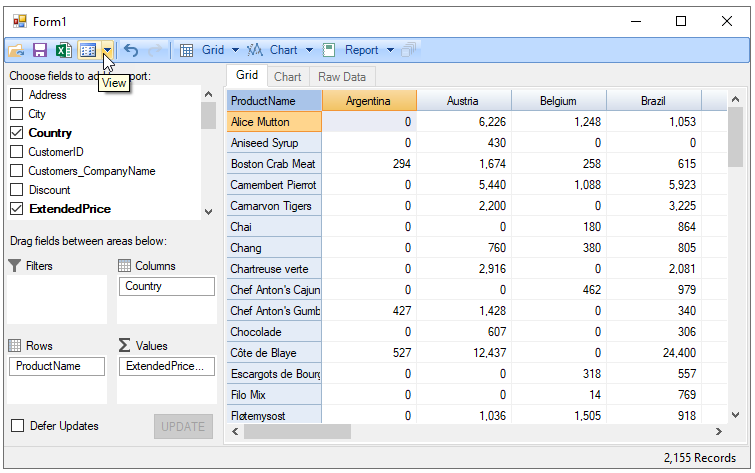
20. Press **F5** to run the application. The toolstrip appears with a View drop-down menu.

```auto
![addingpredefinedview](https://cdn.mescius.io/document-site-files/images/78f24d1c-0e57-452f-87a1-d318e186587a/images/addingpredefinedview_flexpivot_3.png)
```

21. Click the View drop-down menu and observe that the list shows all the views whose definition is added in the **FlexPivotViews.xml** file.

```auto
![addingpredefinedview_flexpivot](https://cdn.mescius.io/document-site-files/images/78f24d1c-0e57-452f-87a1-d318e186587a/images/addingpredefinedview_flexpivot_4.png)
```