# Node Operations
FlexGrid for WinForms provides various options to work with tree grid nodes. Add, delete, move and do more with them. Know more about node operations here.
## Content
Tree Grid not only allows you to present the data in a structured form but it also supports performing various operations with the nodes. You can add, delete, move and fetch nodes by using various methods provided by the Node class.
## Add Node
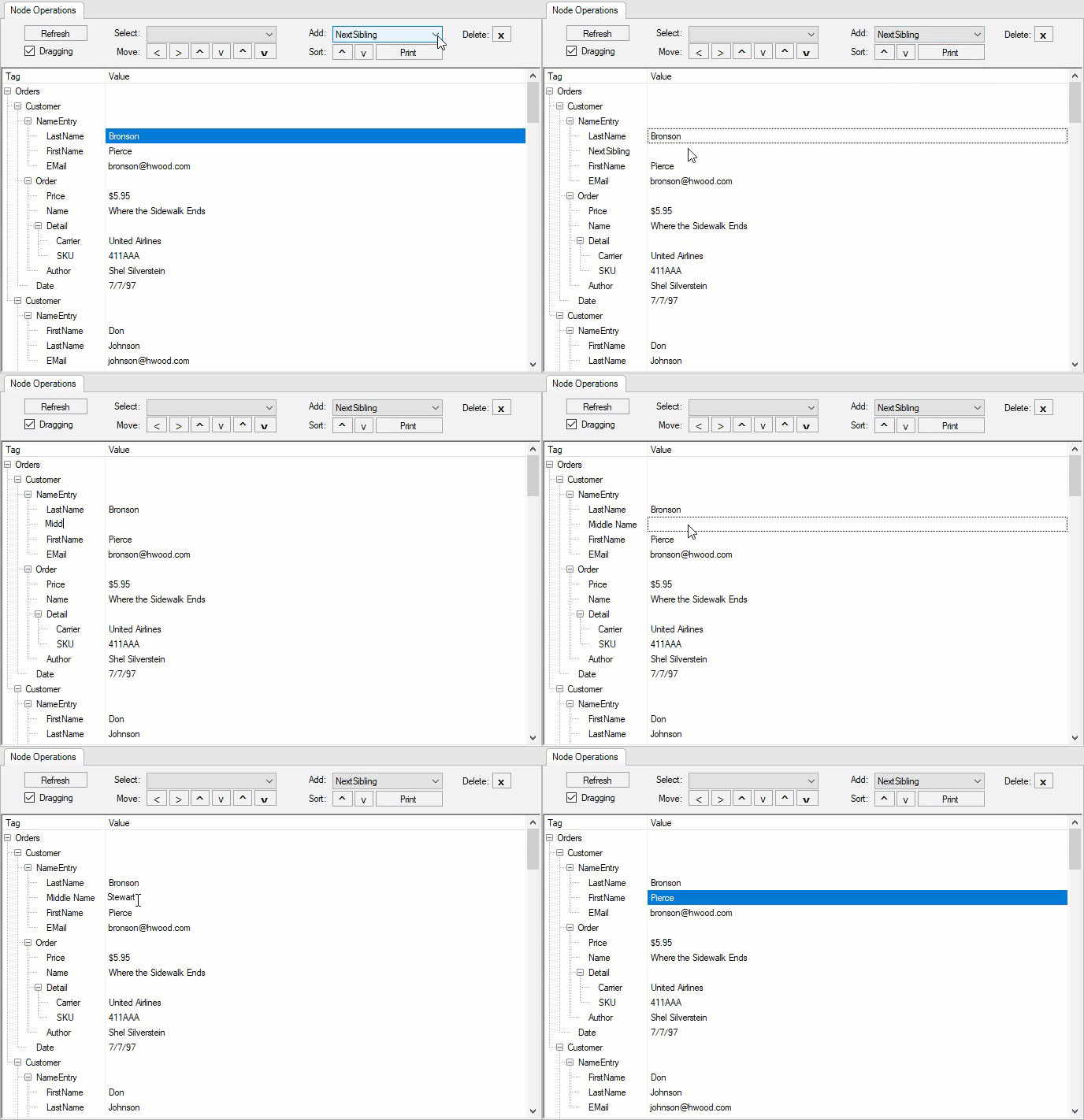
You can add a node at a specific position in the Tree Grid using **AddNode** method of the **Node** class. This appends a new node row to the collection. The method takes **NodeTypeEnum** enumeration as its argument which lets you specify a node with respect to another given node.
The code below shows how to add a node in the WinForms Tree Grid at a specific location.
```csharp
private void cmbAdd_SelectionChangeCommitted(object sender, System.EventArgs e)
{
// Gets current row's node
Node nd = flex.Rows[flex.Row].Node;
// Adds relative as requested by user
// (could be a child or a sibling)
nd.AddNode((NodeTypeEnum)(cmbAdd.SelectedIndex + 2), cmbAdd.Text);
flex.Focus();
}
```
```vbnet
Private Sub cmbAdd_SelectionChangeCommitted(ByVal sender As Object, ByVal e As EventArgs)
' Gets current row's node
Dim nd As Node = flex.Rows(flex.Row).Node
' Adds relative as requested by user
' (could be a child or a sibling)
nd.AddNode(CType(cmbAdd.SelectedIndex + 2, NodeTypeEnum), cmbAdd.Text)
flex.Focus()
End Sub
```
## Delete Node
You can delete a selected node from the Tree Grid using **RemoveNode** method of the **Node** class.
Following code demonstrates how to delete a node from the WinForms Tree Grid.
```csharp
private void btnDelete_Click(object sender, System.EventArgs e)
{
// Gets current node
Node nd = null;
if ( flex.Rows.Count > 0 && flex.Row >= 0 && flex.Row < flex.Rows.Count)
{
nd = flex.Rows[flex.Row].Node;
}
if (nd != null)
{
// Removes node from FlexGrid
nd.RemoveNode();
flex.Focus();
}
}
```
```vbnet
Private Sub btnDelete_Click(ByVal sender As Object, ByVal e As EventArgs)
' Gets current node
Dim nd As Node = Nothing
If flex.Rows.Count > 0 AndAlso flex.Row >= 0 AndAlso flex.Row < flex.Rows.Count Then
nd = flex.Rows(flex.Row).Node
End If
If nd IsNot Nothing Then
' Removes node from FlexGrid
nd.RemoveNode()
flex.Focus()
End If
End Sub
```
## Move Node
The Tree Grid allows you to move the node rows to a new position using **Move** method of the **Node** class. The method takes **NodeMoveEnum** enumeration as an argument which lets you specify the direction in which node has to be moved.
Use the code below to move a node of the WinForms Tree Grid to a new position.
```csharp
private void btnMove_Click(object sender, System.EventArgs e)
{
// Gets current row's node
Node nd = flex.Rows[flex.Row].Node;
// Applies movement selected by the user
// (this will move the selected node)
if (sender == btnMoveOut) nd.Move(NodeMoveEnum.Out);
else if (sender == btnMoveIn) nd.Move(NodeMoveEnum.In);
else if (sender == btnMoveUp) nd.Move(NodeMoveEnum.Up);
else if (sender == btnMoveDown) nd.Move(NodeMoveEnum.Down);
else if (sender == btnMoveFirst) nd.Move(NodeMoveEnum.First);
else if (sender == btnMoveLast) nd.Move(NodeMoveEnum.Last);
// Makes sure the node is still visible
nd.EnsureVisible();
flex.Focus();
}
```
```vbnet
Private Sub btnMove_Click(ByVal sender As Object, ByVal e As EventArgs)
' Gets current row's node
Dim nd As Node = flex.Rows(flex.Row).Node
' Applies movement selected by the user
' (this will move the selected node)
If sender Is btnMoveOut Then
nd.Move(NodeMoveEnum.Out)
ElseIf sender Is btnMoveIn Then
nd.Move(NodeMoveEnum.[In])
ElseIf sender Is btnMoveUp Then
nd.Move(NodeMoveEnum.Up)
ElseIf sender Is btnMoveDown Then
nd.Move(NodeMoveEnum.Down)
ElseIf sender Is btnMoveFirst Then
nd.Move(NodeMoveEnum.First)
ElseIf sender Is btnMoveLast Then
nd.Move(NodeMoveEnum.Last)
End If
' Makes sure the node is still visible
nd.EnsureVisible()
flex.Focus()
End Sub
```
## Select Nodes
In Tree Grid, you can select the nodes to perform different operations using **GetNode** method of the **Node** class. The method takes a parameter called **NodeTypeEnum** enumeration which specifies a node with respect to another given node.
The code below specifies how to fetch a specific node of the WinForms Tree Grid and show it in selected state.
```csharp
private void cmbSelect_SelectionChangeCommitted(object sender, System.EventArgs e)
{
// Gets current row's node
Node nd = flex.Rows[flex.Row].Node;
// Gets relative node selected by the user
nd = nd.GetNode((NodeTypeEnum)cmbSelect.SelectedIndex);
// If failed, show message
if (nd == null)
{
MessageBox.Show("Can't find " + cmbSelect.Text + " for this node.");
return;
}
// Selects node and make sure it's visible (by scrolling into view)
nd.Select();
nd.EnsureVisible();
flex.Focus();
}
```
```vbnet
Private Sub cmbSelect_SelectionChangeCommitted(ByVal sender As Object, ByVal e As EventArgs)
' Gets current row's node
Dim nd As Node = flex.Rows(flex.Row).Node
' Gets relative node selected by the user
nd = nd.GetNode(CType(cmbSelect.SelectedIndex, NodeTypeEnum))
' If failed, show message
If nd Is Nothing Then
MessageBox.Show("Can't find " & cmbSelect.Text & " for this node.")
Return
End If
' Selects node and make sure it's visible (by scrolling into view)
nd.[Select](/componentone/docs/win/online-flexgrid/features/tree-grid/node-operations)
nd.EnsureVisible()
flex.Focus()
End Sub
```
## Expand and Collapse Nodes
You can expand and collapse all nodes in your Tree Grid application using the **Collapsed** property of Node class as shown in the code below. This feature makes it convenient to navigate through node headers as a group when required.
Following code shows how to expand and collapse nodes of the WinForms Tree Grid.
```csharp
foreach (Row row in flex.Rows.Cast().Where(rw => rw.IsNode == true))
{
Node node = row.Node;
node.Collapsed = false;
}
foreach (Row row in flex.Rows.Cast().Where(rw => rw.IsNode == true))
{
Node node = row.Node;
node.Collapsed = true;
}
```
```vbnet
For Each row As Row In flex.Rows.Cast(Of Row)().Where(Function(rw) rw.IsNode = True)
Dim node As Node = row.Node
node.Collapsed = False
Next
For Each row As Row In flex.Rows.Cast(Of Row)().Where(Function(rw) rw.IsNode = True)
Dim node As Node = row.Node
node.Collapsed = True
Next
```
## Drag and Drop Nodes
In Tree Grid, you can drag and drop a selected node to a specific position by handling the **MouseUp**, **MouseDown** and **MouseMove** events.
The code below lets the user drag and drop nodes of the WinForms Tree Grid.
```csharp
private void flex_MouseDown(object sender, MouseEventArgs e)
{
m_DragInfo.checkDrag = false;
// Left button press, no shift: start tracking mouse to drag
if (e.Button != MouseButtons.Left) return;
if (!chkDrag.Checked || m_DragInfo.dragging) return;
if (flex.MouseRow < flex.Rows.Fixed || flex.MouseCol != 0) return;
// Saves current row and mouse position
m_DragInfo.row = flex.Row;
m_DragInfo.mouseDown = new Point(e.X, e.Y);
// Starts checking
m_DragInfo.checkDrag = true;
}
private void flex_MouseMove(object sender, MouseEventArgs e)
{
// If checking and the user moved past our tolerance, start dragging
if (!m_DragInfo.checkDrag || e.Button != MouseButtons.Left) return;
if (Math.Abs(e.X - m_DragInfo.mouseDown.X) +
Math.Abs(e.Y - m_DragInfo.mouseDown.Y) <= DRAGTOL) return;
// Updates flags
m_DragInfo.dragging = true;
// Sets cursor and highlight node
CellStyle cs = flex.Styles["SourceNode"];
flex.Cursor = Cursors.NoMove2D;
flex.SetCellStyle(m_DragInfo.row, 0, cs);
// Checks whether we can drop here
Cursor c = (NoDropHere()) ? Cursors.No : Cursors.NoMove2D;
if (c != flex.Cursor) flex.Cursor = c;
}
private bool NoDropHere()
{
// Row under mouse is not valid
if (flex.MouseRow < flex.Rows.Fixed) return true;
// Column under mouse is not valid
if (flex.MouseCol < flex.Cols.Fixed) return true;
if (flex.GetDataDisplay(flex.Row, 0) == "SKU") return true;
return false;
}
private void flex_MouseUp(object sender, MouseEventArgs e)
{
// We're not checking until the mouse goes down again
m_DragInfo.checkDrag = false;
// Not dragging? we're done
if (!m_DragInfo.dragging) return;
// Stops dragging
m_DragInfo.dragging = false;
flex.SetCellStyle(m_DragInfo.row, 0, (CellStyle)null);
flex.Cursor = Cursors.Default;
// Tests whether the drop is allowed
if (NoDropHere()) return;
// Moves node into new parent node
Node ndSrc = flex.Rows[m_DragInfo.row].Node;
Node ndDst = flex.Rows[flex.Row].Node;
ndSrc.Move(NodeMoveEnum.ChildOf, ndDst);
ndSrc.Select();
}
internal struct DRAGINFO
{
public bool dragging; // Currently dragging
public bool checkDrag; // Currently checking mouse to start dragging
public int row; // Index of row being dragged
public Point mouseDown; // Mouse down position
}
```
```vbnet
Private Sub flex_MouseDown(ByVal sender As Object, ByVal e As MouseEventArgs)
m_DragInfo.checkDrag = False
' Left button press, no shift: start tracking mouse to drag
If e.Button IsNot MouseButtons.Left Then Return
If Not chkDrag.Checked OrElse m_DragInfo.dragging Then Return
If flex.MouseRow < flex.Rows.Fixed OrElse flex.MouseCol <> 0 Then Return
' Saves current row and mouse position
m_DragInfo.row = flex.Row
m_DragInfo.mouseDown = New Point(e.X, e.Y)
' Starts checking
m_DragInfo.checkDrag = True
End Sub
Private Sub flex_MouseMove(ByVal sender As Object, ByVal e As MouseEventArgs)
' If checking and the user moved past our tolerance, start dragging
If Not m_DragInfo.checkDrag OrElse e.Button IsNot MouseButtons.Left Then Return
If Math.Abs(e.X - m_DragInfo.mouseDown.X) + Math.Abs(e.Y - m_DragInfo.mouseDown.Y) <= DRAGTOL Then Return
' Updates flags
m_DragInfo.dragging = True
' Sets cursor and highlight node
Dim cs As CellStyle = flex.Styles("SourceNode")
flex.Cursor = Cursors.NoMove2D
flex.SetCellStyle(m_DragInfo.row, 0, cs)
' Checks whether we can drop here
Dim c As Cursor = If((NoDropHere()), Cursors.No, Cursors.NoMove2D)
If c IsNot flex.Cursor Then flex.Cursor = c
End Sub
Private Function NoDropHere() As Boolean
' Row under mouse is not valid
If flex.MouseRow < flex.Rows.Fixed Then Return True
' Column under mouse is not valid
If flex.MouseCol < flex.Cols.Fixed Then Return True
If flex.GetDataDisplay(flex.Row, 0) Is "SKU" Then Return True
Return False
End Function
Private Sub flex_MouseUp(ByVal sender As Object, ByVal e As MouseEventArgs)
' We're not checking until the mouse goes down again
m_DragInfo.checkDrag = False
' Not dragging? we're done
If Not m_DragInfo.dragging Then Return
' Stops dragging
m_DragInfo.dragging = False
flex.SetCellStyle(m_DragInfo.row, 0, CType(Nothing, CellStyle))
flex.Cursor = Cursors.[Default]
' Tests whether the drop is allowed
If NoDropHere() Then Return
' Moves node into new parent node
Dim ndSrc As Node = flex.Rows(m_DragInfo.row).Node
Dim ndDst As Node = flex.Rows(flex.Row).Node
ndSrc.Move(NodeMoveEnum.ChildOf, ndDst)
ndSrc.[Select](/componentone/docs/win/online-flexgrid/features/tree-grid/node-operations)
End Sub
Friend Structure DRAGINFO
Public dragging As Boolean ' Currently dragging
Public checkDrag As Boolean ' Currently checking mouse to start dragging
Public row As Integer ' Index of row being dragged
Public mouseDown As Point ' Mouse down position
End Structure
```