# Custom Styles
FlexGrid for WinForms provides rich API to facilitate custom styling. Create custom styles and re-use whenever you want. Learn more about custom styling here.
## Content
## Approach 1: Style an Object
To style a specific row, column or a cell range of the WinForms FlexGrid, you can use StyleNew property of the row, column or cell range object.
```csharp
// Apply custom style to a specific row
c1FlexGrid1.Rows[1].StyleNew.BackColor = Color.Azure;
c1FlexGrid1.Rows[1].StyleNew.ForeColor = Color.BlueViolet;
```
```vbnet
' Apply custom style to a specific row
c1FlexGrid1.Rows(1).StyleNew.BackColor = Color.Azure
c1FlexGrid1.Rows(1).StyleNew.ForeColor = Color.BlueViolet
```
This approach is useful for styling a particular object when style is not expected to be reused. To reuse a particular style, you must create a style using the CellStyle object as discussed in the section below.
## Approach 2: Create Re-usable Style
In this approach, you can create a custom style as an object of **CellStyle** class and add it to the **Styles** collection using the **Add** method. Then, define its properties and apply it to a row, column or cell range whenever required. As mentioned above, this approach is very useful when you need to repeatedly use a particular style.
The following image showcases custom styling applied to the first row in FlexGrid.
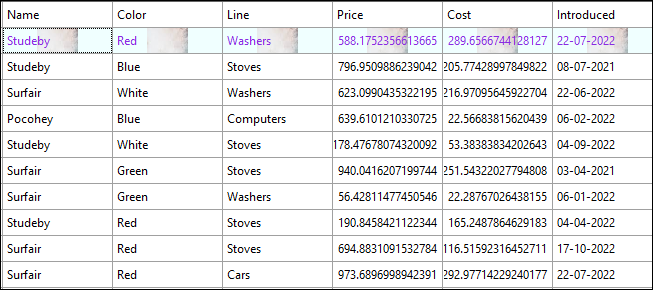
Use the following code to apply styling to the first row in FlexGrid by creating a reusable custom style. In this example, we create a new custom style and add it to the Styles collection after defining the [BackColor](/componentone/api/win/online-flexgrid/dotnet-api/C1.Win.FlexGrid.10/C1.Win.FlexGrid.CellStyle.BackColor.html), [ForeColor](/componentone/api/win/online-flexgrid/dotnet-api/C1.Win.FlexGrid.10/C1.Win.FlexGrid.CellStyle.ForeColor.html), [BackgroundImage](/componentone/api/win/online-flexgrid/dotnet-api/C1.Win.FlexGrid.10/C1.Win.FlexGrid.CellStyle.BackgroundImage.html), and [BackgroundImageLayout](/componentone/api/win/online-flexgrid/dotnet-api/C1.Win.FlexGrid.10/C1.Win.FlexGrid.CellStyle.BackgroundImageLayout.html) properties to be set through the new custom style.
```csharp
// Create new style and add it to the styles collection
CellStyle cs = this.c1FlexGrid1.Styles.Add("Custom");
// Define properties of the new custom style
cs.BackColor = Color.Azure;
cs.ForeColor = Color.BlueViolet;
//set background image in scale layout
cs.BackgroundImage = Image.FromFile("image.png");
cs.BackgroundImageLayout = ImageAlignEnum.Scale;
// Apply custom style to row
c1FlexGrid1.Rows[1].Style = cs;
```
```vbnet
' Create new style and add it to the styles collection
Dim cs As CellStyle = Me.c1FlexGrid1.Styles.Add("Custom")
' Define properties of the new custom style
cs.BackColor = Color.Azure
cs.ForeColor = Color.BlueViolet
' set background image in scale layout
cs.BackgroundImage = Image.FromFile("image.png")
cs.BackgroundImageLayout = ImageAlignEnum.Scale
' Apply custom style to row
c1FlexGrid1.Rows(1).Style = cs
```
## See Also
**Blog**
[Creating Custom Styles for FlexGrid](https://www.grapecity.com/blogs/creating-custom-styles-for-flexgrid)
[Assigning Individual Cell Styles in FlexGrid](https://www.grapecity.com/blogs/assigning-individual-cell-styles-in-flexgrid)