# Auto Merge
FlexGrid for WinForms lets you merge the cells with same values automatically. You can also enable restricted merging. Learn more about auto-merge here.
## Content
FlexGrid enables automatic cell merging when the **AllowMerging** property is set to a value other than **None**. To enable merging for specific rows or columns, set the **AllowMerging** property to **true**. Cells merge only when adjacent cells contain the same non-empty string.
By default, FlexGrid merges adjacent matching cells horizontally first and then vertically. It does not automatically create merged regions that span multiple rows and columns simultaneously. Because merging is automatic and content-based, specific cells cannot be explicitly targeted for merging.
Automatic merging is useful for displaying sorted or grouped data that contains repeated adjacent values.
## Free Auto-merge
Free auto-merge refers to merging of cells with just one pre-condition of having same values in adjacent cells. To automatically merge the cells in a row or a column, you simply need to set **AllowMerging** property of the C1FlexGrid class to **Free** and set **AllowMerging** property of the target row or column object to **true**.
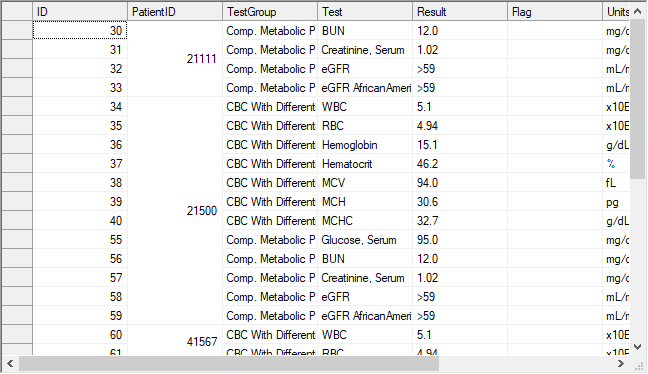
Below code shows how to apply free merging on a WinForms FlexGrid column.
```csharp
// Specify the type of merging allowed
c1FlexGrid1.AllowMerging = C1.Win.C1FlexGrid.AllowMergingEnum.Free;
// Specify the column on which merging is allowed
c1FlexGrid1.Cols[2].AllowMerging = true;
```
```vbnet
' Specify the type of merging allowed
c1FlexGrid1.AllowMerging = C1.Win.C1FlexGrid.AllowMergingEnum.Free
' Specify the column on which merging is allowed
c1FlexGrid1.Cols(2).AllowMerging = True
```
## Restricted Auto-merge
In most of the scenarios, you would want the grid to merge the grid cells with same values only if cells above or in left direction are also merged. This behavior is called restricted auto-merge and can be achieved by setting the **C1FlexGrid.AllowMerging** property to **RestrictAll**, **RestrictRows** or **RestrictCols**. This is required in addition to setting the **AllowMerging** property of target row or column to **true**.
Use the code below to allow restricted auto-merging on a WinForms FlexGrid column.
```csharp
// Specify the column on which merging is allowed
c1FlexGrid1.Cols[3].AllowMerging = true;
// Merge columns only if cells to left are merged
c1FlexGrid1.AllowMerging = C1.Win.C1FlexGrid.AllowMergingEnum.RestrictCols;
```
```vbnet
' Specify the column on which merging is allowed
c1FlexGrid1.Cols(3).AllowMerging = True
' Merge columns only if cells to left are merged
c1FlexGrid1.AllowMerging = C1.Win.C1FlexGrid.AllowMergingEnum.RestrictCols
```
## Merge Table Headers
Merging the header cells, specially in case of multi-row header is another very common scenario used in grids and tables. To merge the header cells, you must set the **C1FlexGrid.AllowMerging** property to **FixedOnly**. You must also set the **AllowMerging** property of designated row and columns to **true**. In this case, headers cells with same value merge together to give a simplified appearance.
>type=info
> **Note**: To create multi-row and multi-column merged regions, implement a custom merge.
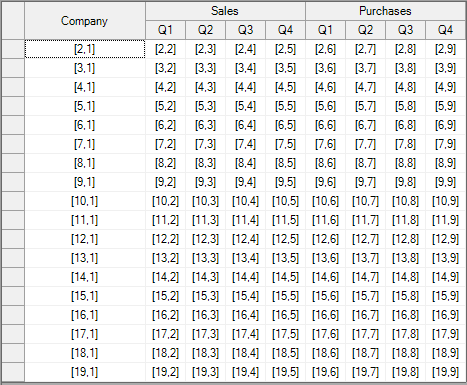
Following code demonstrates how to apply merging only on table headers of the WinForms FlexGrid.
```csharp
// Allow merging the fixed rows and columns
c1FlexGrid1.AllowMerging = C1.Win.C1FlexGrid.AllowMergingEnum.FixedOnly;
```
```vbnet
' Allow merging the fixed rows and columns
c1FlexGrid1.AllowMerging = C1.Win.C1FlexGrid.AllowMergingEnum.FixedOnly
```
## Custom Auto-merge
FlexGrid also provides a **Custom** option through **AllowMerging** enumeration. In this case, auto-merge is performed on cell range collection provided using **MergedRanges** property of the **C1FlexGrid** class. The custom auto-merge is performed independent of cell content. For instance, below image shows the merging of two specified cell ranges despite of the different cell values.

Use the following code snippet to apply custom merge on the WinForms FlexGrid.
```csharp
// Activate merge mode:
this.c1FlexGrid1.AllowMerging = C1.Win.C1FlexGrid.AllowMergingEnum.Custom;
// Define some merged ranges:
// two cells wide, one cell high:
this.c1FlexGrid1.MergedRanges.Add(2, 2, 2, 3);
// three cells wide, three cells high:
this.c1FlexGrid1.MergedRanges.Add(5, 2, 7, 4);
```
```vbnet
' Activate merge mode:
Me.c1FlexGrid1.AllowMerging = C1.Win.C1FlexGrid.AllowMergingEnum.Custom
' Define some merged ranges:
' two cells wide, one cell high:
Me.c1FlexGrid1.MergedRanges.Add(2, 2, 2, 3)
' three cells wide, three cells high:
Me.c1FlexGrid1.MergedRanges.Add(5, 2, 7, 4)
```
## See Also
**Blog**
[Excel-Style Merging for WinForms FlexGrid](https://www.grapecity.com/blogs/excel-style-merging-for-winforms-flexgrid)