# User Interaction
FlexGrid for WinForms lets you give power to the end user by allowing to edit, drag, freeze or resize the rows. Know more about user interaction operations here.
## Content
This topic discusses how you can let end-users interact with the FlexGrid rows.
## Allow Adding
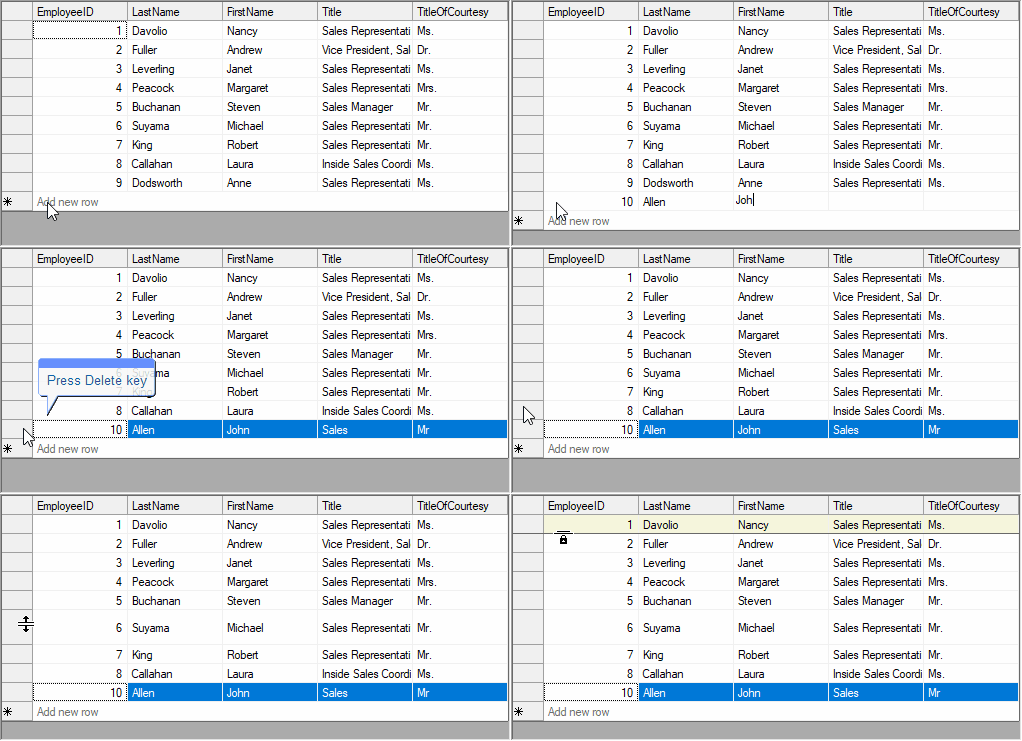
By default, FlexGrid does not allow end-user to add new row to the grid. To provide an option to add rows at runtime, you can set **AllowAddNew** property of the C1FlexGrid class to **true**. FlexGrid also provides a design-time option **Enable Adding Rows** in **C1FlexGrid Tasks** menu to allow adding new row by the end-user. For more information on task menus, see [Tasks Menus](/componentone/docs/win/online-flexgrid/quick-start/design-time-support/tasks-menus). Moreover, you can also set watermark text to be displayed in the new row template through **NewRowWatermark** property.
Use the code below to allow users to add rows in WinForms FlexGrid at run-time.
```csharp
// Allow user to add rows
c1FlexGrid1.AllowAddNew = true;
// Set watermark in the template new row
c1FlexGrid1.NewRowWatermark = "Add new row";
```
```vbnet
' Allow user to add rows
c1FlexGrid1.AllowAddNew = True
' Set watermark in the template new row
c1FlexGrid1.NewRowWatermark = "Add new row"
```
## Allow Deleting
FlexGrid, by default, does not allow end-user to delete rows from the grid. However, if your application requires, you can let the end-user delete the selected rows through **Delete** key by setting **AllowDelete** property to **true**. You can also enable row deletion by checking ON the **Enable Deleting Rows** checkbox on the **C1FlexGrid Tasks** menu.
Following code shows how to allow users to delete rows from WinForms FlexGrid at run-time.
```csharp
// Allow user to delete rows
c1FlexGrid1.AllowDelete = true;
```
```vbnet
' Allow user to delete rows
c1FlexGrid1.AllowDelete = True
```
## Allow Dragging
FlexGrid, by default, does not allow user to rearrange rows by dragging. However, you can change this behavior in unbound grid by using the FlexGrid.AllowDragging property and Row.AllowDragging property. To enable dragging of grid rows, you can set the **FlexGrid.AllowDragging** property to either **Rows** or **Both**. This property accepts the values from AllowDraggingEnum. You can also disable dragging of a particular row by setting the **Row.AllowDragging** property to **false**.
Let users drag the rows in an unbound WinForms FlexGrid at run-time by using the code below.
```csharp
// Allow dragging of all rows across the grid
c1FlexGrid1.AllowDragging = C1.Win.C1FlexGrid.AllowDraggingEnum.Rows;
// Disable dragging of a particular row
c1FlexGrid1.Rows[3].AllowDragging = false;
```
```vbnet
' Allow dragging of all rows across the grid
c1FlexGrid1.AllowDragging = C1.Win.C1FlexGrid.AllowDraggingEnum.Rows
' Disable dragging of a particular row
c1FlexGrid1.Rows(3).AllowDragging = False
```
## Allow Freezing
To allow end user to freeze the rows at runtime, you can use AllowFreezing property of the C1FlexGrid class which accepts values from AllowFreezingEnum. When this property is set to **Rows** or **Both**, a lock sign appears when mouse is hovered over the edge of header row. End-user can click and drag the lock sign to freeze the rows.
Use the code below to allow your users to freeze the WinForms FlexGrid rows at run-time.
```csharp
// Allow freezing of rows at runtime
c1FlexGrid1.AllowFreezing = C1.Win.C1FlexGrid.AllowFreezingEnum.Rows;
```
```vbnet
' Allow freezing of rows at runtime
c1FlexGrid1.AllowFreezing = C1.Win.C1FlexGrid.AllowFreezingEnum.Rows
```
## Allow Resizing
By default, FlexGrid does not give option to resize the rows. To change this behavior, you can use AllowResizing property of the **C1FlexGrid** class. This property accepts values from the AllowResizingEnum enumeration which enables end-user to change size of columns, rows or both. The enumeration also gives you options to uniformly resize the rows, columns or both, that is, if you resize one of the columns or rows, the grid automatically resizes rest of the columns or rows as well. FlexGrid also provides Row.AllowResizing property which is Boolean type and lets you enable or disable resizing of a particular row.
Following code shows how to allow users to resize the WinForms FlexGrid rows at run-time.
```csharp
// Allow user to resize rows
c1FlexGrid1.AllowResizing = C1.Win.C1FlexGrid.AllowResizingEnum.Rows;
// Stop user from resizing second row
c1FlexGrid1.Rows[2].AllowResizing = false;
```
```vbnet
' Allow user to resize rows
c1FlexGrid1.AllowResizing = C1.Win.C1FlexGrid.AllowResizingEnum.Rows
' Stop user from resizing second row
c1FlexGrid1.Rows(2).AllowResizing = False
```