# Nodes and Edges

## Content

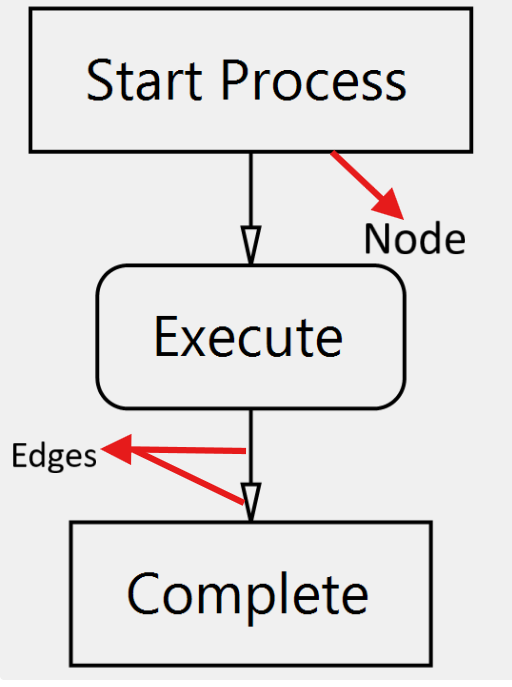
<span id="beaa6541-9759-4390-8eda-93af38153100" annotationtype="inlineComment" data-mark-type="annotation" data-mark-annotation-type="inlineComment" data-id="beaa6541-9759-4390-8eda-93af38153100" data-prosemirror-content-type="mark" data-prosemirror-mark-name="annotation">In FlexDiagram, two core components are used to build diagrams: Nodes and Edges.</span>

* <span id="beaa6541-9759-4390-8eda-93af38153100" annotationtype="inlineComment" data-mark-type="annotation" data-mark-annotation-type="inlineComment" data-id="beaa6541-9759-4390-8eda-93af38153100" data-prosemirror-content-type="mark" data-prosemirror-mark-name="annotation">Nodes represent items or data points and can appear in several shapes such as rectangles, circles and diamonds.</span>
* <span id="beaa6541-9759-4390-8eda-93af38153100" annotationtype="inlineComment" data-mark-type="annotation" data-mark-annotation-type="inlineComment" data-id="beaa6541-9759-4390-8eda-93af38153100" data-prosemirror-content-type="mark" data-prosemirror-mark-name="annotation">Edges represent connections or relationships between nodes and are displayed as lines or arrows.</span>

<span id="beaa6541-9759-4390-8eda-93af38153100" annotationtype="inlineComment" data-mark-type="annotation" data-mark-annotation-type="inlineComment" data-id="beaa6541-9759-4390-8eda-93af38153100" data-prosemirror-content-type="mark" data-prosemirror-mark-name="annotation">Nodes and edges form the structure of a diagram and help users visualize data relationships.</span>
![](https://cdn.mescius.io/document-site-files/images/ba3667c3-8434-4d44-931a-224dda3ad70f/Nodes%20and%20edges.63a562.png)