# Custom Function
Expression Editor provides various built-in functions to create custom expressions for your applications. See more demos, documentation, and samples here.
## Content
Expression Editor provides various built-in functions to create expressions for your applications. It allows you to define custom functions using the [AddFunction](/componentone/docs/win/online-expressioneditor/) method of C1ExpressionEditor class. This custom function gets added to the ExpressionEditor engine and is accessible at runtime by C1ExpressionEditor for performing calculations.
The following image shows a custom function named Factorial, added to the ExpressionEditor engine.
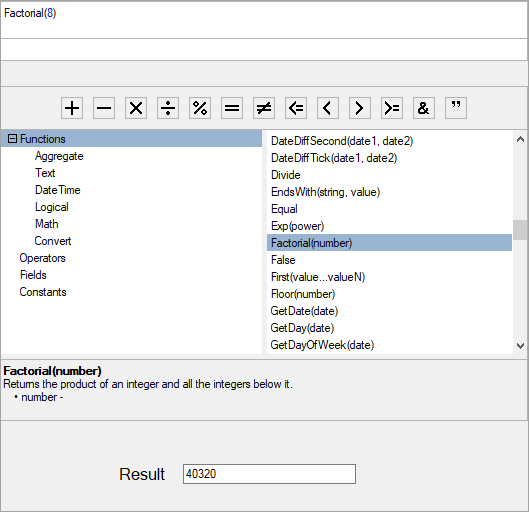
The following code demonstrates how a custom function is created and added to the Expression Editor panel:
```csharp
public partial class Form1 : Form
{
public Form1()
{
InitializeComponent();
c1ExpressionEditorPanel1.ExpressionEditor = c1ExpressionEditor1;
ExpressionItem factItem = new ExpressionItem("Factorial", "Factorial()",
"Returns the product of an integer and all the integers below it.", ItemType.MathFuncs);
factItem.Arguments.Add(new Argument("number", typeof(System.Double)));
c1ExpressionEditor1.AddFunction(factItem, Factorial, 1, 1);
}
private object Factorial(List