# Format Text
## Content
Editor provides options for formatting XHTML documents and their elements through the commands and style options available in **[EditorRibbon](https://developer.mescius.com/componentone/api/win/online-editor-net/dotnet-api/C1.Win.Editor.10/C1.Win.Editor.C1EditorRibbon.-ctor.html "https://developer.mescius.com/componentone/api/win/online-editor-net/dotnet-api/C1.Win.Editor.10/C1.Win.Editor.C1EditorRibbon.-ctor.html")**.
## Align text
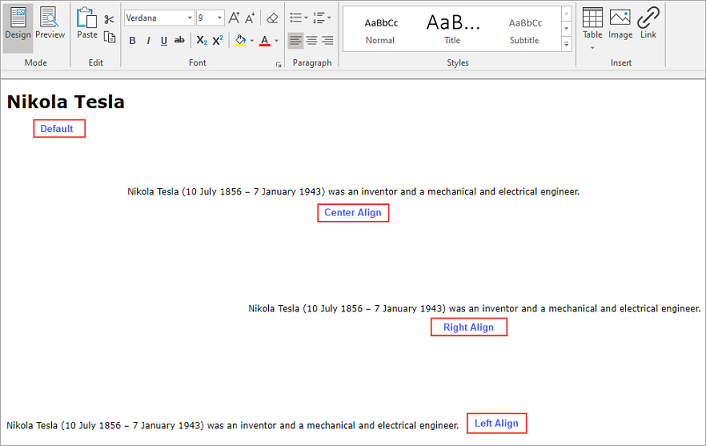
Use the alignment commands in the **Paragraph** group of EditorRibbon to configure paragraph alignment.

The following image shows document text with different alignment settings.
>type=note
> Note: Content aligns left by default.
***
## Decorate Text
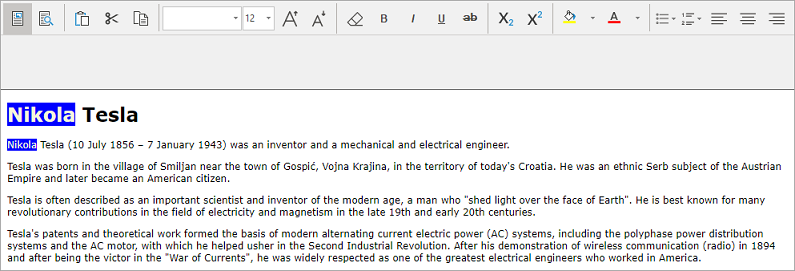
Use the [FindAndDecorate](/componentone/api/win/online-editor-net/dotnet-api/C1.Win.Editor.10/C1.Win.Editor.C1Editor.FindAndDecorate.html) method of the [C1Editor](/componentone/api/win/online-editor-net/dotnet-api/C1.Win.Editor.10/C1.Win.Editor.C1Editor.html) class to apply style attributes to text that matches a specified pattern.
The pattern can contain plain text or a regular expression. Style attributes can configure the background color, foreground color, and other formatting properties. Separate multiple style declarations with semicolons.
For example, matching occurrences of a name can be displayed with a blue background and beige text.
```auto
c1Editor1.FindAndDecorate("Nikola", null, "background-color:blue; color:beige;");
```
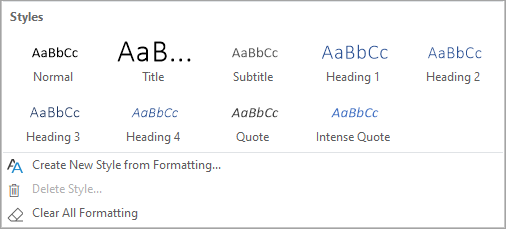
Use the [Styles](/componentone/api/win/online-editor-net/dotnet-api/C1.Win.Editor.10/C1.Win.Editor.Ribbon.StylesGroup.html) group in EditorRibbon to perform the following actions:
* Apply a predefined style.
* Create a custom style by selecting **Create New Style from Formatting**.
* Remove applied formatting by selecting **Clear All Formatting**.
The following image shows the predefined style options available in EditorRibbon.