# For Developers: Mapping at Design Time
## Content
[C1DynamicHelp](/componentone/api/win/online-dynamichelp/dotnet-framework-api/C1.Win.C1DynamicHelp.4.8/C1.Win.C1DynamicHelp.C1DynamicHelp.html) provides visual editing at design time to make it easier to map specific Help topics to controls within an application. You can use the **C1DynamicHelp smart tag** and **Select Help Topic** dialog box to quickly perform topic mapping.
### C1DynamicHelp Smart Tag
In Visual Studio, the C1DynamicHelp component includes a smart tag. A smart tag () represents a short-cut tasks menu that provides the most commonly used properties for a control.
To access the **C1DynamicHelp Tasks** menu, click the smart tag in the upper-right corner of the C1DynamicHelp control.
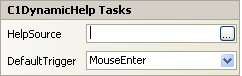
* **HelpSource Property**
Click the **ellipsis** button to locate and select the .chm or NetHelp .htm file that will be used for topic mapping.
> type=note
> **Note**:If using NetHelp, use the default.htm or the file name that was used as the base URL for the NetHelp target.
* **DefaultTrigger Property**
The [DefaultTrigger](/componentone/api/win/online-dynamichelp/dotnet-framework-api/C1.Win.C1DynamicHelp.4.8/C1.Win.C1DynamicHelp.C1DynamicHelp.DefaultTrigger.html) property allows you to specify whether the Help topic will appear when the control has the focus (**Enter**), the mouse is hovering over the control (**MouseEnter**), or not at all (**None**).
### Select Help Topic Dialog Box
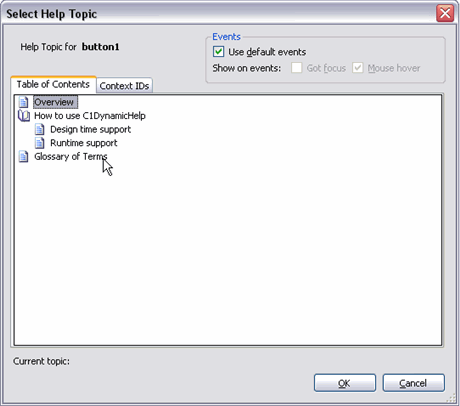
Within this dialog box, you can specify the topic to map to the control through the **Table of Contents** tab by simply selecting it, or you can choose the topic's context ID from the **Context IDs** tab. Additionally, you can specify here whether a topic should be shown when: the control gets focus; the mouse hovers over it; both; or neither, in which case, you can show the topic programmatically.
## See Also
[Specifying the Source Help File](/componentone/docs/win/online-dynamichelp/usingdynamichelpforw/fordevelopersmapping/specifyingthesourceh)
[Mapping a Topic to a Control at Design Time](/componentone/docs/win/online-dynamichelp/usingdynamichelpforw/fordevelopersmapping/mappingatopictoacont)
[Preparing C1DynamicHelp for Authoring Mode](/componentone/docs/win/online-dynamichelp/usingdynamichelpforw/fordevelopersmapping/preparingc1dynamiche)