# Step 1 of 4: Add controls to the Windows form
## Content
To set up your new Form with the [C1DynamicHelp](/componentone/api/win/online-dynamichelp/dotnet-framework-api/C1.Win.C1DynamicHelp.4.8/C1.Win.C1DynamicHelp.C1DynamicHelp.html) control, a **TextBox**, and a **TreeView** control, complete the following steps. These steps should be performed by the software developer.
1. Create a .NET project and add the C1DynamicHelp control to the Toolbox.
2. From the Toolbox, double-click the C1DynamicHelp control. It docks at the right of your form.
3. Add a **TextBox** control to the form:
1\. From the Toolbox\, double\-click the **TextBox** control to add it to your form.
2\. From the Properties window\, set the **textBox1.Text** property to **Show topic on got focus**.
4. Add the **TreeView** control to the form:
1 From the Toolbox, double-click the **TreeView** control to add it to your form.
2\. From the Properties window\, add nodes to the **treeView1** according to the following image:
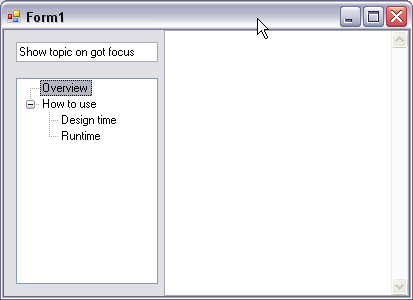
In the next step you will set up the C1DynamicHelp control.