# Step 3 of 6: Associate topics with controls on the form
## Content
You can associate Help topics with controls using the **Select Help Topic** dialog box.
1. Select **Button1** and click the ellipsis button next to the **HelpTopic on C1DynamicHelp1** property in the Properties window. The **Select Help Topic** dialog box opens:
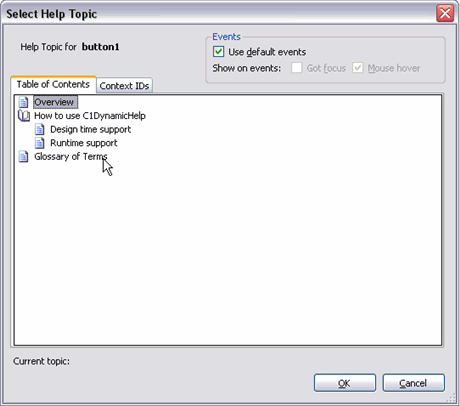
2. Select any help topic from the **Table of Contents** tab and click **OK**. In this example, we will select the **Overview** topic.
3. Select **TextBox1** and set its **HelpTopic on C1DynamicHelp1** property to any topic from the **Table of Contents** tab.
4. In the **Events** group of the **Select Help Topic** dialog box, uncheck **Use default events** and check the **Got focus** checkbox next to **Show on events**.

Unchecking **Use default events** allows you to specify the events on a per-control basis. Otherwise, the [DefaultTrigger](/componentone/api/win/online-dynamichelp/dotnet-framework-api/C1.Win.C1DynamicHelp.4.8/C1.Win.C1DynamicHelp.C1DynamicHelp.DefaultTrigger.html) property is used for all controls. Using the **Events** settings makes showing topics automatic when a control obtains focus or the mouse hovers over it, or in both cases. But if you want manual control over what triggers topic display, you can uncheck both check boxes (or set DefaultTrigger=None; this will do it for all controls if it's not overridden on a per-control basis) and [show topics programmatically](/componentone/docs/win/online-dynamichelp/dynamichelpforwinfor2/tutorial1mappinghelp1/step5of6showtopicspr).
5. Click **OK**.