# Quick Start
Learn how to create a simple app using ComponentOne WinForms SSRSDocumentSource component to access reports.
## Content
This quick start topic guides you through a step-by-step process of creating a simple application for loading a SSRS report in the FlexViewer control. It uses a SSRS report named AdventureWorks, from the ComponentOne report server.
The following image shows a SSRS report opened in FlexViewer.
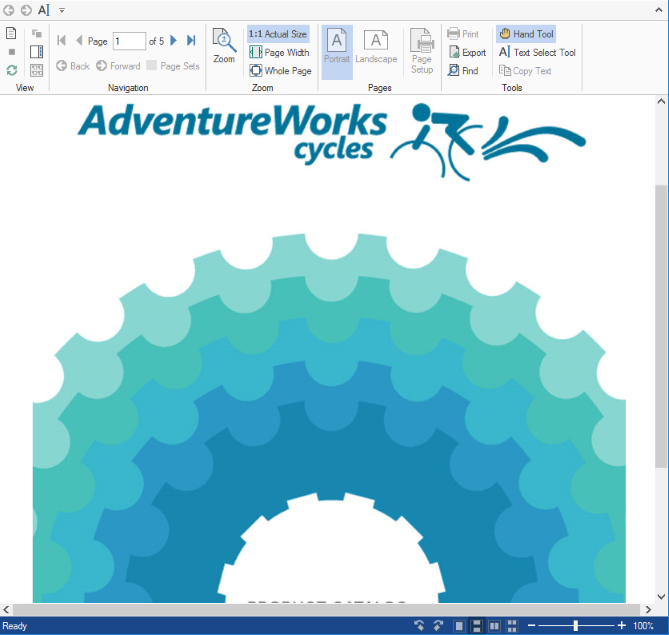
### To load a SSRS report in FlexViewer at design time
1. Create a new Winforms Application project.
2. From the toolbox, add the **C1SSRSDocumentSource** component onto the form. It appears in the component tray.
3. Add the **FlexViewer** control on the form. Set its **Dock** property to **Fill**.
4. Click the dropdown arrow next to **DocumentSource** property value field and select **c1SSRSDocumentSource1**. This assigns the C1SSRSDocumentSource component to C1FlexViewer's **DocumentSource** property.
5. Right click the C1SSRSDocumentSource and select **Properties** to open the Properties window.
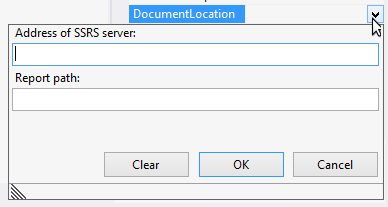
6. Click the drop-down arrow next to the **DocumentLocation** property.
7. Specify the address of the SSRS server and the full path to the report in the following dialog and click **OK**.
8. Expand the **ConnectionOptions** property group.
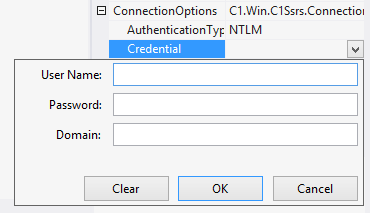
9. Click the drop-down arrow next to the **Credential** property.
10. Specify the User Name, Password and Domain in the following dialog and click **OK**.
11. Build and run the application. The SSRS report is rendered in FlexViewer control.
### To load a SSRS report in FlexViewer programmatically
* [Step 1: Setting up the application](/componentone/docs/win/online-documentlibrary/SSRSDocumentSource-for-WinForms/SSRSDocumentSource-Quick-Start#step-1-setting-up-the-application)
* [Step 2: Load the SSRS report in FlexViewer](/componentone/docs/win/online-documentlibrary/SSRSDocumentSource-for-WinForms/SSRSDocumentSource-Quick-Start#step-2-load-the-ssrs-report-in-flexviewer)
* [Step 3: Build and run the project](/componentone/docs/win/online-documentlibrary/SSRSDocumentSource-for-WinForms/SSRSDocumentSource-Quick-Start#step-3-build-and-run-the-project)
#### Step 1: Setting up the application
1. Create a new WinForms application.
2. Drag and drop **C1SSRSDocumentSource** and **C1FlexViewer** on the form.
#### Step 2: Load the SSRS report in FlexViewer
* Switch to the code view and add the following code to initialize the variables to be used as parameters for NetWorkCredential Property.
**vbnet**
```vbnet
Shared ReadOnly _
ssrsUrl As String = "http:// server url",
ssrsName As String = "*",
ssrspwd As String = "*",
ssrsdomain As String = String.Empty
```
**csharp**
```csharp
static readonly string
ssrsUrl = "http:// server url",
ssrsName = "*",
ssrspwd = "*",
ssrsdomain = string.Empty;
```
2. Add the following code in the **Form1\_Load** event to provide the location of the report on the server using [DocumentLocation](/componentone/docs/win/online-documentlibrary/#DOCUMENTLOCATION) and set the credentials using [Credential](/componentone/docs/win/online-documentlibrary/#CREDENTIAL) property:
**vbnet**
```vbnet
C1SSRSDocumentSource1.DocumentLocation =
New SSRSReportLocation(ssrsUrl, "AdventureWorks/Product Catalog")
C1SSRSDocumentSource1.Credential =
New NetworkCredential(ssrsName, ssrspwd, ssrsdomain)
```
**csharp**
```csharp
c1SSRSDocumentSource1.DocumentLocation =
new SSRSReportLocation(ssrsUrl, "AdventureWorks/Product Catalog");
c1SSRSDocumentSource1.Credential =
new NetworkCredential(ssrsName, ssrspwd, ssrsdomain);
```
3. Render the SSRS report in the FlexViewer control using **DocumentSource** property.
**vbnet**
```vbnet
C1FlexViewer1.DocumentSource = C1SSRSDocumentSource1
```
**csharp**
```csharp
c1FlexViewer1.DocumentSource = c1SSRSDocumentSource1;
```
#### Step 3: Build and run the project
1. Press **Ctrl+Shift+B** to build the project.
2. Press **F5** to run the application.
## See Also
[Key Features](/componentone/docs/win/online-documentlibrary/SSRSDocumentSource-for-WinForms/SSRSDocumentSource-Key-Features)
[Features](/componentone/docs/win/online-documentlibrary/SSRSDocumentSource-for-WinForms/SSRSDocumentSource-Features)