# Filter Summaries
Learn how to use filter summaries that makes it easier for you to analyze the count, sum, maximum, and minimum values of the filter items.
## Content
DataFilter control allows you to configure the Checklist filter to implement the filter summaries using AggregateType property by assigning AggregateType Enum. The feature makes it easier for you to analyze the count, sum, maximum and minimum values of the filter items.
Let us take a use case to display count and maximum values of the filter items in a checklist filter. In the image and example below, *count* of the individual filter items of the *Brand* filter are listed and *maximum* price values for the filter items in the *Category* filter are listed.
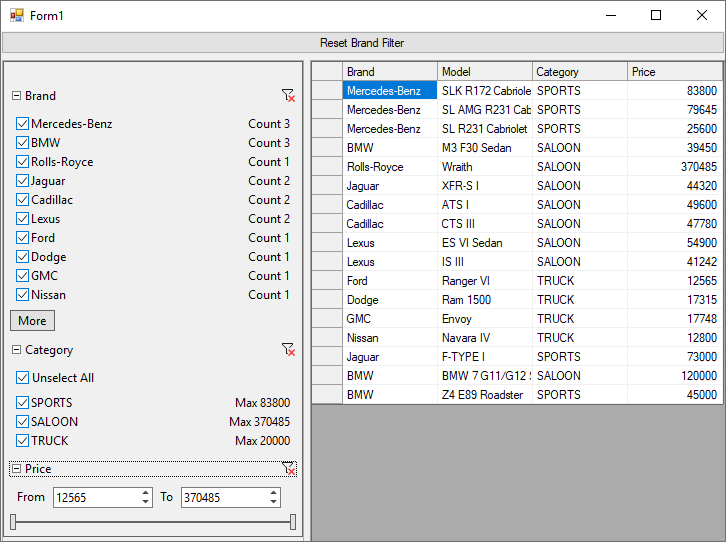
You can use the following code to display the count of the filter items and the maximum value of a filter item corresponding to the data as shown in the above example using **AggregateType** property.
```csharp
private void c1DataFilter1_FilterAutoGenerating(object sender, C1.DataFilter.FilterAutoGeneratingEventArgs e)
{
switch (e.Property.Name)
{
//Set the checklist items for Brand filter
case "Brand":
brandFilter = (C1.Win.DataFilter.ChecklistFilter)e.Filter;
brandFilter.ItemsSource = c1NWindDataSet.Cars;
brandFilter.ValueMemberPath = "Brand";
//Define the summary for the Checklist filter defined for Brand Field.
//This summary displays the count of cars available for each brand.
brandFilter.FilterSummary.AggregateType = AggregateType.Count;
brandFilter.FilterSummary.Label = "Count";
brandFilter.FilterSummary.PropertyName = "Brand";
//Select all the filter items
brandFilter.SelectAll();
break;
//Set the checklist items for Category filter
case "Category":
var categoryFilter = (C1.Win.DataFilter.ChecklistFilter)e.Filter;
categoryFilter.ItemsSource = c1NWindDataSet.Cars;
categoryFilter.ValueMemberPath = "Category";
//Define the summary for the Checklist filter defined for Category Field.
//This summary displays the maximum price of cars for the specific category.
categoryFilter.FilterSummary.AggregateType = AggregateType.Max;
categoryFilter.FilterSummary.Label = "Max";
categoryFilter.FilterSummary.PropertyName = "Price";
//Select all the filter items
categoryFilter.SelectAll();
break;
//Set the minimum/maximum value for the Price filter
case "Price":
var priceFilter = (C1.Win.DataFilter.RangeFilter)e.Filter;
priceFilter.Maximum = c1NWindDataSet.Cars.AsEnumerable().Max(x => x.Field("Price"));
priceFilter.Minimum = c1NWindDataSet.Cars.AsEnumerable().Min(x => x.Field("Price"));
priceFilter.Increment = 1000;
priceFilter.Digits = 0;
break;
//Cancels the creation of all other filters
default:
e.Cancel = true;
break;
}
}
```