# Legend Toolbar
## Content
The toolbar for the Legend element is similar to the Header/Footer toolbars except that it includes an additional command button called Edit text. The Label toolbar also contains this command button.
### Exposing the Legend Toolbar
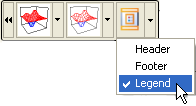
In order for the **Legend** toolbar to appear you have to select the Legend item from the Chart toolbar's drop-down menu.
### Legend Toolbar's Command Buttons
The following command buttons are available in the **Legend** toolbar:
* **Font button**
The **Properties** button for the Legend toolbar exposes the **Chart Properties** editor for the Legend once it is clicked by the user.
* **Background button**
The **Background** button functions exactly like the rest of the Border command buttons for the **C1Chart** control toolbars.
* **Border button**
The **Border** command button functions exactly like the rest of the Border command buttons for the **C1Chart** control toolbars.
* **Compass Location button**
The **Compass** command button has a drop-down list box which includes a list of different compass directions (North, South, West, and East) for the user to choose from. The directions will position the **Header**, **Footer**, or **Legend** in the North position which is above the Chart, the South position which is below the Chart, the West position which is to the left of the Chart, and the East position which is to the right of the Chart. The default compass position for the Header is north and the default position for the Footer is South.
## See Also
[Working with the Chart3D Wizard](/componentone/docs/win/online-chart3d/designtimetoolsforcr/workingwiththechart3)