# Chart3DPoint Collection Editor
## Content
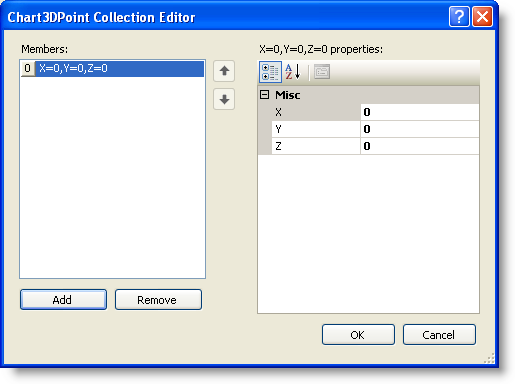
The **Chart3DPoint Collection Editor** allows the user to add or remove points for points in 3D space.
### To access the Chart3DPoint Collection Editor:
1. Right-click on the **C1Chart3D** control and select **Properties** from its context menu.
2. In the Properties window, expand the **ChartGroups** node, then click on the **ellipsis** button next to the **ChartGroupsCollection** property. The **Chart3DGroup Collection Editor** opens.
3. In the **Chart3DGroup Collection Editor**, expand the **ChartData** node, then set the [Layout](/componentone/api/win/online-chart3d/dotnet-framework-api/C1.Win.C1Chart3D.4.8/C1.Win.C1Chart3D.Chart3DData.Layout.html) property to PointData.
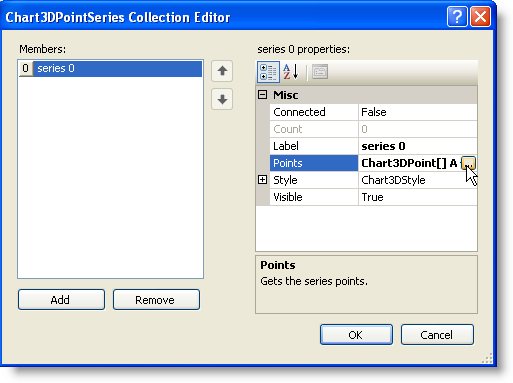
4. Expand the **Set** node, then click on the **ellipsis** button next to the **SeriesCollection** property. The **Chart3DPointSeries Collection Editor** opens.
5. Click **Add**, to add a series to the point data layout. The properties appear for the Chart3DPointSeries Collection.
6. Click on the **ellipsis** button next to the **Points** property.
The **Chart3DPoint Collection Editor** appears.
## See Also
[Chart3DPointSeries Collection Editor](/componentone/docs/win/online-chart3d/3dchartdesigntimesup/c1chart3dcollectione/chart3dpointseriesco)