# Legend Toolbar
## Content
The floating toolbar for the Legend element is similar to the Header/Footer toolbars except that it includes an additional command button called Edit text. The Label toolbar also contains this command button.
The following figure illustrates the Legend toolbar:
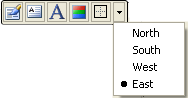
### Exposing the Legend Floating Toolbar
In order for the **Legend** floating toolbar to appear you have to select the Legend item from the Chart toolbar's drop-down menu.
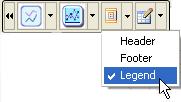
The section below lists all of the command buttons available in the **Legend** toolbar and describes the functionality of each one.
### Properties Button
The **Properties** button for the **Legend** floating toolbar exposes the **Chart Properties** designer for the Legend once it is clicked by the user.
### Edit text Button
The **Edit text** button for the **Legend** floating toolbar makes the textbox for the Legend editable.
### Background Button
The **Background** button functions exactly like the rest of the Border command buttons for the [C1Chart](/componentone/api/win/online-chart2d/dotnet-framework-api/C1.Win.C1Chart.4.8/C1.Win.C1Chart.C1Chart.html) control toolbars.
### Border button
The **Border** command button functions exactly like the rest of the Border command buttons for the [C1Chart](/componentone/api/win/online-chart2d/dotnet-framework-api/C1.Win.C1Chart.4.8/C1.Win.C1Chart.C1Chart.html) control toolbars.
The next section describes the Chart Wizard interface and how it can be used to create 2D Charts at design time.
## See Also
[Working with the Chart Wizard](/componentone/docs/win/online-chart2d/designtimetoolsforcr/workingwiththechartw)