# PlotArea Toolbar
## Content
Another primary floating toolbar, the **PlotArea** toolbar for the [C1Chart](/componentone/api/win/online-chart2d/dotnet-framework-api/C1.Win.C1Chart.4.8/C1.Win.C1Chart.C1Chart.html) control includes a **Properties**, **Background**, and a drop-down menu which contains an **Add/Edit** labels command item to add or edit chart labels and an **Inverted chart** command item to make the chart inverted.
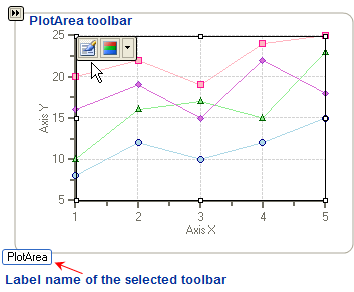
The figure below shows how the **PlotArea** toolbar appears when the user selects the **PlotArea** on the [C1Chart](/componentone/api/win/online-chart2d/dotnet-framework-api/C1.Win.C1Chart.4.8/C1.Win.C1Chart.C1Chart.html) control. When a user selects a toolbar, a label name is provided for the user's convenience.
### Exposing the PlotArea Floating toolbar
To expose the **PlotArea** floating toolbar slide your cursor in the PlotArea of the chart.
### PlotArea Floating Toolbar's Command Buttons
The following figure illustrates each button in the **PlotArea** toolbar:
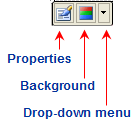
The section below lists all of the command buttons available in the **PlotArea** toolbar and describes the functionality of each one.
### Properties Button
The **Properties** button for the **PlotArea** toolbar functions exactly like the **Properties** button for the **ChartArea** toolbar.
### Background Button
The **Background** button for the **PlotArea** toolbar functions exactly like the **Background** button for the **ChartArea** toolbar.
### Drop-down menu
The drop-down menu for the **PlotArea** toolbar contains two menu items: **Inverted** and **Add/Edit** labels. The **Inverted** command item inverts the Y and X-axis. For more information about Inverted charts, please see [Inverted and Reversed Chart Axes](/componentone/docs/win/online-chart2d/chartareaandplotarea/axes/invertedandreversedc).
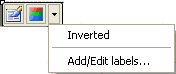
The **Add/Edit** labels command item exposes the **Edit labels** editor. In the **Edit labels** editor you can add or edit existing labels.
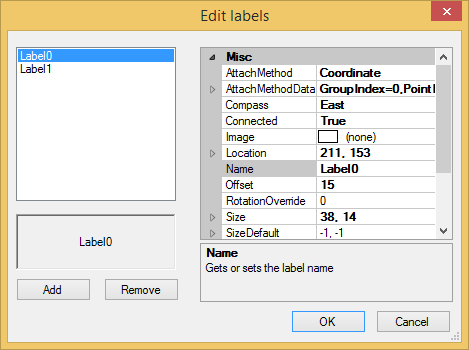
For more information on using the Edit labels editor to add labels see, [Add Labels to the Chart](/componentone/docs/win/online-chart2d/chartforwinformstask/creatingandformattin1/addlabelstothechart).
## See Also
[Secondary Floating Toolbars](/componentone/docs/win/online-chart2d/designtimetoolsforcr/workingwiththesmartd/secondaryfloatingtoo)