# C1Chart Smart Tag
## Content
In Visual Studio, the **C1Chart** component includes a smart tag. A smart tag represents a short-cut tasks menu that provides the most commonly used properties in each component/command.
The **C1Chart** component provides quick and easy access to the **Chart Wizard** editor, **Visual Effects** designer, and common properties through its smart tag.
To access the **C1Chart Tasks** menu, click the smart tag () in the upper-right corner of the **C1Chart** control. This will open the **C1Chart Tasks** menu.
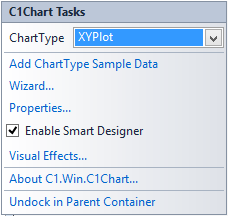
The **C1Chart Tasks** menu operates as follows:
* **Add ChartType Sample Data**
Clicking the **Add CharType Sample Data** item opens a **Warning** dialog box that says the current data will be lost. Once you select **Yes** to continue it will change the current or default data to the sample data for the selected chart type.
* **Wizard**
Clicking the **Wizard** item opens the **Chart Wizard** editor. For more information about the elements in the **Chart Wizard** dialog box and how to use them, see [Working with the Chart Wizard](/componentone/docs/win/online-chart2d/designtimetoolsforcr/workingwiththechartw).
* **Properties**
Clicking the **Properties** item opens the **Chart Properties** designer. For more information about the elements in the **Chart Properties** designer and how to use them, see [Working with the Chart Properties Designer](/componentone/docs/win/online-chart2d/designtimetoolsforcr/workingwiththechartp).
* **Enable Smart Designer**
Selecting the **Enable Smart Designer** check box enables the Smart Designer of the **C1Chart** control. The default value is **True** (checked). For more information about the Smart Designer's elements see, [Working with the Smart Designer](/componentone/docs/win/online-chart2d/designtimetoolsforcr/workingwiththesmartd).
* **Visual Effects**
Clicking the **Visual Effects** item opens the **Visual Effects** designer. For more information about the elements in the **Visual Effects** designer and how to use them, see [Visual Effects Designer](/componentone/docs/win/online-chart2d/customizingchartelem/visualeffectsdesigne).
* **About C1.Win.C1Chart**
Clicking the **About** item displays a dialog box, which is helpful in finding the version number of C1Chart and online resources.
* **Dock/Undock in Parent Container**
Clicking the Dock in parent container docks the **C1Chart2D** control inside its parent container. Clicking Undock in Parent Container undocks the control.
## See Also
[C1Chart Context Menu](/componentone/docs/win/online-chart2d/designtimesupport/c1chartcontextmenu)