# C1Chart Context Menu
## Content
The **C1Chart2D** control provides a context menu for additional functionality to use at design time.
To access C1Chart2D's context menu, right-click on the **C1Chart2D** component.
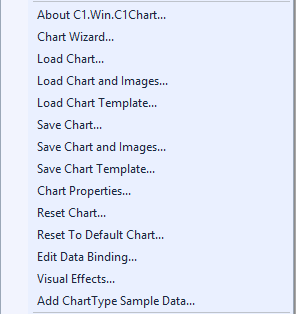
The **C1Chart** context menu operates as follows:
* **About C1.Win.C1Chart**
Displays a dialog box, which is helpful in finding the version number of C1Chart and online resources.
* **Chart Wizard**
Opens the **Chart Wizard**.
* **Load Chart**
Loads the saved layout of the C1Chart2D control.
* **Save Chart**
Saves the layout of the C1Chart2D control as a XML file.
* **Chart Properties** Opens the **Chart Properties** designer.
* **Reset Chart**
Resets the Chart.
* **Reset To Default Chart**
Resets the Chart back to its default settings.
* **Edit Data Binding**
Opens the C1Chart Data Binding editor.
* **Visual Effects**
Opens the **Visual Effects** designer.
## See Also
[C1Chart Collection Editors](/componentone/docs/win/online-chart2d/designtimesupport/c1chartcollectionedi)