# Defining the Header and Footer Elements
## Content
Here is how the Header and Footer elements appear in **C1Chart**:
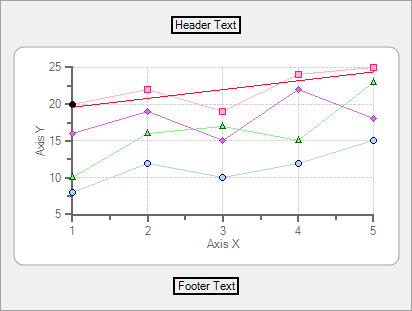
The header and footer elements are used to display descriptive information about the chart. They are controlled by the Header and Footer properties. Both properties return a [Title](/componentone/api/win/online-chart2d/dotnet-framework-api/C1.Win.C1Chart.4.8/C1.Win.C1Chart.Title.html) object that contains the following main properties:
| **Property** | **Description** |
| --- | --- |
| [Text](/componentone/api/win/online-chart2d/dotnet-framework-api/C1.Win.C1Chart.4.8/C1.Win.C1Chart.Title.Text.html) | Contains text displayed in the title (header or footer). |
| [Style](/componentone/api/win/online-chart2d/dotnet-framework-api/C1.Win.C1Chart.4.8/C1.Win.C1Chart.Title.Style.html) | Contains properties that set the font, orientation, colors, and border of the title. |
| [Compass](/componentone/api/win/online-chart2d/dotnet-framework-api/C1.Win.C1Chart.4.8/C1.Win.C1Chart.Title.Compass.html) | Determines the position of the title. |
| [Visible](/componentone/api/win/online-chart2d/dotnet-framework-api/C1.Win.C1Chart.4.8/C1.Win.C1Chart.Title.Visible.html) | Determines whether the title is visible. |
**C1Chart** sizes and positions the titles automatically, based on their contents and how the [Compass](/componentone/api/win/online-chart2d/dotnet-framework-api/C1.Win.C1Chart.4.8/C1.Win.C1Chart.Title.Compass.html) property is set. Title object positions are customized using the [SizeDefault](/componentone/api/win/online-chart2d/dotnet-framework-api/C1.Win.C1Chart.4.8/C1.Win.C1Chart.Title.SizeDefault.html) and [LocationDefault](/componentone/api/win/online-chart2d/dotnet-framework-api/C1.Win.C1Chart.4.8/C1.Win.C1Chart.Title.LocationDefault.html) properties (negative values activate the automatic sizing and positioning).
### Creating header and footer elements
The Chart header and footer elements can be created programmatically through its [Title](/componentone/api/win/online-chart2d/dotnet-framework-api/C1.Win.C1Chart.4.8/C1.Win.C1Chart.Title.html) object or they can be created at design time through the Chart's Properties window, **Chart Properties** designer, or by Chart's SmartDesigner.
The simplest way of creating them is through the Chart's Smart Designer. For more information on creating header or footers through the Chart's Smart Designer, see [Add a Chart Header](/componentone/docs/win/online-chart2d/chartforwinformstask/creatingandformattin1/addachartheader) or [Add a Chart Footer](/componentone/docs/win/online-chart2d/chartforwinformstask/creatingandformattin1/addachartfooter).
### Customizing header and footer elements
The header and footer elements' text and alignment, position, border, colors, and font can be customized using the Title's properties. Additionally, light patterns, shadows, and custom colors can be added to the header and footer elements using the **Visual Effects** designer.
Please refer to [Customizing Chart Elements](/componentone/docs/win/online-chart2d/customizingchartelem) for more information on the properties and tools used to enhance 2D Chart's elements. For more information on positioning the header element see [Displaying both the Chart Legend and Chart Header](/componentone/docs/win/online-chart2d/chartforwinformstask/displayingboththecha).
## See Also
[Defining the Legend Element](/componentone/docs/win/online-chart2d/chartfundamentals/definingthelegendele)