# Attach By Data Coordinate
## Content
The Attached by Data Coordinate method item command gets the **DataCoordinate** member of the AttachMethodEnum and sets the value of the [AttachMethod](/componentone/api/win/online-chart2d/dotnet-framework-api/C1.Win.C1Chart.4.8/C1.Win.C1Chart.Label.AttachMethod.html) property in the Label. It attaches the label anywhere inside the plot area of the chart or to the specified coordinate location. To attach the label as a data coordinate, complete the following steps:
1. Select an existing Chart label and select the **Attached By Data Coordinate** item from its drop-down menu.
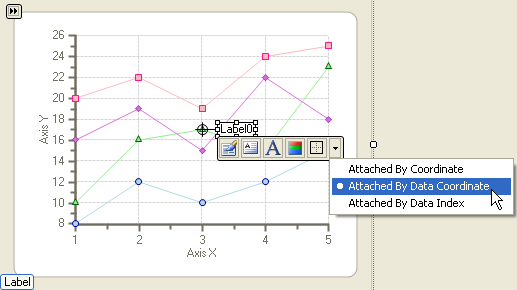
2. Click on the **Properties** button of the Label floating toolbar and observe the following in its **Edit labels** editor:
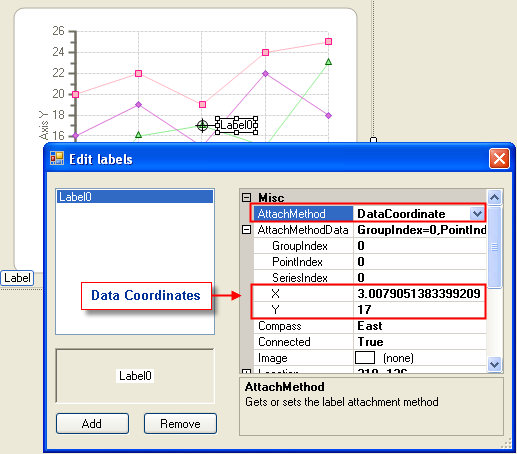
* The AttachMethod property is now set to DataCoordinate since the Attached by Data Coordinate item was chosen.
* Locate the X and Y coordinate values and notice that they are set to the values of the X and Y coordinate respectively. This is because the DataCoordinate attachment method attaches the labels by the defined coordinate X and Y values.
The following image illustrates the two observations:
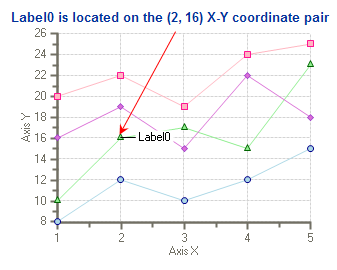
3. If you would like the label to represent a different coordinate pair then simply change the X and Y coordinates in the **Edit labels** editor. For example, let's say we would like the label on the (2, 16) coordinate pair. In the **Edit labels** editor we change the X value to 2 and the Y value to 16. The label appears on the (2, 16) X-Y coordinate pair. The image below shows the new position of the label.
## See Also
[Attach By Data Index](/componentone/docs/win/online-chart2d/chartforwinformstask/creatingandformattin1/attachchartlabels/attachbydataindex)