# Axis Annotation Overlap
## Content
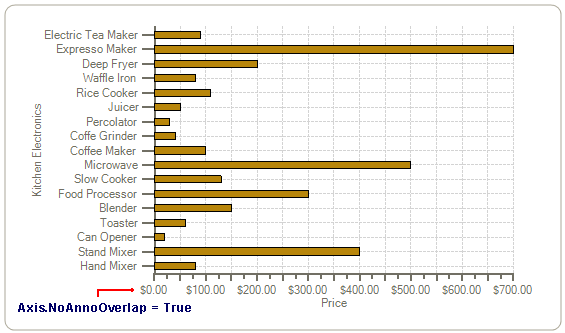
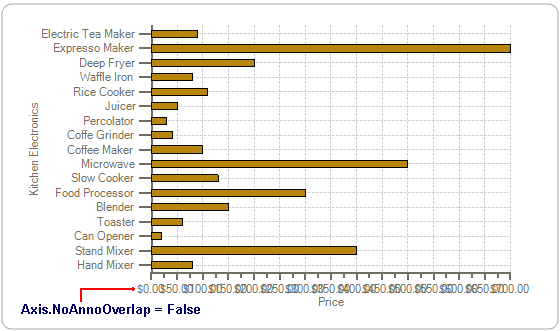
In cases when you don’t have enough room on the axes to display your annotation you can set the [NoAnnoOverlap](/componentone/api/win/online-chart2d/dotnet-framework-api/C1.Win.C1Chart.4.8/C1.Win.C1Chart.Axis.NoAnnoOverlap.html) property to True so it will suppress the drawing of any axis annotation that would overlap a previously drawn annotation regardless of the reason for the overlap.
If you have [AutoMajor](/componentone/api/win/online-chart2d/dotnet-framework-api/C1.Win.C1Chart.4.8/C1.Win.C1Chart.Axis.AutoMajor.html) property set to true then you don’t need to use the [NoAnnoOverlap](/componentone/api/win/online-chart2d/dotnet-framework-api/C1.Win.C1Chart.4.8/C1.Win.C1Chart.Axis.NoAnnoOverlap.html) property because the AutoMajor property will automatically calculate the best value for the major tick marks.
The following chart displays the [NoAnnoOverlap](/componentone/api/win/online-chart2d/dotnet-framework-api/C1.Win.C1Chart.4.8/C1.Win.C1Chart.Axis.NoAnnoOverlap.html) property set to True:
The following chart display the [NoAnnoOverlap](/componentone/api/win/online-chart2d/dotnet-framework-api/C1.Win.C1Chart.4.8/C1.Win.C1Chart.Axis.NoAnnoOverlap.html) property set to False:
## See Also
[Plot Area](/componentone/docs/win/online-chart2d/chartareaandplotarea/plotarea)