# Inverted and Reversed Chart Axes
## Content
When a data set contains X or Y values which span a large range, sometimes the normal chart setup does not display the information most effectively. Formatting a chart with a vertical Y-axis and axis annotation that begins at the minimum value can sometimes be more visually appealing if the chart could be inverted or the axes reversed. Therefore, [C1Chart](/componentone/api/win/online-chart2d/dotnet-framework-api/C1.Win.C1Chart.4.8/C1.Win.C1Chart.C1Chart.html) provides the [Inverted](/componentone/api/win/online-chart2d/dotnet-framework-api/C1.Win.C1Chart.4.8/C1.Win.C1Chart.Area.Inverted.html) property of the ChartArea and the [Reversed](/componentone/api/win/online-chart2d/dotnet-framework-api/C1.Win.C1Chart.4.8/C1.Win.C1Chart.Axis.Reversed.html) property of the axis.
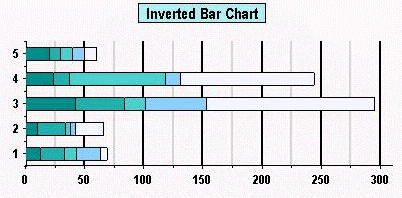
Setting the [Inverted](/componentone/api/win/online-chart2d/dotnet-framework-api/C1.Win.C1Chart.4.8/C1.Win.C1Chart.Area.Inverted.html) property of the ChartArea to **True** will invert the axes. This means that the X-axis will take the place of the Y-axis, and the Y-axis will take the place of the X-axis. Initially the chart is setup with the X-axis displayed horizontally and the Y-axis displayed vertically. This feature is commonly used in Bar Charts.
> type=note
> **Note**: An Inverted Bar Chart is a standard Bar Chart with the [Inverted](/componentone/api/win/online-chart2d/dotnet-framework-api/C1.Win.C1Chart.4.8/C1.Win.C1Chart.Area.Inverted.html) property set to **True**. Thus, Inverted Bar Charts do not have a special ChartType.
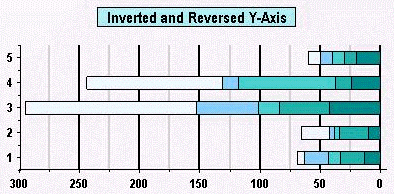
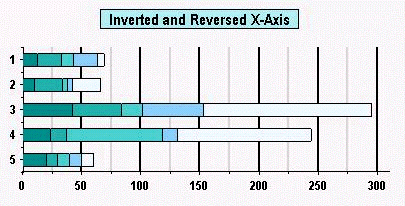
Setting the [Reversed](/componentone/api/win/online-chart2d/dotnet-framework-api/C1.Win.C1Chart.4.8/C1.Win.C1Chart.Axis.Reversed.html) property of the ChartArea to **True** will reverse the axes. This means that the Max side of the axis will take the place of the Min side of the axis, and the Min side of the axis will take the place of the Max side of the axis. Initially, the chart displays the Minimum value on the left side of the X-axis, and on the bottom side of the Y-axis. Setting the [Reversed](/componentone/api/win/online-chart2d/dotnet-framework-api/C1.Win.C1Chart.4.8/C1.Win.C1Chart.Axis.Reversed.html) property of the Axis, however will juxtapose these Maximum and Minimum values.
## See Also
[Axes Annotation](/componentone/docs/win/online-chart2d/chartareaandplotarea/axesannotation)