# Axis Tick Marks
## Content
The chart automatically sets up the axis with both major and minor ticks. Customizing the tick spacing or attributes is as easy as manipulating a set of properties.
The [TickMajor](/componentone/api/win/online-chart2d/dotnet-framework-api/C1.Win.C1Chart.4.8/C1.Win.C1Chart.Axis.TickMajor.html) and [TickMinor](/componentone/api/win/online-chart2d/dotnet-framework-api/C1.Win.C1Chart.4.8/C1.Win.C1Chart.Axis.TickMinor.html) properties set the state of the Axis' tick marks. This property can be set to any of the [TickMarksEnum](/componentone/api/win/online-chart2d/dotnet-framework-api/C1.Win.C1Chart.4.8/C1.Win.C1Chart.TickMarksEnum.html) values.
### Tick Mark Position
These values set where and if the tick marks will be displayed:
| **Value** | **Description** |
| --- | --- |
| **TickMarksEnum.None** | No tick marks along axis. |
| **TickMarksEnum.Cross** | Tick marks cross over axis. |
| **TickMarksEnum.Outside** | Tick marks located outside chart area on axis. |
| **TickMarksEnum.Inside** | Tick marks located inside chart area on axis. |
### Tick Mark Spacing
The [AutoMajor](/componentone/api/win/online-chart2d/dotnet-framework-api/C1.Win.C1Chart.4.8/C1.Win.C1Chart.Axis.AutoMajor.html) and [AutoMinor](/componentone/api/win/online-chart2d/dotnet-framework-api/C1.Win.C1Chart.4.8/C1.Win.C1Chart.Axis.AutoMinor.html) properties set whether the tick marks are to be automatically configured by the chart. When both these properties are set to **True**, the chart uses the current data to logically place the major and minor tick marks. When the [AutoMajor](/componentone/api/win/online-chart2d/dotnet-framework-api/C1.Win.C1Chart.4.8/C1.Win.C1Chart.Axis.AutoMajor.html) property is true, its not necessary to enable overlap for axis annotations.
The [UnitMajor](/componentone/api/win/online-chart2d/dotnet-framework-api/C1.Win.C1Chart.4.8/C1.Win.C1Chart.Axis.UnitMajor.html) and [UnitMinor](/componentone/api/win/online-chart2d/dotnet-framework-api/C1.Win.C1Chart.4.8/C1.Win.C1Chart.Axis.UnitMinor.html) properties set the units by which the ticks will be spaced. When the [UnitMajor](/componentone/api/win/online-chart2d/dotnet-framework-api/C1.Win.C1Chart.4.8/C1.Win.C1Chart.Axis.UnitMajor.html) property is set, the [UnitMinor](/componentone/api/win/online-chart2d/dotnet-framework-api/C1.Win.C1Chart.4.8/C1.Win.C1Chart.Axis.UnitMinor.html) property is automatically set by the chart to half the UnitMajor value. Although the chart automatically sets the [UnitMinor](/componentone/api/win/online-chart2d/dotnet-framework-api/C1.Win.C1Chart.4.8/C1.Win.C1Chart.Axis.UnitMinor.html) property, it also can be manually changed to a different value.
### Tick Mark Length
You can increase the length of the Major and Minor tick marks using the [TickFactorMajor](/componentone/api/win/online-chart2d/dotnet-framework-api/C1.Win.C1Chart.4.8/C1.Win.C1Chart.Axis.TickFactorMajor.html) and [TickFactorMinor](/componentone/api/win/online-chart2d/dotnet-framework-api/C1.Win.C1Chart.4.8/C1.Win.C1Chart.Axis.TickFactorMinor.html) properties. Tick marks are sized based on the thickness of the axis line as well as the tick factor. Doubling the tick factor doubles the length of the axis tick mark. Values are limited to integers from 1 to 20. Values outside of this range are ignored.
The following chart image has the [TickFactorMajor](/componentone/api/win/online-chart2d/dotnet-framework-api/C1.Win.C1Chart.4.8/C1.Win.C1Chart.Axis.TickFactorMajor.html) property set to 5. This makes the tick length for the major tick marks five times longer.
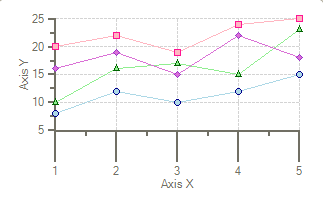
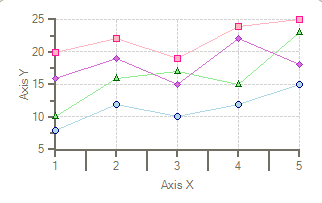
The following chart image has the [TickFactorMinor](/componentone/api/win/online-chart2d/dotnet-framework-api/C1.Win.C1Chart.4.8/C1.Win.C1Chart.Axis.TickFactorMinor.html) property set to 5. This makes the tick length for the minor tick marks five times longer.
## See Also
[Axis Grid Lines](/componentone/docs/win/online-chart2d/chartareaandplotarea/axes/axisgridlines)