# Styling
## Content
The look and feel of a bullet graph control can be customized according to your preference. The [C1BulletGraph](/componentone/docs/win/online-bulletgraph/) class provides a [Styles](/componentone/docs/win/online-bulletgraph/) property that can be used to customize the different visual parts of the BulletGraph control. It is of the type [BulletGraphTheme](/componentone/docs/win/online-bulletgraph/) class. Styling can be applied to BulletGraph control using different classes for different visual parts of the control.
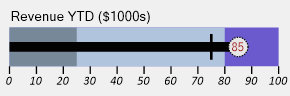
The image given above depicts the use of **Styles** property in **WinForms** application.
The BulletGraph control consists of several UI elements such as labels, marks and ranges. The BulletGraphTheme class provides several properties to handle the styling of the BulletGraph control and the above mentioned elements. Each of these properties is of a specific class type and is used to style specific parts of the BulletGraph control.
These properties are given below:
* **Common**: This property is of the type [BulletGraphCommonStyle](/componentone/docs/win/online-bulletgraph/) class. It allows you to customize the appearance (graph offset) of the BulletGraph control.
The code below shows an example to style the DataFilter control:
**vbnet**
```vbnet
'Styling the BulletGraph
C1BulletGraph1.Styles.Common.GraphOffset = 10 'Sets the graph offset
```
**csharp**
```csharp
//Styling the BulletGraph
c1BulletGraph1.Styles.Common.GraphOffset = 10; //Sets the graph offset
```
* **Labels**: This property is of the type [BulletGraphLabelStyles](/componentone/docs/win/online-bulletgraph/) class. It allows you to customize the appearance (color, font and font-size) of different labels the BulletGraph control is composed of such as the [captio](/componentone/docs/win/online-bulletgraph/)n label, [scale](/componentone/docs/win/online-bulletgraph/) labels and the featured [value](/componentone/docs/win/online-bulletgraph/) label.
The code below shows as example to style the bullet graph labels: **vbnet**
```vbnet
'Styling the Labels
C1BulletGraph1.Styles.Labels.Scale.Color = Color.Black
C1BulletGraph1.Styles.Labels.Scale.Font = New Font("Calibri", 9, FontStyle.Italic)
C1BulletGraph1.Styles.Labels.Caption.FontSize = 20
C1BulletGraph1.Styles.Labels.Value.Color = Color.Brown
```
**csharp**
```csharp
//Styling the Labels
c1BulletGraph1.Styles.Labels.Scale.Color = Color.Black;
c1BulletGraph1.Styles.Labels.Scale.Font = new Font("Calibri", 9, FontStyle.Italic);
c1BulletGraph1.Styles.Labels.Caption.FontSize = 20;
c1BulletGraph1.Styles.Labels.Value.Color = Color.Brown;
```
* **Marks**: This property is of the type [BulletGraphMarkStyles](/componentone/docs/win/online-bulletgraph/) class. It allows you to customize the appearance of different marks in the BulletGraph such as the comparative measure or [target](/componentone/docs/win/online-bulletgraph/) mark (lines that runs perpendicular to the existing orientation of the graph), [scale](/componentone/docs/win/online-bulletgraph/) tick marks and the featured [value](/componentone/docs/win/online-bulletgraph/) mark (the circle within which the featured value label is shown).
The code below shows an example to style the bullet graph marks: **vbnet**
```vbnet
'Styling the Marks
C1BulletGraph1.Styles.Marks.Target.Color = Color.Black
C1BulletGraph1.Styles.Marks.Target.Thickness = 4
C1BulletGraph1.Styles.Marks.Scale.Thickness = 2
C1BulletGraph1.Styles.Marks.Value.Width = 30
C1BulletGraph1.Styles.Marks.Value.Border.LineStyle = C1GaugeBorderStyle.Dot
C1BulletGraph1.Styles.Marks.Value.Border.Thickness = 5
```
**csharp**
```csharp
//Styling the Marks
c1BulletGraph1.Styles.Marks.Target.Color = Color.Black;
c1BulletGraph1.Styles.Marks.Target.Thickness = 4;
c1BulletGraph1.Styles.Marks.Scale.Thickness = 2;
c1BulletGraph1.Styles.Marks.Value.Width = 30;
c1BulletGraph1.Styles.Marks.Value.Border.LineStyle = C1GaugeBorderStyle.Dot;
c1BulletGraph1.Styles.Marks.Value.Border.Thickness = 2;
```
* **Ranges**: This property is of the type [BulletGraphRangeStyles](/componentone/docs/win/online-bulletgraph/) class. It allows you to customize the appearance of different ranges in the BulletGraph control. It is composed of a main bullet graph bar, good/bad ranges and the featured measure bar.
The code below shows as example to style the bullet graph ranges: **vbnet**
```vbnet
'Styling the Ranges
C1BulletGraph1.Styles.Ranges.Bar.Color = Color.SlateBlue
C1BulletGraph1.Styles.Ranges.Good.Color = Color.LightSteelBlue
C1BulletGraph1.Styles.Ranges.Bad.Color = Color.LightSlateGray
C1BulletGraph1.Styles.Ranges.Value.Width = 15
```
**csharp**
```csharp
//Styling the Ranges
c1BulletGraph1.Styles.Ranges.Bar.Color = Color.SlateBlue;
c1BulletGraph1.Styles.Ranges.Good.Color = Color.LightSteelBlue;
c1BulletGraph1.Styles.Ranges.Bad.Color = Color.LightSlateGray;
c1BulletGraph1.Styles.Ranges.Value.Width = 15;
```