# Uninstall Web API
## Content
To uninstall Web API project templates, follow these steps:
1. Open the Control Panel using **ComponentOneControlPanel** shortcut on the screen.
The registration screen appears. In case you are an existing user, you can login using the registered email address and password. Alternatively, if you are a new user: Register with ComponentOne and create an account by filling the required fields.
* A verification mail will be sent to your email address.
* Visit the activation link to verify your email address.
* In case you do not wish to login or register, you can **proceed as an anonymous user**.
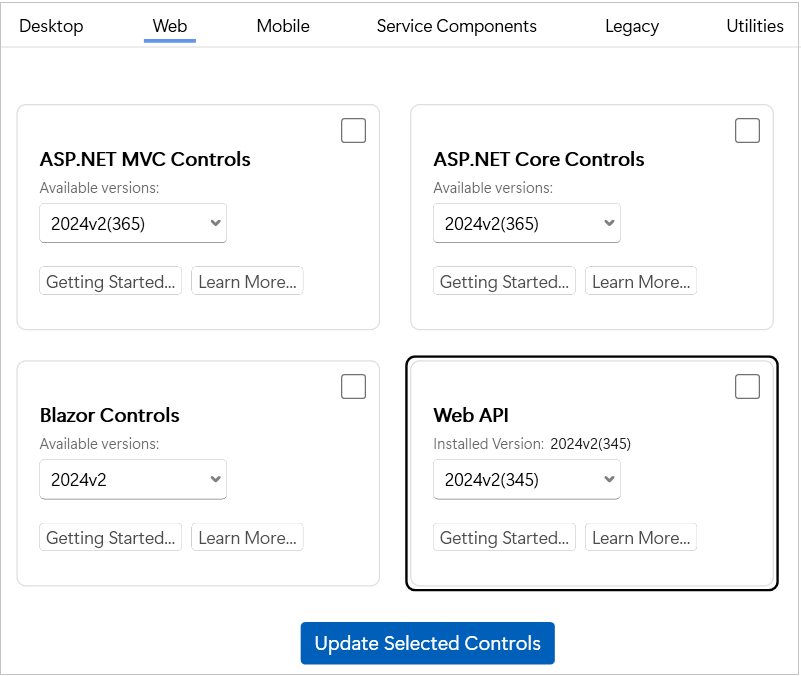
2. Click the Web tab to view the **Web API** tile.
3. Unselect the checkbox in the Web API tile and click the **Update Selected Controls** button.
> type=note
> **Note**: The checkbox remains selected if you have already downloaded any version of Web API.After successful uninstallation, the "**Installation/Uninstallation completed !!!**" message appears.
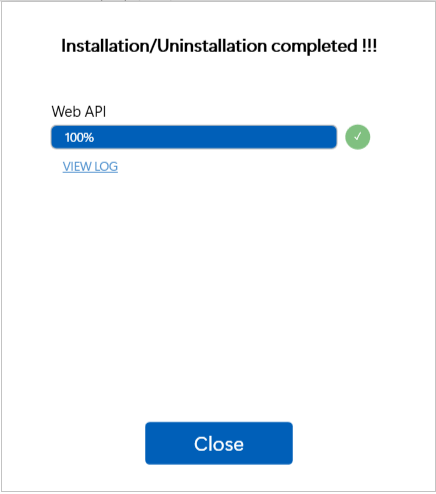
4. Click the **Close** button to complete the uninstallation of Web API.