# Generate Barcode from Texts
## Content
This section demonstrates how to call the Web API service through a client application and generate barcode image from the desired text.
[Step 1: Call the Service](/componentone/docs/webapi/online-webapicore/Services/barcode-services/GenerateBarcode#step-1-call-the-service)
[Step 2: Run the Client Project](/componentone/docs/webapi/online-webapicore/Services/barcode-services/GenerateBarcode#step-2-run-the-client-project)
The following image shows the barcode generated after completing the steps above:
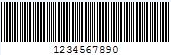
The following example makes a call to the Web API [service](/componentone/docs/webapi/online-webapicore/overview/WorkingwithC1WebAPI/ConfiguringWebAPI) through HTML as well as WinForms client applications. These clients send a GET request to the service, which returns a barcode stream in response. This response stream can then be saved as image, as the barcode image above.
In the following example, the service url takes 1234567890 in **Text** parameter and **encoding type** parameter as Code39x, to generate the above image.
### Step 1: Call the Service
Complete the following steps to call the Web API service.
**csharp**
```csharp
public void GetBarcode() {
var apiURL = string.IsNullOrEmpty(c1TextBox1.Text) ?
"https://demos.componentone.com/ASPNET/5/C1WebAPI/3.0.20193.222/api/barcode?Text=1234567890" : c1TextBox1.Text;
WebRequest request = WebRequest.Create(apiURL);
WebResponse response = request.GetResponse();
var fileStream = File.Create("D:\\BarcodeImg.Png");
//The file format specified here should be same as that specified in the
request url
response.GetResponseStream().CopyTo(fileStream);
}
```
### HTML
```html
```
### Step 2: Run the Client Project
**WinForms Application**
* Click **Build | Build Solution** to build the project.
* Press **F5** to run the project.
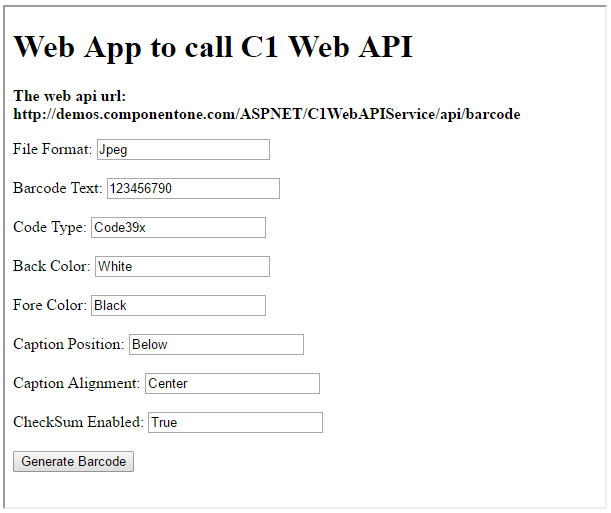
* Provide the service URL, along with the query string containing appropriate barcode parameters, in the textbox corresponding to Request URL field.
* Click the **Generate Barcode** button. The generated barcode image will get downloaded at the location specified within the GetBarcode() method.
**HTML Application**
* Save your HTML file and open it in a browser.
* Set the appropriate barcode parameters for the desired barcode image, and click **Generate Barcode** button.
> type=note
> Explore detailed demo samples of REST API service to generate barcode at:
>
> * [Generate Barcode Live Demo](https://demos.componentone.com/ASPNET/5/WebApiExplorer/)