# Configure PDF Web API Service
## Content
PDF Web API enables you to build HTTP services, which can be consumed by a variety of clients for viewing, loading and caching PDF files. These are REST based API services, which communicate with the HTML 5 PDFViewer control to display the pdf file content on the web.
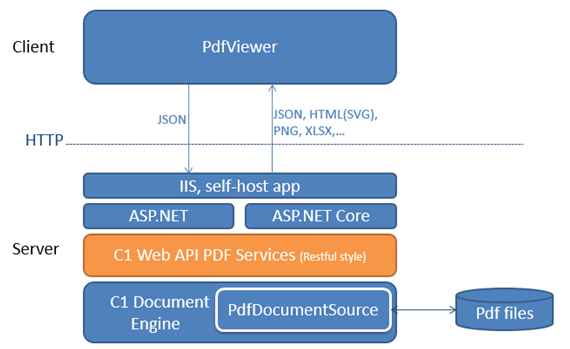
Complete the following steps to setup PDF services.
### Create a new WebAPI application
1. Open Visual Studio and Select **Create a new project**.
2. In the **Create a new project** window, select **C1** from the **Project Types** drop down and select **C1 Web API Application for ASP.NET Core (.Net Framework)** and click **Next**.
3. Set a **Name** and **Location** for your application and click **Create**.
4. In the **ComponentOne ASP.NET Web API Application Wizard**, select **Pdf services** option.
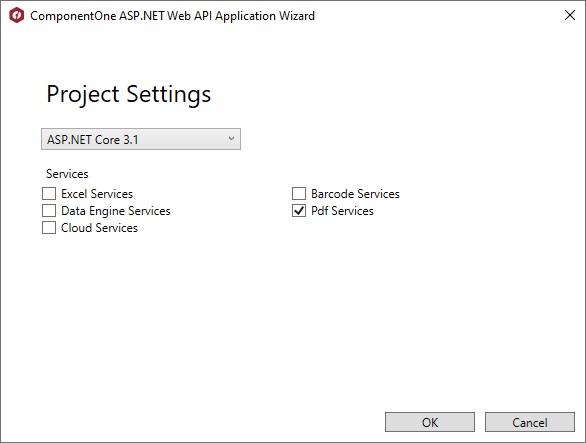
5. Once you have selected the **Services** from the wizard, click **OK** to create a new **C1 Web API Service application**.
### Configure Startup.cs file
1. Create a folder named **PdfRoot**, in your service application.
2. Add the desired **PDF files** to the PdfRoot folder.
3. From the Solution Explorer, select and open **Startup.cs** file.
4. In the **Startup.cs** file, replace the existing code under Startup class with the following code.
```csharp
public class Startup
{
public Startup(IWebHostEnvironment env, IConfiguration config, ILoggerFactory loggerFactory)
{
Environment = env;
var builder = new ConfigurationBuilder()
.SetBasePath(env.ContentRootPath)
.AddJsonFile("appsettings.json", optional: true, reloadOnChange: true)
.AddJsonFile($"appsettings.{env.EnvironmentName}.json", optional: true)
.AddEnvironmentVariables();
Configuration = builder.Build();
}
public static IWebHostEnvironment Environment { get; set; }
public IConfiguration Configuration { get; }
//Add services to the container.
public void ConfigureServices(IServiceCollection services)
{
services.AddMvc();
// Add framework services.
//MESCIUS API
services.AddMvc().ConfigureApplicationPartManager(manager =>
{
var afp = manager.FeatureProviders.First(iafp => iafp.GetType() == typeof(ControllerFeatureProvider));
if (afp != null)
{
manager.FeatureProviders.Remove(afp);
}
manager.FeatureProviders.Add(new CustomControllerFeatureProvider());
});
// CORS support
services.AddCors(options =>
{
options.AddPolicy("AllowAll", builder => builder.AllowAnyOrigin().AllowAnyMethod().AllowAnyHeader());
});
services.Configure(options => options.ValueLengthLimit = int.MaxValue);
// MESCIUS API
services.AddMvc(option => { option.EnableEndpointRouting = false; });
services.AddC1Api();
}
// Configure the HTTP request pipeline.
public void Configure(IApplicationBuilder app, IWebHostEnvironment env, ILoggerFactory loggerFactory)
{
//MESCIUS API
app.UseC1Api();
app.UseStaticFiles();
var defaultCulture = "en-US";
IList supportedCultures = new List
{
new CultureInfo(defaultCulture)
};
app.UseRequestLocalization(new RequestLocalizationOptions
{
DefaultRequestCulture = new RequestCulture(defaultCulture),
SupportedCultures = supportedCultures,
SupportedUICultures = supportedCultures
});
app.UseMvc();
//MESCIUS API
app.UseStorageProviders()
.AddDiskStorage("PdfRoot", Path.Combine(env.WebRootPath, "Pdfs"));
}
}
```
Notice that the disk storage is added in the **Configure** method of Startup using the **AddDiskStorage** method.
### Build and Run the Project
1. Click **Build | Build Solution** to build the project.
2. Press **F5** to run the project.