# Configuring Server-side Data
## Content
You can also use data from a database file to generate, merge, and convert excel. You need to configure the connection string to use the required data from the database file. The following example uses a locally available mdb file named C1NWind as storage, and OleDb data provider. However, your database file could exist locally or reside on SQL server, and you may use any other data provider.
> type=note
> **Note**: Once you have configured your server-side data, you can create client side application to call the services to use the data. For more information, see [Web API Services](/componentone/docs/webapi/online-webapi/Services) topic.
Complete the below steps to configure the connection string for C1NWind.mdb database file available locally.
1. Create a new folder in your Web API service application, and add the database file in it. Here we add the file in App\_Data folder.
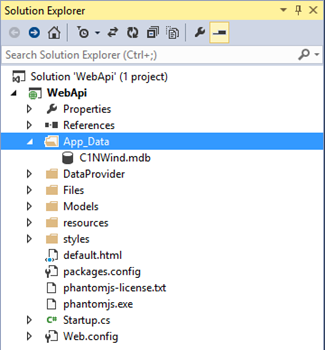
2. Create an OleDbProvider.cs file in your application, and add the **OleDbProvider** class to it.
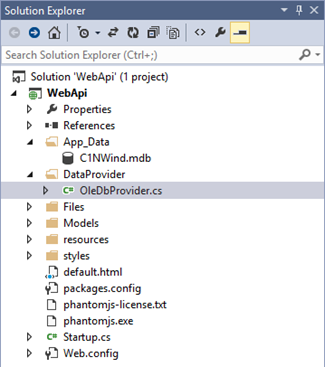
3. Add the following code in the **OleDbProvider** class.
```csharp
public class OleDbProvider: DataProvider {
public OleDbProvider(string name, string connectionString) {
Name = name;
ConnectionString = connectionString;
}
public string Name {
get;
private set;
}
public string ConnectionString {
get;
private set;
}
public override bool Supports(string name) {
return name.StartsWith(Name, StringComparison.OrdinalIgnoreCase);
}
public override IEnumerable GetObject(string name, NameValueCollection args) {
var tableName = name.Substring(Name.Length).TrimStart('\\', '/');
var selectCommand = string.Format("select * from {0}", tableName);
var conn = new OleDbConnection(ConnectionString);
var command = new OleDbCommand(selectCommand) {
Connection = conn
};
conn.Open();
return command.ExecuteReader(CommandBehavior.CloseConnection);
}
}
```
4. Configure the connection string for the database file within **Configuration (IAppBuilder app)** method of **Startup** class, as shown below.
```csharp
var connectionString = ConfigurationManager.ConnectionStrings["Nwind"].ConnectionString;
app.AddDataProvider(new OleDbProvider("Nwind", connectionString));
```