# Step 2: Add Custom Authorization
## Content
Complete the following steps to create a customized authorization for controlling the file access permissions.
* [Configure folder access permissions](/componentone/docs/webapi/online-webapi/overview/SecureReportService/CustomAuthorization#configure-folder-access-permission)
* [Customize ReportController with the customized authorization attribute](/componentone/docs/webapi/online-webapi/overview/SecureReportService/CustomAuthorization#customize-reportcontroller-with-the-customized-authorization-attribute)
* [Customize IDirectRouteProvider for route attributes](/componentone/docs/webapi/online-webapi/overview/SecureReportService/CustomAuthorization#customize-idirectrouteprovider-for-route-attributes)
* [Resolve conflict of multiple ReportControllers](/componentone/docs/webapi/online-webapi/overview/SecureReportService/CustomAuthorization#resolve-conflict-of-multiple-reportcontrollersregister-httpconfiguration-in-webapiconfig-class)
* [Register HttpConfiguration in WebApiConfig class](/componentone/docs/webapi/online-webapi/overview/SecureReportService/CustomAuthorization#register-httpconfiguration-in-webapiconfig-class)
* [Build and Run the Project](/componentone/docs/webapi/online-webapi/overview/SecureReportService/CustomAuthorization#build-and-run-the-project)
### Configure folder access permission
In your application, you need to add files that define which role can access the folder, as shown in the image below. Once you have added the **\_roles** file, you can read the roles information in authorization attribute.
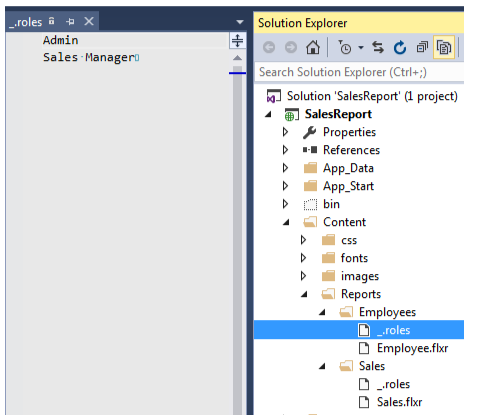
To provide access to the folders based on the role assigned to the user, read the roles information in the authorization attribute. The authorization attribute identifies the user login and provides access to the files based on the role assigned to the users.
1. In the **Solution Explorer**, right click project and select **Add | Class**. The Add New Item dialog appears.
2. In the **Add New Item** dialog, set the name of the class (for example: StorageAuthorizeAttribute.cs).
3. Click **Add**. A new class is added to the application.
4. Add the following code inside StorageAuthorizeAttribute.cs file.
```csharp
using C1.Web.Api.Report;
using System;
using System.Collections.Generic;
using System.IO;
using System.Linq;
using System.Net;
using System.Web.Http.Controllers;
using System.Web.Http.Filters;
using C1.Web.Api.Storage;
namespace SalesReport.Controllers
{
internal class StorageAuthorizeAttribute : AuthorizationFilterAttribute
{
public override void OnAuthorization(HttpActionContext actionContext)
{
var principal = actionContext.ControllerContext.RequestContext.Principal;
if (principal == null || principal.Identity == null || !principal.Identity.IsAuthenticated)
{
Unauthorize(actionContext);
return;
}
var values = actionContext.RequestContext.RouteData.Values;
object pathObj;
if (!values.TryGetValue("path", out pathObj))
{
return;
}
var path = (pathObj as string) ?? string.Empty;
var defaultProvider = ReportProviderManager.Current.Get("") as FlexReportProvider;
if (defaultProvider == null)
{
return;
}
var roles = GetRoles(defaultProvider.Storage, path);
if(!roles.Any())
{
return;
}
if (!roles.Any(r => principal.IsInRole(r)))
{
Unauthorize(actionContext);
}
}
private static readonly object _locker = new object();
private static readonly IDictionary> _folderRoles =
new Dictionary>(StringComparer.OrdinalIgnoreCase);
private static IEnumerable GetRoles(IStorageProvider storage, string path)
{
string folder = path;
var fileStorage = storage.GetFileStorage(path);
if (fileStorage.Exists)
{
var pathParts = path.Split('/');
pathParts = pathParts.Take(pathParts.Length - 1).ToArray();
folder = string.Join("/", pathParts);
}
lock (_locker)
{
IEnumerable roles;
if (_folderRoles.TryGetValue(folder, out roles))
{
return roles;
}
var roleList = GetFolderRoles("", storage);
var folderParts = folder.Split(new[] { '/' }, StringSplitOptions.RemoveEmptyEntries);
var currentFolder = "";
foreach (var part in folderParts)
{
currentFolder += part;
var current = GetFolderRoles(currentFolder, storage);
if(current != null && current.Any())
{
roleList = current;
}
currentFolder += "/";
}
return roleList;
}
}
private static IEnumerable GetFolderRoles(string path, IStorageProvider storage)
{
IEnumerable roles;
if (_folderRoles.TryGetValue(path, out roles))
{
return roles;
}
var roleList = new List();
var rolesFile = storage.GetFileStorage(path + "/_.roles");
if(rolesFile.Exists)
{
using (var reader = new StreamReader(rolesFile.Read()))
{
while (!reader.EndOfStream)
{
var line = reader.ReadLine();
if (!string.IsNullOrEmpty(line))
{
roleList.Add(line);
}
}
}
}
_folderRoles.Add(path, roleList);
return roleList;
}
private static void Unauthorize(HttpActionContext actionContext)
{
actionContext.Response = new System.Net.Http.HttpResponseMessage(HttpStatusCode.Unauthorized);
}
}
}
```
### Customize ReportController with the customized authorization attribute
1. In the **Solution Explorer**, right click the folder **Controllers.**
2. From the context menu, select **Add | Controller**. The **Add Scaffold** dialog appears.
3. Complete the following steps in the **Add Scaffold** dialog:
1. Select **Empty MVC Controller** template.
2. Set name of the controller (for example: `ReportController`).
3. Click **Add**.
4. Add the following code inside ReportController.cs file.
```csharp
using System.Web.Http;
namespace SalesReport.Controllers
{
public class ReportController : C1.Web.Api.Report.ReportController
{
[StorageAuthorize]
public override IHttpActionResult GetCatalogInfo(string path, bool recursive = false)
{
return base.GetCatalogInfo(path, recursive);
}
}
}
```
### Customize IDirectRouteProvider for route attributes
1. In the **Solution Explorer**, right click project and select **Add | Class**. The Add New Item dialog appears.
2. In the **Add New Item** dialog, set the name of the class (for example: CustomDirectRouteProvider.cs).
3. Click **Add**. A new class is added to the application.
4. Add the following code inside CustomDirectRouteProvider.cs file.
```csharp
using System.Collections.Generic;
using System.Linq;
using System.Web.Http.Controllers;
using System.Web.Http.Routing;
namespace SalesReport
{
public class CustomDirectRouteProvider : DefaultDirectRouteProvider
{
protected override IReadOnlyList GetActionRouteFactories(HttpActionDescriptor actionDescriptor)
{
// inherit route attributes decorated on base class controller's actions
return actionDescriptor.GetCustomAttributes(true);
}
protected override string GetRoutePrefix(HttpControllerDescriptor controllerDescriptor)
{
var prefix = base.GetRoutePrefix(controllerDescriptor);
if (string.IsNullOrEmpty(prefix))
{
var prefixAttr = controllerDescriptor.GetCustomAttributes(true).FirstOrDefault();
if (prefixAttr != null)
{
return prefixAttr.Prefix;
}
}
return prefix;
}
}
}
```
### Resolve conflict of multiple ReportControllers
There are two ReportControllers in this application. This code adds a customized **IHttpControllerTypeResolver** which helps the client application to identify the required ReportController at the time of execution.
1. In the **Solution Explorer**, right click project and select **Add | Class**. The Add New Item dialog appears.
2. In the **Add New Item** dialog, set the name of the class (for example: ReportsControllerTypeResolver.cs).
3. Click **Add**. A new class is added to the application.
4. Add the following code inside **ReportsControllerTypeResolver.cs** file.
```csharp
using System;
using System.Web.Http.Controllers;
using System.Web.Http.Dispatcher;
namespace SalesReport
{
internal class ReportsControllerTypeResolver : DefaultHttpControllerTypeResolver
{
public ReportsControllerTypeResolver() : base(IsControllerType)
{ }
private static bool IsControllerType(Type t)
{
if (t != null && t.IsClass && (t.IsVisible && !t.IsAbstract) && typeof(IHttpController).IsAssignableFrom(t))
return HasValidControllerName(t) && t != typeof(C1.Web.Api.Report.ReportController);
return false;
}
private static bool HasValidControllerName(Type controllerType)
{
string str = DefaultHttpControllerSelector.ControllerSuffix;
if (controllerType.Name.Length > str.Length)
return controllerType.Name.EndsWith(str, StringComparison.OrdinalIgnoreCase);
return false;
}
}
}
```
### Register HttpConfiguration in WebApiConfig class
Register the HttpConfiguration in WebApiConfig.cs file. Also, configure the Web API to use only bearer token authentication.
1. In the **Solution Explorer**, right click **AppData** folder and select **Add | Class**. The Add New Item dialog appears.
2. In the **Add New Item** dialog, set the name of the class (for example: WebApiConfig.cs).
3. Click **Add**. A new class is added to the application.
4. Add the following code inside **WebApiConfig.cs** file.
```csharp
using System.Web.Http;
using Microsoft.Owin.Security.OAuth;
using System.Web.Http.Dispatcher;
namespace SalesReport
{
public static class WebApiConfig
{
public static void Register(HttpConfiguration config)
{
// Web API configuration and services
// Configure Web API to use only bearer token authentication.
config.SuppressDefaultHostAuthentication();
config.Filters.Add(new HostAuthenticationFilter(OAuthDefaults.AuthenticationType));
// Web API routes
config.MapHttpAttributeRoutes(new CustomDirectRouteProvider());
config.Routes.MapHttpRoute(
name: "DefaultApi",
routeTemplate: "api/{controller}/{id}",
defaults: new { id = RouteParameter.Optional }
);
config.Services.Replace(typeof(IHttpControllerTypeResolver), new ReportsControllerTypeResolver());
}
}
```
### Build and Run the Project
1. Click **Build | Build Solution** to build the project.
2. Press **F5** to run the project.