# Adding Web API Client JavaScript
## Content
Client application sends request to Web API service application. Web API Edition provides JavaScript client code to help raise this request in web platform. ComponentOne Web API Client JavaScript file, **webapiclient.min.js**, provides export/import extension JavaScript for Wijmo and MVC controls. It provides API to call the server side from client application.
Note that, for consuming REST based API services, client JavaScript file is not required. The request methods- GET and POST- are used for calling RESTful services. For more information on using services, see the [Services](/componentone/docs/webapi/online-webapi/Services) section.
>type=note
> **Note**: webapiclient.min.js file is by default installed in C:\\Program Files (x86)\\ComponentOne\\Web Api Edition\\client.
Complete the following steps for adding and using Web API Client JavaScript file in your client application:
### MVC
1. Add **webapiclient.min.js** file to **Scripts** folder of your client project.
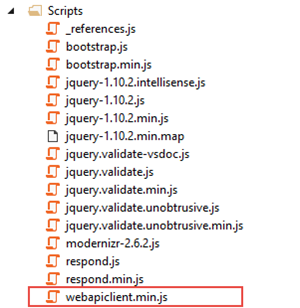
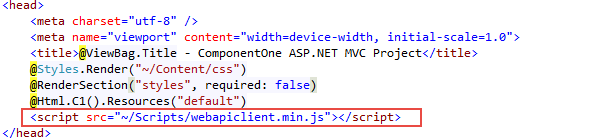
2. Add the **webapiclient.min.js** reference to **Views \| Shared** **\|** **\_Layout.cshtml** file. Drag the **"webapiclient.min.js"** file from **Solution Explorer** to the location of scripts settings at the top of this file.
### HTML
1. Add **webapiclient.min.js** file to a folder where your client project resides.
2. Add reference to **webapiclient.min.js** file within \ tag of your HTML page along with other Wijmo references. If you place the client JavaScript file within "Scripts" folder, you can add the following reference.
```html
```