# Convert Workbook Formats using Data from Storage
## Content
This section demonstrates how to call the Web API service through a client application to convert the excel file available in storage (remote storage or storage at the same server) to a different file format.
[Step 1: Call the Service](/componentone/docs/webapi/online-webapi/Services/ExcelServices/GenerateExcelService/GETConvertExcelFormats#step-1-call-the-service)
[Step 2: Run the Client Project](/componentone/docs/webapi/online-webapi/Services/ExcelServices/GenerateExcelService/GETConvertExcelFormats#step-2-run-the-client-project)
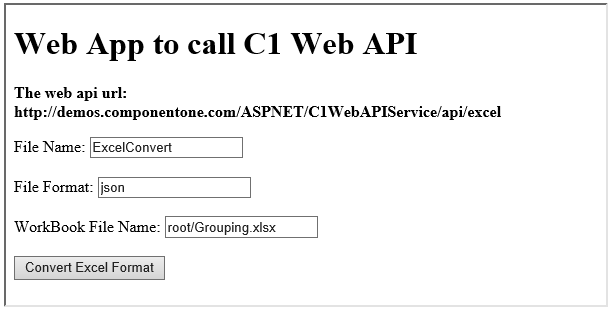
The following example makes a call to the Web API [service](/componentone/docs/webapi/online-webapi/overview/WorkingwithC1WebAPI/ConfiguringWebAPI) through HTML as well as WinForms client applications. These clients send a GET request to the service, which returns a response stream. This response stream is then saved in the desired excel file format.
In the following example, the service URL takes name and location of excel workbook (present in [storage](/componentone/docs/webapi/online-webapi/overview/WorkingwithC1WebAPI/ConfiguringWebAPI/Configuring.NETCollections)) in **WorkBookFileName** parameter and the desired file format, json, in **Type** parameter. The specified excel workbook, results.xlsx, resides in root folder of the hosted service.
### Step 1: Call the Service
Complete the following steps to call the Web API service.
**csharp**
```csharp
public void ConvertExcel() {
var apiURL = string.IsNullOrEmpty(C1TextBox1.Text) ? "https://developer.mescius.com/componentone/demos/aspnet/c1WebAPI/latest/api/excel? FileName=excel&type=json&workbookfilename=root%2Grouping.xlsx" : C1TextBox1.Text;
WebRequest request = WebRequest.Create(apiURL);
WebResponse response = request.GetResponse();
var fileStream = File.Create("D:\\ExcelConvert.json");
response.GetResponseStream().CopyTo(fileStream);
}
```
**HTML**
1\. Create an HTML application\, as discussed in [Configure Client for REST API service](/componentone/docs/webapi/online-webapi/overview/WorkingwithC1WebAPI/configuring-the-client-application/ClientAppRESTApiServices).
2. Add the following markups in the \
```
Note that, for GET request we set **method** attribute of \