# Using Regular Expressions
## Content
The TextParser library provides [StartsAfterContinuesUntil](/componentone/api/services/online-textparser/dotnet-standard-api/C1.TextParser/C1.TextParser.StartsAfterContinuesUntil.html) class to set up the StartsAfterContinuesUntil extractor which retrieves a block of text from a plain text source, based on **regular expressions**. It pulls all the text placed between the occurrences of starting and ending regular expression patterns.
The extraction technique using regular expressions is the simplest and the easiest to get started with, however, we must consider the following facts about this technique:
* The extractor starts from the beginning of the input text and **extracts** it **sequentially** until a match of the regular expression **StartsAfter** occurs. After this point, the extractor starts collecting all the text that is placed until a match of the regular expression **ContinuesUntil** occurs. This means that even if the extracted text contains one or more matches of **StartsAfter**, it will ignore the same and keep looking for the occurence of **ContinuesUntil**.
So, the collected text is returned as one text instance and not multiple text instances even though **StartsAfter** has occurred more than once in the input text.
> type=note
> **Note**: For example, we have the text input as "_1 Apple 2 Mangoes 3 Grapes._" where we want to extract the text that **StartsAfter** a digit and **ContinuesUntil** end of the sentance using regular expressions. So, due to the sequential nature of the extractor, the output will be "_Apple 2 Mangoes 3 Grapes_". The extractor will count "1" as the **StartsAfter** condition and ignore all the other digits occuring in the text until it finds end of the sentence which is the **ContinuesUntil** condition.
* The **StartsAfterContinuesUntil** extractor is **character oriented** and has no concept of white space, word, or any other structural entity. It reads everything at character level.
> type=note
> **Note**: For example, we have the text intput as "_An apple a day_." where we want to extract the text placed between the first article and end of the sentence. Now, the extractor will not consider "_An_" as the first article rather it will take "_A_" as **StartsAfter** article at character level and give you the output as "_n apple a day_". For this reason, the regular expressions written must consider the input text as a collection of characters not words.
Let us take another example to understand how to use TextParser using regular expressions.
Following drop down section shows the text input source.
DOC-DETAILS-TAG-OPEN
DOC-SUMMARY-TAG-OPEN
Click here to see the input
DOC-SUMMARY-TAG-CLOSE
Let’s look at the latest ranking of two best tourist spots in Japan.
1\. Fushimi Inari-taisha Shrine (Kyoto)
Fushimi Inari Taisha Shrine fascinates the tourists most by numerous gates.
2\. Hiroshima Peace Memorial Museum (Hiroshima)
Hiroshima Peace Memorial Museum is one of top visited tourist sites.
DOC-DETAILS-TAG-CLOSE
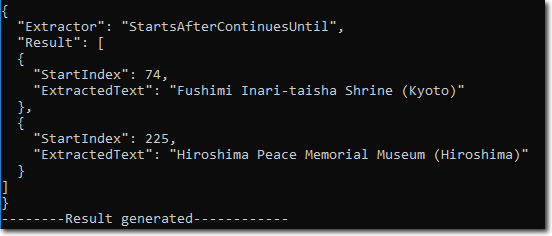
Now, from the text input we want to retreive just the names of the tourist spots listed above. To extract any such text between **StartsAfter** and **ContinuesUntil** regular expressions using StartsAfterContinuesUntil class, you need to implement the steps mentioned in the code snippet below:
1. Open the plain text **input stream** from which you want to extract the text. **csharp**
```csharp
Stream inputStream = File.Open("JapanTouristSpots.txt", FileMode.Open);
```
2. Create an instance of the **StartsAfterContinuesUntil** class and pass the starting and ending regular expression patterns as parameters to it. This will initialize the StartsAfterContinuesUntil class to extract all the text between two regular expressions. **csharp**
```csharp
StartsAfterContinuesUntil extractor = new StartsAfterContinuesUntil(@"([1-9]|10)[.]\s", "\r");
```
3. The [Extract](/componentone/api/services/online-textparser/dotnet-standard-api/C1.TextParser/C1.TextParser.StartsAfterContinuesUntil.Extract.html) method of [StartsAfterContinuesUntil](/componentone/api/services/online-textparser/dotnet-standard-api/C1.TextParser/C1.TextParser.StartsAfterContinuesUntil.html) class is used to extract the text from input stream. This method returns an instance of [IExtractionResult](/componentone/api/services/online-textparser/dotnet-standard-api/C1.TextParser/C1.TextParser.IExtractionResult.html) interface containing the extraction results. **csharp**
```csharp
IExtractionResult res = extractor.Extract(inputStream);
```
4. The [ToJsonString](/componentone/api/services/online-textparser/dotnet-standard-api/C1.TextParser/C1.TextParser.IExtractionResult.ToJsonString.html) method of the [IExtractionResult](/componentone/api/services/online-textparser/dotnet-standard-api/C1.TextParser/C1.TextParser.IExtractionResult.html) interface is used to convert the extraction result to JSON string.
**csharp**
```csharp
Console.WriteLine(res.ToJsonString());
```
Following image shows the parsed result in JSON string format: