# Getting Started
## Content
The **ADO.NET provider for Salesforce** provides a wide range of features that enable connectivity to Salesforce from .Net applications. The documentation will help you understand the [C1.AdoNet.Salesforce](/componentone/api/services/online-dataconnector/dotnet-standard-api/C1.AdoNet.Salesforce/Assembly) namespace, which includes all the available classes that can be used to connect and retrieve data from Salesforce.
DataConnectors are mostly used in combination with other ComponentOne components, such as DataEngine and FlexPivot. The procedure below describes how to use the DataConnector in a console application within Visual Studio.
### How to create a new Console Application
The ADO.NET provider for Salesforce can be used in any application. In this guide, a console application is created:
1. Open **Visual Studio**.
2. Select **Create a new project** from the **Get Started** pane.
3. In the **Create a new project** window, select **Console Application** and click **Next**, as in the screenshot below: 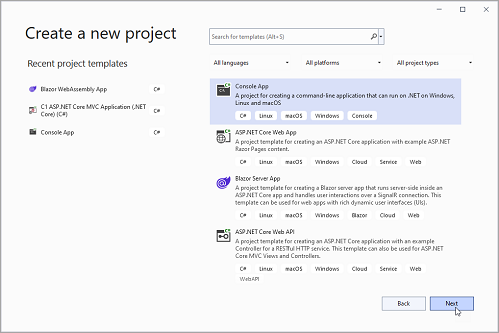
4. In the **Configure your new project** window, write your project name, choose a location to save your project, and click **Create**.
### How to add the NuGet packages
1. From the Project menu, select **Manage NuGet Packages**. The **NuGet Package** Manager appears.
2. In the **NuGet Package** Manager, click the **Package source** drop down and select **nuget.org**
3. In the **left** pane of the **Browse** tab, select **C1.AdoNet.Salesforce.**
4. In the **right** pane of the **Browse** tab, click **Install** to add the reference to the package.
### How to use the ADO.Net provider for Salesforce to retrieve data
Follow the steps provided below to learn and implement data retrieval using the ADO.NET provider for Salesforce.
1. In the first step, create a reference to the Salesforce service URL. The connection string contains various parameters such as username, password, security token, OAuth client ID, OAuth client secret, OAuth token endpoint, and URL. Make sure to replace the asterisks ("\*\*\*\*\*\*\*\*\*") with the appropriate values for your Salesforce environment
```csharp
const string GCSalesforceServerConnectionString = @"Username=*********;Password=*********;Security Token=***********;
OAuth Client Id=**************;
OAuth Client Secret=*************;
OAuth Token Endpoint=https://ap16.salesforce.com/services/oauth2/token;
Url=https://ap16.salesforce.com/services/data/v45.0";
```
2. In the next step, use the [C1SalesforceDataAdapter](/componentone/api/services/online-dataconnector/dotnet-standard-api/C1.AdoNet.Salesforce/C1.AdoNet.Salesforce.C1SalesforceDataAdapter.html) class to retrieve the data. It starts by defining an SQL query that selects specific fields from the "Order" object, limiting the results to 10 records. [Click here](/componentone/docs/services/online-dataconnector/ado.net-provider-for-salesforce/salesforceconnection) for more information on creating connections. The [C1SalesforceConnection](/componentone/api/services/online-dataconnector/dotnet-standard-api/C1.AdoNet.Salesforce/C1.AdoNet.Salesforce.C1SalesforceConnection.html) class implements the ADO.NET DbConnection, similar to the standard ADO.NET connection object. Once the connection is established, the adapter's **Fill** method is used to retrieve the data from the source and fill it into a DataTable as shown in the following **code example**.
```csharp
String sql = "SELECT Id,BillingCity,BillingState from [Order] limit 10";
using (C1SalesforceConnection c = new C1SalesforceConnection($@"{GCSalesforceServerConnectionString}"))
{
//Open Connection
c.Open();
using (C1SalesforceDataAdapter a = new C1SalesforceDataAdapter(c, sql))
{
//Filling Data Table with the help of adapter
DataTable t = new DataTable();
a.Fill(t);
//Printing the fetched table data on console
foreach (DataRow dataRow in t.Rows)
{
foreach (var item in dataRow.ItemArray)
{
Console.Write(item + " - ");
}
Console.WriteLine();
}
}
}
```