# Getting Started
## Content
The **ADO.NET provider for JSON** provides a wide range of features that enable connectivity to JSON from .Net applications. The documentation will help you understand the [C1.AdoNet.JSON](/componentone/api/services/online-dataconnector/dotnet-standard-api/C1.AdoNet.Json/Assembly) namespace, which includes all the available classes that can be used to connect and retrieve data from JSON.
DataConnectors are mostly used in combination with other ComponentOne components, such as DataEngine and FlexPivot. The procedure below describes how to use the DataConnector in a console application within Visual Studio.
### How to create a new Console Application
The ADO.NET provider for JSON can be used in any application. In this guide, a console application is created:
1. Open **Visual Studio**.
2. Select **Create a new project** from the **Get Started** pane.
3. In the **Create a new project** window, select **Console Application** and click **Next**, as in the screenshot below: 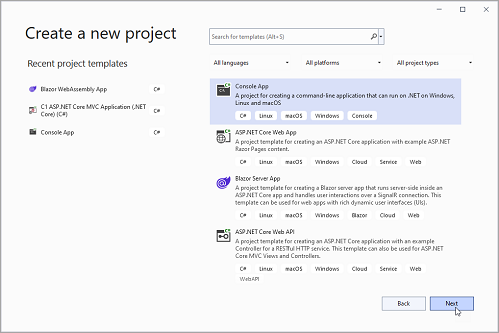
4. In the **Configure your new project** window, write your project name, choose a location to save your project, and click **Create**.
### How to add the NuGet packages
To use the ADO.NET provider for JSON in an application, the respective NuGet package should be added:
1. From the **Project** menu, select **Manage NuGet Packages**.
2. In the **NuGet Package** Manager, click the **Package source** drop-down and select **nuget.org**
3. In the **left** pane of the **Browse** tab, select **C1.AdoNet.JSON**
4. In the **right** pane of the **Browse** tab, click **Install** to add the reference to the package.
### How to use ADO.Net provider for JSON to retrieve data
Follow the steps provided below to learn and implement data retrieval using ADO.NET provider for JSON.
1. Create a connection string to set up a connection to a local JSON resource by setting Uri, DataModel, and JsonPath properties.
```csharp
static string documentConnectionString = $"Data Model=Document;Uri='json_bookstore.json';Json Path='$.bookstore.books'";
```
2. Fetch the data using [C1JsonConnection](/componentone/api/services/online-dataconnector/dotnet-standard-api/C1.AdoNet.Json/C1.AdoNet.Json.C1JsonConnection.html) class. The connection string using corresponding attributes is passed as an argument. For more information on creating connections, see [Creating Connection](/componentone/docs/services/online-dataconnector/ado.net-provider-for-json/jsonconnection).
**C1JsonConnection** implements the ADO.NET DbConnection, similar to standard ADO.NET connection object that retrieves a single result set of all the data that matches a query. Once the connection is established, it retrieves the data from the source as shown in the following code.
```csharp
static void ReadData()
{
Console.WriteLine("Query all Accounts...");
//Fetch data
using(var con = new C1JsonConnection(documentConnectionString))
{
con.Open();
var table = con.GetSchema("columns", new string[] { "books" });
ShowDataTable(table);
var cmd = con.CreateCommand();
//Provide command
cmd.CommandText = "Select * From books";
var reader = cmd.ExecuteReader();
}
}
//Display Table
static void ShowDataTable(DataTable table, int length = 25)
{
foreach (DataColumn col in table.Columns)
{
Console.Write("{0,-" + length + "}", col.ColumnName);
}
Console.WriteLine();
foreach (DataRow row in table.Rows)
{
foreach (DataColumn col in table.Columns)
{
if (col.DataType.Equals(typeof(DateTime)))
Console.Write("{0,-" + length + ":d}", row[col]);
else if (col.DataType.Equals(typeof(decimal)))
Console.Write("{0,-" + length + ":C}", row[col]);
else
Console.Write("{0,-" + length + "}", row[col]);
}
Console.WriteLine();
}
}
```