# Getting Started
## Content
**The** **ADO.NET provider for Google Analytics** provides a wide range of features that enable connectivity to Google Analytics from .Net applications . The documentation will help you understand the [C1.AdoNet.GoogleAnalytics](/componentone/api/services/online-dataconnector/dotnet-standard-api/C1.AdoNet.GoogleAnalytics/Assembly) namespace, which includes all the available classes that can be used to connect and retrieve data from Google Analytics
DataConnectors are mostly used in combination with other ComponentOne components, such as DataEngine and FlexPivot. The procedure below describes the first steps to use the DataConnector in a console application within Visual Studio.
### How to create a new Console Application
The ADO.NET provider for Google Analytics can be used in any application. In this guide, a console application is created:
1. Open **Visual Studio**.
2. Select **Create a new project** from the **Get Started** pane.
3. In the **Create a new project** window, select **Console Application** and click **Next**, as in the screenshot below: 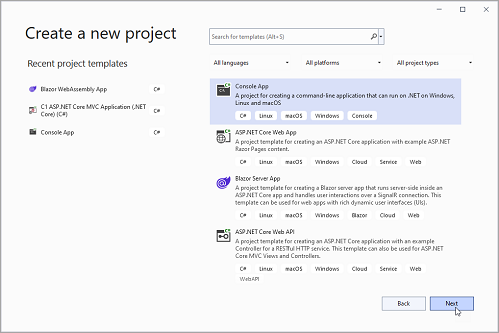
4. In the **Configure your new project** window, write your project name, choose a location to save your project, and click **Create**.
### How to add the NuGet packages
To use the ADO.NET provider for Google Analytics in an application, the respective NuGet package should be added:
1. From the **Project** menu, select **Manage NuGet Packages**.
2. In the **NuGet Package** Manager, click the **Package source** drop-down and select **nuget.org**
3. In the **left** pane of the **Browse** tab, select **C1.AdoNet.GoogleAnalytics**.
4. In the right pane of the **Browse** tab, click **Install** to add the reference to the package
### How to use ADO.Net provider for Google Analytics to retrieve data
Follow the steps provided below to learn and implement data retrieval using ADO.NET provider for Google Analytics.
1. The first step is to add the [KeyFile](/componentone/api/services/online-dataconnector/dotnet-standard-api/C1.AdoNet.GoogleAnalytics/C1.AdoNet.GoogleAnalytics.C1GoogleAnalyticsConnection.KeyFile.html), which contains service account credentials in JSON format, and the [ViewId](/componentone/api/services/online-dataconnector/dotnet-standard-api/C1.AdoNet.GoogleAnalytics/C1.AdoNet.GoogleAnalytics.C1GoogleAnalyticsConnection.ViewId.html) from which data is required to be retrieved to the connection string. For more details on how to get **KeyFile** and **ViewId** go to the [Authorization](/componentone/docs/services/online-dataconnector/ado.net-provider-for-google-analytics/googleauthentication) section.
```csharp
const string KeyFile = "*******";
const string ViewId = "************";
```
2. In the next step, [C1GoogleAnalyticsConnection](/componentone/api/services/online-dataconnector/dotnet-standard-api/C1.AdoNet.GoogleAnalytics/C1.AdoNet.GoogleAnalytics.C1GoogleAnalyticsConnection.html) is used to retrieve the data. [Click here](/componentone/docs/services/online-dataconnector/ado.net-provider-for-google-analytics/googleconnection) for more information on creating connections.
**C1GoogleAnalyticsConnection** implements the ADO.NET DbConnection, similar to a standard ADO.NET connection object that retrieves a single result set of all the data that matches a query. Once the connection is established, it retrieves the data from the source as shown in the following **code**.
```csharp
static void ReadData()
{
//Define connection string
string connectionString = string.Format("Key File={0};View Id={1}", KeyFile, ViewId);
//Define command
string sql = "SELECT Source, Sessions FROM Traffic WHERE Sessions > 500 AND StartDate = '14DaysAgo' AND EndDate = 'Today'";
//Fetch data
using (var con = new C1GoogleAnalyticsConnection(connectionString))
{
con.Open();
var command = con.CreateCommand();
command.CommandText = sql;
var reader = command.ExecuteReader();
while (reader.Read())
{
Console.WriteLine(String.Format("{0} --> \t\t{1}", reader["Source"], reader["Sessions"]));
}
}
}
```