# Getting Started
## Content
The **ADO.NET provider for CSV** provides a wide range of features that enable connectivity to CSV from .Net applications. The documentation will help you understand the [C1.AdoNet.CSV](/componentone/api/services/online-dataconnector/dotnet-standard-api/C1.AdoNet.CSV/Assembly) namespace, which includes all the available classes that can be used to connect and retrieve data from a CSV file.
DataConnectors are mostly used in combination with other ComponentOne components, such as DataEngine and FlexPivot. The procedure below describes how to use the DataConnector in a console application within Visual Studio.
### How to create a new Console Application
The ADO.NET provider for CSV can be used in any application. In this guide, a console application is created:
1. Open **Visual Studio**.
2. Select **Create a new project** from the **Get Started** pane.
3. In the **Create a new project** window, select **Console Application** and click **Next**, as in the screenshot below: 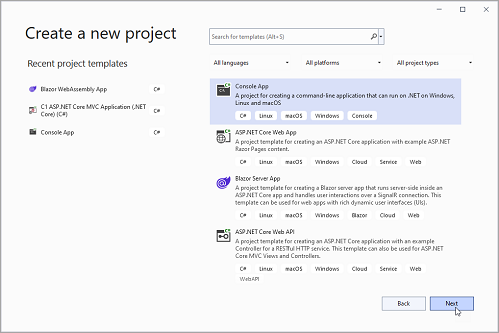
4. In the **Configure your new project** window, write your project name, choose a location to save your project, and click **Create**.
### How to add the NuGet packages
1. From the Project menu, select **Manage NuGet Packages**. The **NuGet Package** Manager appears.
2. In the **NuGet Package** Manager, click the **Package source** drop-down and select **nuget.org**
3. In the **left** pane of the **Browse** tab, select **C1.AdoNet.CSV**
4. In the **right** pane of the **Browse** tab, click **Install** to add the reference to the package.
### How to use ADO.Net provider for CSV to retrieve data
Follow the steps provided below to learn and implement data retrieval using ADO.NET provider for CSV.
1. Create a connection string to set up a connection to a local CSV resource by setting the [Uri](/componentone/api/services/online-dataconnector/dotnet-standard-api/C1.AdoNet.CSV/C1.AdoNet.CSV.C1CSVConnection.Uri.html) property.
```csharp
static string csvConnectionString = $"Uri='sampleCSV.csv'";
```
2. Fetch the data using [C1CSVConnection](/componentone/api/services/online-dataconnector/dotnet-standard-api/C1.AdoNet.CSV/C1.AdoNet.CSV.C1CSVConnection.html) class. The connection string using corresponding attributes is passed as an argument. For more information on creating connections, see [Creating Connection](/componentone/docs/services/online-dataconnector/ado.net-provider-for-csv/csvconnection).
**C1CSVConnection** implements the ADO.NET DbConnection, similar to standard ADO.NET connection object that retrieves a single result set of all the data that matches a query. Once the connection is established, it retrieves the data from the source as shown in the following **code example.**
```csharp
static void ReadData()
{
Console.WriteLine("Query all Accounts...");
//Fetch data
using(var con = new C1CSVConnection(csvConnectionString))
{
con.Open();
var table = con.GetSchema("columns", new string[] { "sampleCSV" });
ShowDataTable(table);
var cmd = con.CreateCommand();
//Provide command
cmd.CommandText = "Select * From sampleCSV";
var reader = cmd.ExecuteReader();
}
}
//Display Table
static void ShowDataTable(DataTable table, int length = 25)
{
foreach (DataColumn col in table.Columns)
{
Console.Write("{0,-" + length + "}", col.ColumnName);
}
Console.WriteLine();
foreach (DataRow row in table.Rows)
{
foreach (DataColumn col in table.Columns)
{
if (col.DataType.Equals(typeof(DateTime)))
Console.Write("{0,-" + length + ":d}", row[col]);
else if (col.DataType.Equals(typeof(decimal)))
Console.Write("{0,-" + length + ":C}", row[col]);
else
Console.Write("{0,-" + length + "}", row[col]);
}
Console.WriteLine();
}
}
```