# Theming
Develop powerful and lightweight web applications using ASP.NET MVC controls. Learn more about the ComponentOne MVC controls in ASP.NET MVC documentation.
## Content
The TreeMap chart control allows you to customize its appearance by using the [Palette](/componentone/api/mvc/online-mvc/dotnet-framework-api/C1.Web.Mvc/C1.Web.Mvc.TreeMap-1.Palette.html) property. You can set a collection value to this property. The collection item type could be **System.Drawing.Color** or [C1.Web.Mvc.TreeMapItemStyle](/componentone/api/mvc/online-mvc/dotnet-framework-api/C1.Web.Mvc/C1.Web.Mvc.TreeMapItemStyle.html).
The following image shows how a TreeMap control appears after applying a theme using **Palette** property.
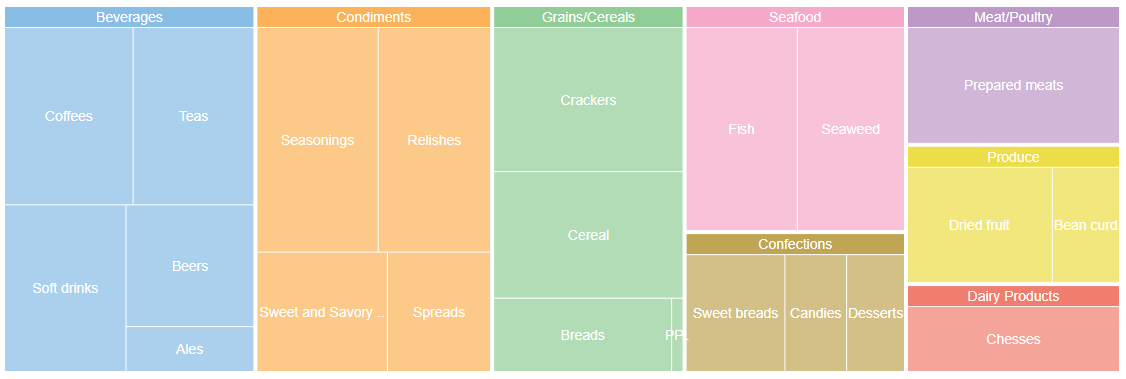
The below example code uses FoodSale.cs model added in the [QuickStart](/componentone/docs/mvc/online-mvc/workwithcontrols/TreeMap/QuickStartTreeMap) section.
**In Code**
**Themeing.cshtml**
```razor
@using .Models;
@using System.Drawing;
@model IEnumerable
@{
var colors = new List { "#88bde6", "#fbb258", "#90cd97", "#f6aac9", "#bfa554", "#bc99c7", "#eddd46", "#f07e6e", "#8c8c8c" };
}
@(Html.C1().TreeMap()
.Binding("Sales")
.BindingName("Category", "SubCategory")
.Bind(Model)
.Palette(colors.Select(ColorTranslator.FromHtml).ToList())
.DataLabel(dlb => dlb.Position(C1.Web.Mvc.Chart.LabelPosition.Center).Content("{name}")))
```