# Group Collection
Develop powerful and lightweight web applications using ASP.NET MVC controls. Learn more about the ComponentOne MVC controls in ASP.NET MVC documentation.
## Content
The TreeMap control allows you to group the data to display the contents with better visualization. You can configure a group in TreeMap in view. The grouped TreeMap item represents a collection of leaf tree map items grouped by some value. The GroupHeader allows you to identify by which value leaf items are grouped in the TreeMap control.
The following image shows how a TreeMap control appears after setting the **GroupBy** property.
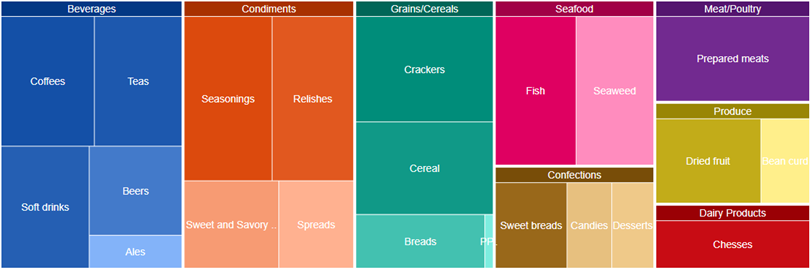
The below example code uses FoodSale.cs model added in the [QuickStart](/componentone/docs/mvc/online-mvc/workwithcontrols/TreeMap/QuickStartTreeMap) section.
**In Code**
**Grouping.cshtml**
```razor
@using .Models;
@using System.Drawing;
@model IEnumerable
@(Html.C1().TreeMap()
.Binding("Sales")
.BindingName("Category", "SubCategory")
.Bind(isb => isb.Bind(Model).GroupBy("Category", "SubCategory"))
.DataLabel(dlb => dlb.Position(C1.Web.Mvc.Chart.LabelPosition.Center).Content("{name}")))
```