# Slicer
Develop powerful and lightweight web applications using ASP.NET MVC controls. Learn more about the ComponentOne MVC controls in ASP.NET MVC documentation.
## Content
A slicer control can provide an easy way to filter a grid or a chart, making it an excellent visual tool for your dashboard. Slicers make it really convenient to filter data in a pivot table. Though the **OLAP** control is already incorporated with conventional filtering capacities, it does not provide any clue to decipher what exactly is being filtered in the current state. This is where the **Slicer** control becomes useful. The slicer offers a user-friendly interface to filter the PivotGrid or PivotChart data.
Apart from providing quick filtering, the slicer also indicates the current filtering state. This makes it easy to understand what exactly is shown in a filtered **PivotGrid** or **PivotChart**. The Slicer control for MVC displays all the unique values of the field which is being filtered in a list. You can then simply select the field values from that list to filter the **PivotGrid/PivotChart** data.
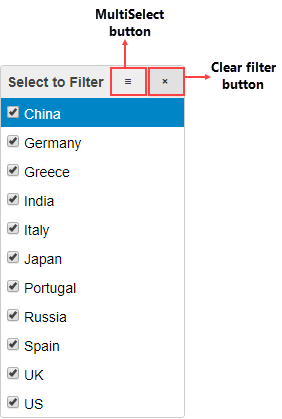
Slicer consists of elements as follows:
* **Header**: Header area of the FlexPivotSlicer contains a Caption that can be set using [Header](/componentone/api/mvc/online-mvc/dotnet-framework-api/C1.Web.Mvc.Olap/C1.Web.Mvc.Olap.Slicer.Header.html) property. Along with Caption, header also displays Multi-select and Clear filter buttons on the right hand side. The Slicer control allows you to toggle the visibility of the header area using the [ShowHeader](/componentone/api/mvc/online-mvc/dotnet-framework-api/C1.Web.Mvc.Olap/C1.Web.Mvc.Olap.Slicer.ShowHeader.html) property of the Slicer class. Purpose of the header buttons is elaborated below:
* **Multi-Select button**: The Multi-Select button allows users to change the selection mode for the list at runtime. Once the Multi-Select button is enabled, multiple items can be selected from the list by normally clicking on the items or using **Shift+Click** or **Ctrl+Click**. The Multi-Select button shown in the header can be shown or hidden using the [MultiSelect](/componentone/api/mvc/online-mvc/dotnet-framework-api/C1.Web.Mvc.Olap/C1.Web.Mvc.Olap.Slicer.MultiSelect.html) property of the Slicer class.
* **Clear filter button**: The Clear filter button shown in the control’s header allows you to clear the filtering applied to the PivotGrid/PivotChart using the Slicer control at runtime.
* **List**: Once the Slicer is bound to a field, which needs to be filtered, the list area of the control shows a list of all unique values from that field. PivotGrid or PivotChart data can be filtered based on the values selected in this list.